web
You’re offline. This is a read only version of the page.
close
Skip to main content

Notifications

Announcements

No record found.

Community site session details

Community site session details

Session Id :
Microsoft Dynamics AX (Archived)

Inventory Costing Query

(0) ShareShare
ReportReport
Posted on by

Hi everyone,

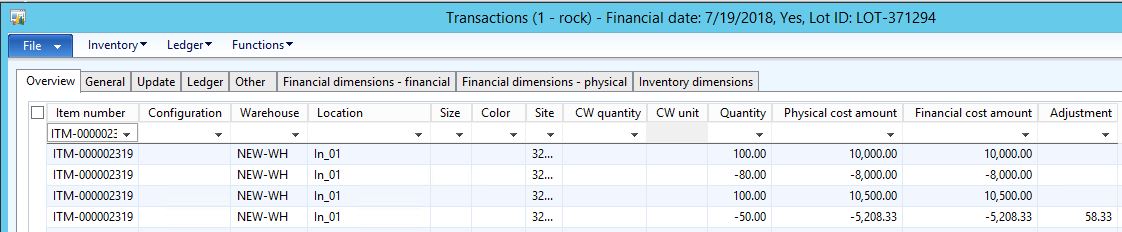
We are currently using FIFO for our inventory.  We would like to inquire how was the 5,208.33 been derived based on the Inventory transaction below.
8738.Capture1.JPG

1st transaction is purchase of 100 qty at 100.
2nd transaction is issuance of 80, which leaves us 20 qty at 100.
3rd transaction is purchase of 100 qty at 105.
4th transaction is issuance of 50 (20 is from 1st transaction and 30 is from 3rd transaction).


Hope you could help us with this.


Best regards,
Edmond

*This post is locked for comments

I have the same question (0)
  • Suggested answer
    Ludwig Reinhard Profile Picture
    Microsoft Employee on at

    Hello Edmond,

    If you select the inventory button in the form you shared and then select trace or cost explorer you can see how issues and receipts were mateched.

    Can you check and possibly share those details?

    Best regards,

    Ludwig

  • Verified answer
    Brandon Wiese Profile Picture
    17,788 on at

    FIFO is used during inventory recalculation to make inventory adjustments to financial value, but during daily transactions the value is determined by average cost.

    In your case, after receipt of 100 ($10,000), an issue of 80 ($8,000), and another receipt of 100 ($10,500), you have 120 on-hand with value $12,500, for an average cost of $104.1667.

    The next issue of 50 at $104.1667 average cost has a total value of $5,208.33.

  • Community Member Profile Picture
    on at

    Hi Ludwig,

    Thank you for your input.  I have checked the Trace and Cost explorer and both did not provide the exact data we need.

    Hi Brandon,

    This is exactly what I need.  Thank you for your help!

    Best regards,

    Edmond

  • Suggested answer
    Ludwig Reinhard Profile Picture
    Microsoft Employee on at

    Hello Edmond,

    The calculation from Brandon is pretty cool and can help you identifying the costs in this simple case.

    However, in case you have thousands of transactions with different status such a manual calculation might not be possible.

    In the long-term with an increasing number of transactions recorded you might have to search for alternatives how to identify the FIFO values.

    That is not an easy task but the trace and cost explorer might help if you display the cost amounts.

    What might help also is the settlement report that you can find in the inventory closing and adjustment form.

    Just take a look at it and whether it might be something that you can use in the future.

    Best regards,

    Ludwig

  • Community Member Profile Picture
    on at

    Hi Ludwig,

    I have checked the settlements, the trace and cost explorer but it doesn't contain any logic behind on how the amount 5,208.33 was derived.  It does contain information though that will be helpful to us to some extent.  Appreciate your inputs!

    Best regards,

    Edmond

Under review

Thank you for your reply! To ensure a great experience for everyone, your content is awaiting approval by our Community Managers. Please check back later.

Helpful resources

Quick Links

Responsible AI policies

As AI tools become more common, we’re introducing a Responsible AI Use…

Neeraj Kumar – Community Spotlight

We are honored to recognize Neeraj Kumar as our Community Spotlight honoree for…

Leaderboard > 🔒一 Microsoft Dynamics AX (Archived)

#1
Martin Dráb Profile Picture

Martin Dráb 4 Most Valuable Professional

#1
Priya_K Profile Picture

Priya_K 4

#3
MyDynamicsNAV Profile Picture

MyDynamicsNAV 2

Last 30 days Overall leaderboard

Featured topics

Product updates

Dynamics 365 release plans



