web
You’re offline. This is a read only version of the page.
close
Skip to main content

Announcements

News and Announcements icon
Community site session details

Community site session details

Session Id :
Microsoft Dynamics CRM (Archived)

2016 Online :: "Service Health" link on the "Manage all CRM Online instances" page disappears

(0) ShareShare
ReportReport
Posted on by

We noticed yesterday that the "Service Health" link on the "Manage all CRM Online instances" page is no longer available.  We frequently used this link in the past to get to the Storage Usage page.  

  • Does anyone experience this?  
  • Does anyone know of another way to view the storage usage?
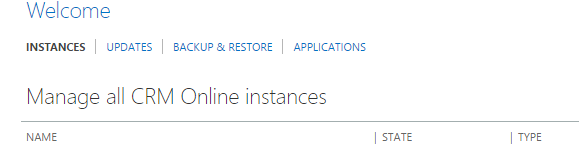
2016_2D00_10_2D00_08-10_5F00_13_5F00_53_2D00_Microsoft-Dynamics-CRM-Online.png

Thanks!!

*This post is locked for comments

I have the same question (0)
  • Neil Parkhurst Profile Picture
    10,727 User Group Leader on at

    I share your problem! I saw exactly the same thing this morning. Really keen to hear the answer.

    I think you can also see space from your CRM web application. In settings, go to administration and then resources in use. Except that also isn't working for me this morning!

  • Suggested answer
    razdynamics Profile Picture
    17,308 User Group Leader on at

    Yes this has also been an issue for us all week, we have been patiently waiting for ms to restore but so far no luck. We have logged a support ticket. It seems only EMEA customers are experiencing this issue?

  • Neil Parkhurst Profile Picture
    10,727 User Group Leader on at

    Thanks Raz, hopefully this will be resolved soon.

  • Suggested answer
    razdynamics Profile Picture
    17,308 User Group Leader on at

    Hi Guys, MS have provided a workaround which is to access the following URL when logged into your Office 365 CRM Online Portal; port.crm4.dynamics.com/.../Index.aspx

    https://port.crm4.dynamics.com/G/ServiceHealth/Index.aspx

    This displays the Service Health Page which the Disk Space utilisation for all your CRM Online Instances

    Best Wishes, Raz

  • Community Member Profile Picture
    on at

    Thanks Raz.  The link you provided worked.

Under review

Thank you for your reply! To ensure a great experience for everyone, your content is awaiting approval by our Community Managers. Please check back later.

Helpful resources

Quick Links

Season of Sharing Community Challenge Launch!

Jump in, show your community spirit, and win prizes!

Women in Power Builds Momentum

Expanding mentorship, skilling, and AI innovation

Congratulations to the May Top 10 Community Leaders

These are the community rock stars!

Leaderboard > 🔒一 Microsoft Dynamics CRM (Archived)

#1
ScottDurow Profile Picture

ScottDurow 2

#2
GJones Profile Picture

GJones 1

Last 30 days Overall leaderboard

Featured topics

Product updates

Dynamics 365 release plans



