web
You’re offline. This is a read only version of the page.
close
Skip to main content

Notifications

Announcements

No record found.

Community site session details

Community site session details

Session Id :
Customer experience | Sales, Customer Insights,...
Suggested Answer

Copy Lead specific field value to Opportunity Line on Lead Qualification

(0) ShareShare
ReportReport
Posted on by 40

Hi Expert ,

    I have 4 custom field in Lead . Two fields are lookup type (Product , Type) .Two fields are optionset (App1 , App2). Same type of fields are exist in opportunity line. Now i want to copy these four fields value from Lead to Opportunity Line on Lead Qualification.I want to this in realtime . I am new user . Please suggest me how to do that .

Thanks

Surajit Kundu

I have the same question (0)
  • David Jennaway Profile Picture
    14,065 on at

    Unfortunately there's no simple way to do this. In most cases you could create a realtime workflow in CDS, but unfortunately the CDS workflow engine does not permit you create or update Opportunity Line (opportunityproduct) records. I think you can instead create the Opportunity Line via a Power Automate flow, though this is necessarily asynchronous

  • Suggested answer
    LuHao Profile Picture
    40,892 on at

    Hi partner,

    We can create the same 4 fields for Opportunity, then create the mapping of relationships between Lead and Opportunity, Opportunity Line, so that when we qualify Lead and new Opportunity Lines, the values of these 4 fields will be mapped to related entity.

    1. Create the same 4 fields for Opportunity.

    2. Create the mapping of relationships between Lead and Opportunity, Opportunity Line.

    Edit the relationship opportunity_originating_lead.

    pastedimage1595386480852v4.png

    New a mapping.

    pastedimage1595386316720v2.png

    Select the same type fields.

    pastedimage1595386394634v3.png

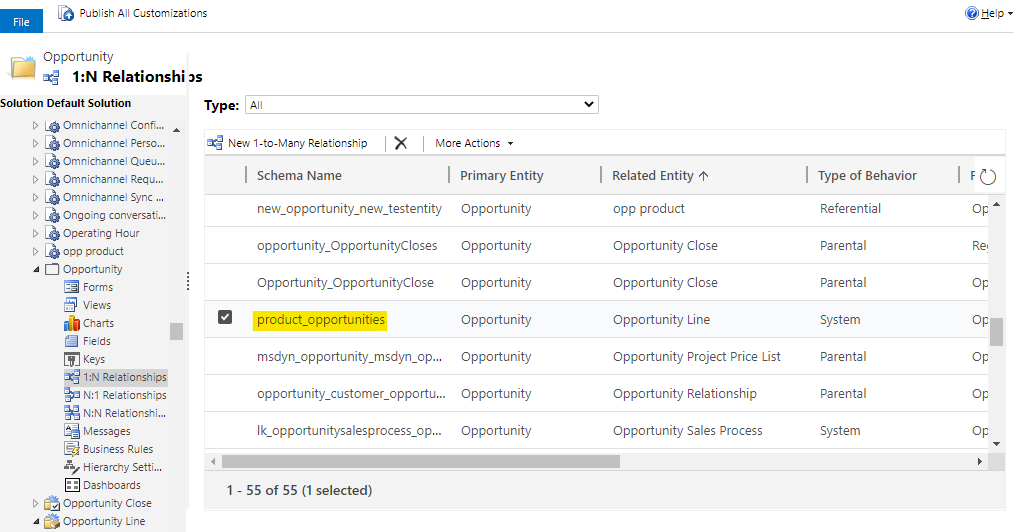
    Edit the relationship product_opportunities.

    pastedimage1595386515005v5.png

    New a mapping. Select the same type fields.

    pastedimage1595386593575v6.png

    In this way, when we qualify Lead, the field value of Lead will be copy to the Opportunity field, and when we new an Opportunity Line, the field value of Opportunity will be copy to Opportunity Line field.

  • surajitinsync Profile Picture
    40 on at

    Hi David ,

      Thanks for your suggession. I have try one Power automate flow to copy a Product customfield into opportunity line .It's working fine but i have an issue with realtime .It's take time near about 2/3 mints to copy the data . is there any way so that data will be copy in realtime

    Thanks

    Surajit

  • surajitinsync Profile Picture
    40 on at

    Hi Lu Hao,

        Thanks for your suggestion. I have done copy field data from lead to  opportunity using mapping . But i want to  create one opportunity line whenever a opportunity is created by lead qualify.

    Thanks

    Surajit

  • LuHao Profile Picture
    40,892 on at

    Hi partner,

    You mean, when we qualify a Lead and an Opportunity is created, you want an Opportunity Line record to create automatically instead of manually, right?

    If so, we have to use power automate to create Opportunity Line records, althrough it is asynchronous and there is a slight delay.

    In short,

    • Use power automate, it is not real-time, but it can create Opportunity Line records automatically.
    • Use mappings of relationship, it is real-time, but it needs users to create Opportunity Line records manually.
  • LuHao Profile Picture
    40,892 on at

    Hi partner,

    Has your problem been solved? Need more help?

    Please click Yes under "Did this answer your question?" to close this thread.

    pastedimage1596189247311v1.png

    Thanks.

Under review

Thank you for your reply! To ensure a great experience for everyone, your content is awaiting approval by our Community Managers. Please check back later.

Helpful resources

Quick Links

Responsible AI policies

As AI tools become more common, we’re introducing a Responsible AI Use…

Neeraj Kumar – Community Spotlight

We are honored to recognize Neeraj Kumar as our Community Spotlight honoree for…

Leaderboard > Customer experience | Sales, Customer Insights, CRM

#1
Tom_Gioielli Profile Picture

Tom_Gioielli 70 Super User 2025 Season 2

#2
Gerardo Rentería García Profile Picture

Gerardo Rentería Ga... 33 Most Valuable Professional

#3
Daniyal Khaleel Profile Picture

Daniyal Khaleel 32 Most Valuable Professional

Last 30 days Overall leaderboard

Product updates

Dynamics 365 release plans