web
You’re offline. This is a read only version of the page.
close
Skip to main content

Announcements

News and Announcements icon
Community site session details

Community site session details

Session Id :
Service | Customer Service, Contact Center, Fie...
Suggested Answer

How to change the calendar settings of the resources without losing the old previous calendar settings/schedule board?

(0) ShareShare
ReportReport
Posted on by 347

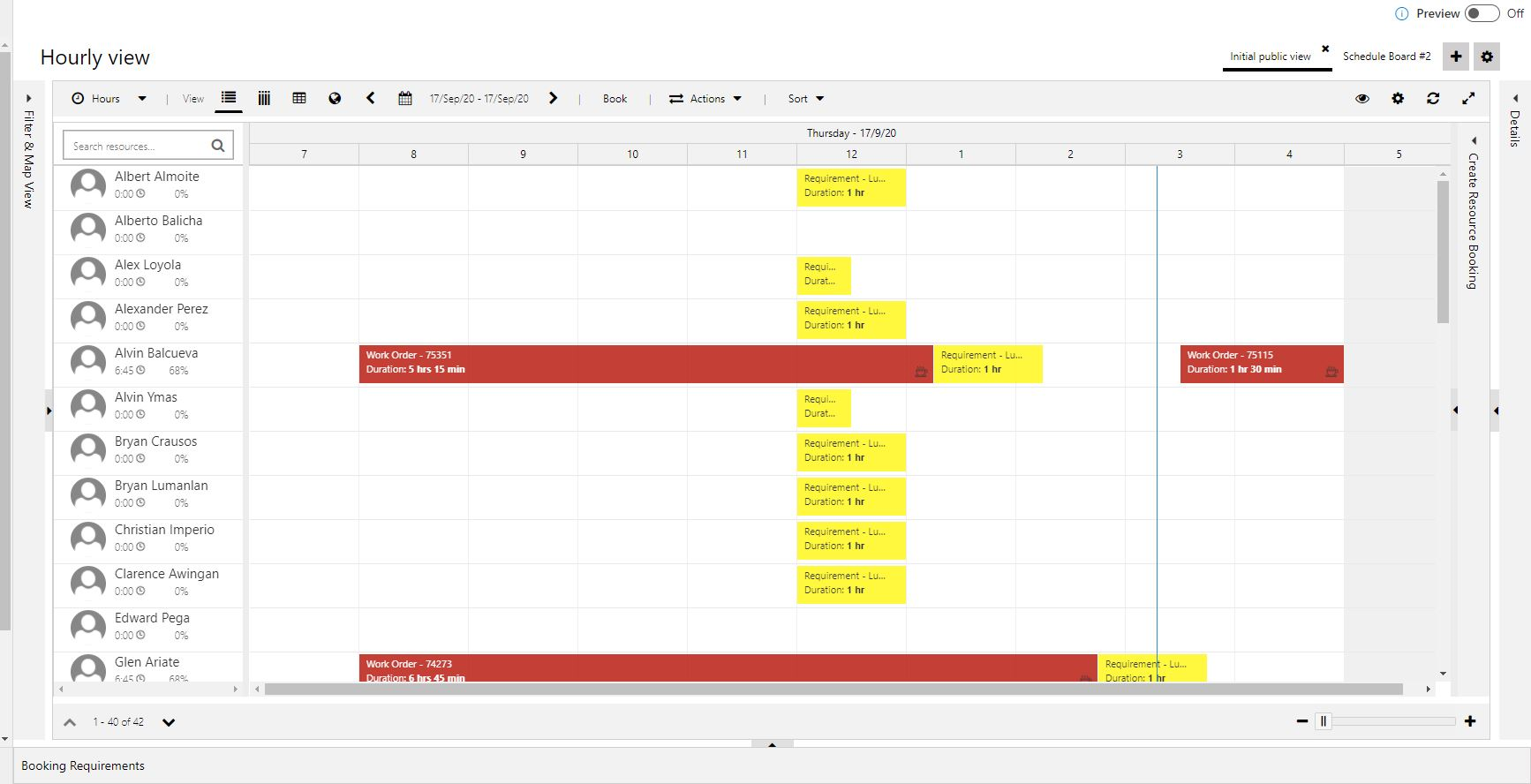
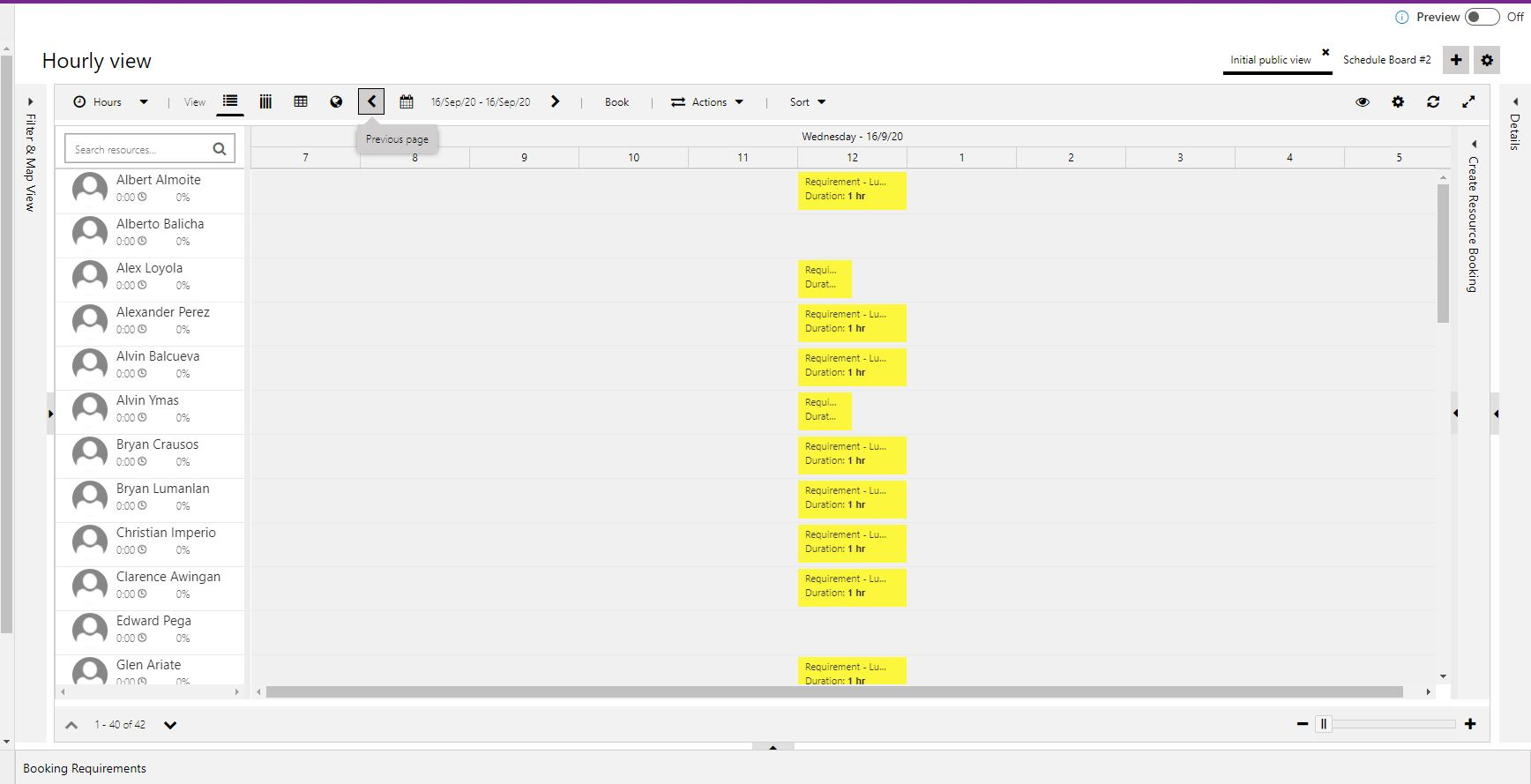
We are using Microsoft Dynamics 365 for field service from quite some time. Now we have slightly change in timings for some bookable resources on two days of a week. I would like to know how we can achieve this without disturbing the old records. I mean without disturbing the old timings on the schedule board. I tried doing the changes in the calendar (on sandbox instance), but I lost all the previous schedule board timings details. The jobs are still there on schedule board, but the details of the resource timings are lost (working hours). How can we avoid that? Please below images for better understanding.
pastedimage1600341593671v1.png

This image is showing the updated timings of each bookable resource. (the white background I am referring to)
pastedimage1600341659551v3.png

In this image, it is showing yesterday's schedule board which is blank (not showing the resource working hours after updating the calendar today). So, basically, it showing everything right from today onward but has messed up the previous record specifically the resource board.

Can someone please help me how can I overcome or is there anything which I am doing wrong?

I have the same question (0)
  • Suggested answer
    Claudia Amaral Profile Picture
    Microsoft Employee on at

    Hello Walled,

    Please let me know if you can provide more information like: 
    - In 16th September what is the working hour defined for a specific user? You can check this on the calendar working hour: 
    pastedimage1600349583566v1.png

    I did the following test and I am seeing the changes on the Schedule Board. In addition, all bookings added previously remains, even if the user is not in their working hours. 
    Please see. 
    User: Claudia - working hours: 12:00 am to 12:00 pm. 
    pastedimage1600349654098v2.png

    Updated the working hours of the user to 02:30 pm to 06:00 pm: 

    pastedimage1600349689979v3.png

    Please see the grey area updated on the Schedule Board:

    pastedimage1600349709612v4.png

    Looking forward to hearing from you. 

    If this answer was helpful to you please mark it as an answer. Thank you!
    Thank you for using Microsoft Dynamics CRM Communities. 

    Cláudia Amaral

    Support Engineer 
    Microsoft Dynamics CRM

  • waleedbinafzal Profile Picture
    347 on at

    Hi Claudia,

    I know that way actually if we are doing it just for one day or one employee, it will work perfectly as you have mentioned above, However, the point is that there is a change in the working hours for two days. So from now onwards, we want to change the working hours of let's say Monday for 4 specific employees, how can we do that without disturbing the old working hours record on the schedule board? Like how can we do that in bulk for all the Mondays from now onwards for 4 employees instead of doing manually one by one for each day?

  • AppJetty Profile Picture
    1,019 on at

    Hello waleed Bin

    I think this one source help you.

    https://docs.microsoft.com/en-us/dynamics365/field-service/configure-default-settings

    thanks regards

    Dynamics 365 calendar

Under review

Thank you for your reply! To ensure a great experience for everyone, your content is awaiting approval by our Community Managers. Please check back later.

Helpful resources

Quick Links

Season of Sharing Community Challenge Winners!

Congratulations to our community stars!

Women in Power Builds Momentum

Expanding mentorship, skilling, and AI innovation

Congratulations to the June Top 10 Community Leaders

These are the community rock stars!

Leaderboard > Service | Customer Service, Contact Center, Field Service, Guides

#1
KristineRisberg Profile Picture

KristineRisberg 37

#2
11manish Profile Picture

11manish 35

#3
Manoj - ManoVerse Profile Picture

Manoj - ManoVerse 21 Super User 2026 Season 1

Last 30 days Overall leaderboard

Featured topics

Product updates

Dynamics 365 release plans
