web
You’re offline. This is a read only version of the page.
close
Skip to main content

Notifications

Announcements

No record found.

Community site session details

Community site session details

Session Id :
Microsoft Dynamics AX (Archived)

Stack trace when task recorder is on

(0) ShareShare
ReportReport
Posted on by

Hi,

I am struggling with a bizar issue in combination with the task recorder on.

We have a custom made form to fill in questionnaires in combination with a treeview. When changing the treeview item, AX comes into the \Classes\SysTaskRecorderSetupFormRun\selectControl method. Here it is where i get an object not initialized error.

Even though "prevBasicControl" is null, AX passes the if statement and continues to excecute the following code, having a FormControl object not initialized error as a result in the SysTaskRecorderGlobal::isInGridControl method.
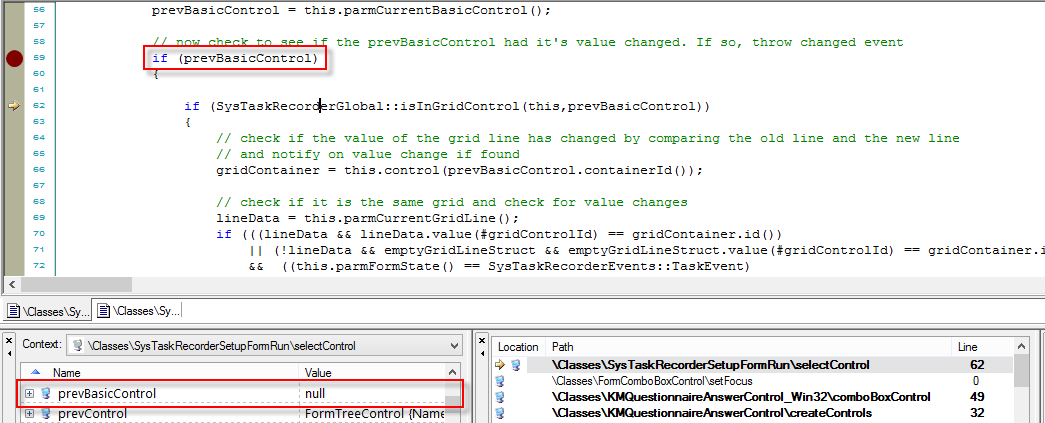
4338.1.png

Does anyone else have some experience with this problem and how to solve it?

*This post is locked for comments

I have the same question (0)
  • Community Member Profile Picture
    on at

    HI Jonathan,

    Have you got any solution for this?

    i am facing the same issue with my custom form.

    Thanks& Regards

    Naresh.D

  • JonathanD Profile Picture
    on at

    Dear Naresh,

    I did indeed found a solution for my problem:

    I've added following code and this has solved the issue:

    Bugfix.png

    Code in plain text:

    if(_control && prevControl is FormTreeControl)
        prevBasicControl = null;

  • Community Member Profile Picture
    on at

    Hi Janthan,

    Thanks for the response.

    but in my case ,same error but control is different .

    when i am using task recorder and changed some value in "FormSegmentedEntryControl " and press Tab  on keyboard i am getting this error.

    when press Tab on keyboard the next control is "FormGroupControl"

    FormSegmentedEntryControl  is BasicControl  but FormGroupControl is not BasicControl.

  • JonathanD Profile Picture
    on at

    If  you debug you could see what kind of type gives the error and implement an analog bugfix...

    (if prevControl = 'The control causing your issue (FormGroupControl?)

    prevBasicControl = null

Under review

Thank you for your reply! To ensure a great experience for everyone, your content is awaiting approval by our Community Managers. Please check back later.

Helpful resources

Quick Links

Responsible AI policies

As AI tools become more common, we’re introducing a Responsible AI Use…

Neeraj Kumar – Community Spotlight

We are honored to recognize Neeraj Kumar as our Community Spotlight honoree for…

Leaderboard > 🔒一 Microsoft Dynamics AX (Archived)

#1
Priya_K Profile Picture

Priya_K 4

#1
Martin Dráb Profile Picture

Martin Dráb 4 Most Valuable Professional

#3
Ali Zaidi Profile Picture

Ali Zaidi 2

Last 30 days Overall leaderboard

Featured topics

Product updates

Dynamics 365 release plans



