web
You’re offline. This is a read only version of the page.
close
Skip to main content

Notifications

Announcements

No record found.

Community site session details

Community site session details

Session Id :
Microsoft Dynamics AX (Archived)

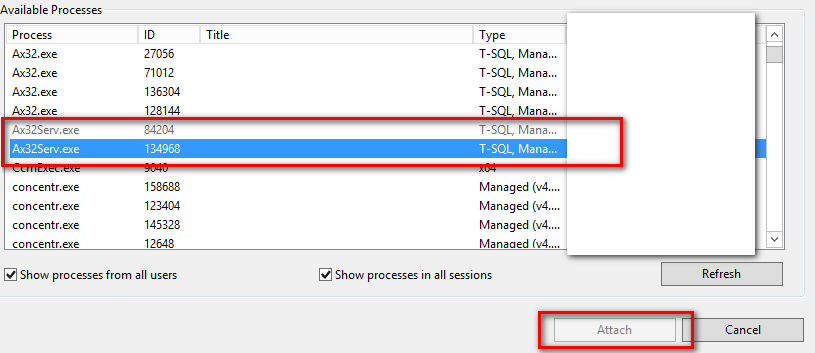
Attach to Process button disabled. Debugging Batch job

(0) ShareShare
ReportReport
Posted on by 1,606

Hi,

I am trying to debug a batch job. And in the visual studio, I am wondering why this Ax32Serv.exe can't be attached? I am thinking that this maybe a user access but I am already a Systems administrator to the AOS server. Also my visual studio already ran as administrator.

Let me know what else I can check.

Note" This is my first time debugging a batch job. :)
2016_2D00_09_2D00_12_5F00_081430.png

Thank you in advance,

Chester

*This post is locked for comments

I have the same question (0)
  • André Arnaud de Calavon Profile Picture
    301,141 Super User 2025 Season 2 on at

    Hi Wenchester,

    Probably you are missing some prerequisites. Have a look at the next page with an walkthrough for debugging: msdn.microsoft.com/.../gg889149.aspx.

  • Suggested answer
    Vilmos Kintera Profile Picture
    46,149 on at

    If you do not have the AX Visual Studio tools, and the AX client installed locally, it will not work. Also you need both the Local client configuration and the Business connector in the dropdown menu to point at your AX AOS instance in the AX Configuration Management Utility.

    Once those are set up correctly, in Visual Studio you should be able to see the AX Application Object Tree in View menu > Application Object Explorer. If it is not there, your setup is incorrect.

Under review

Thank you for your reply! To ensure a great experience for everyone, your content is awaiting approval by our Community Managers. Please check back later.

Helpful resources

Quick Links

Responsible AI policies

As AI tools become more common, we’re introducing a Responsible AI Use…

Neeraj Kumar – Community Spotlight

We are honored to recognize Neeraj Kumar as our Community Spotlight honoree for…

Leaderboard > 🔒一 Microsoft Dynamics AX (Archived)

#1
Martin Dráb Profile Picture

Martin Dráb 4 Most Valuable Professional

#1
Priya_K Profile Picture

Priya_K 4

#3
MyDynamicsNAV Profile Picture

MyDynamicsNAV 2

Last 30 days Overall leaderboard

Featured topics

Product updates

Dynamics 365 release plans



