web
You’re offline. This is a read only version of the page.
close
Skip to main content

Announcements

No record found.

News and Announcements icon
Community site session details

Community site session details

Session Id :
Microsoft Dynamics NAV (Archived)

Changeing description when using deferral schedule

(0) ShareShare
ReportReport
Posted on by

Hello,

When using Deferral code in a GenJournal i want to use the description set on the GenJournal Line instead of the description from the Deferral Template - I have tried various things but can't seem to get it completely working.

I have looked at the following and tried to modify the code: Table 81 -> Change the variable "Description" to Rec.Description. 
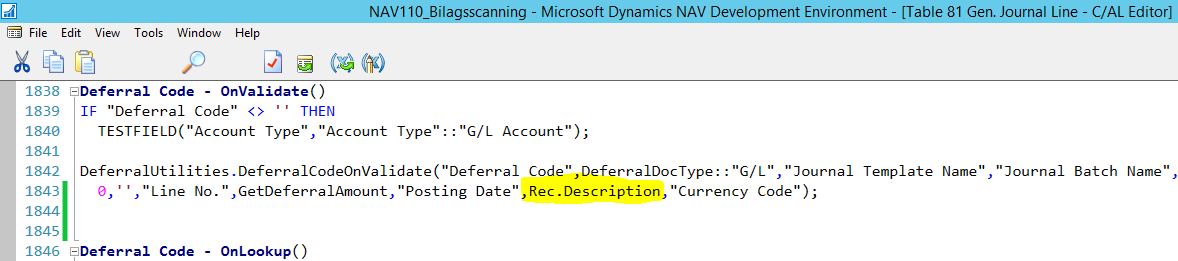
table81.PNG

In codeunit 1720 - I have modified where description is set in functions - DeferralCodeOnValidate, CreateRecurringDescription, CreateDeferralSchedule.

When changeing the description in GenJournalLine its only half of the entries that will get the new text i have applied when posting. 
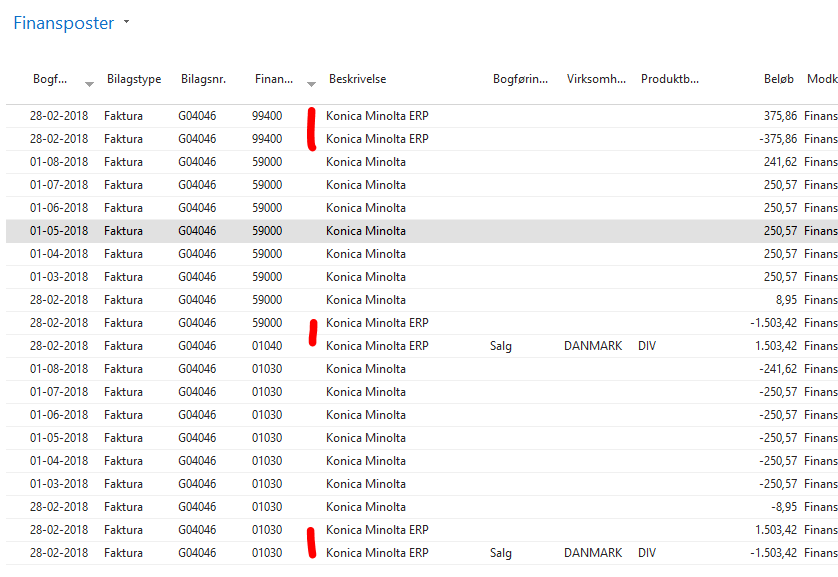
period.PNG
Can somebody help me out?

Thanks in advance.

*This post is locked for comments

I have the same question (0)
  • Suggested answer
    Suresh Kulla Profile Picture
    50,269 Super User 2026 Season 1 on at

    What did you change in codeunit 1720? You can just comment the code in the function DeferralCodeOnValidate in that codeunit where it is setting the DeferralDescription

    Comment this code

    IF GenJnlBatchName <> '' THEN

           DeferralDescription := GenJnlBatchName + '-' + COPYSTR(Description,1,30)

         ELSE

           DeferralDescription := DocumentNo + '-' + COPYSTR(Description,1,30);

    Add this code

    DeferralDescription := COPYSTR(Description,1,50);

  • Community Member Profile Picture
    on at

    Hi Suresh,

    I have tried to do something similar to what you suggested.

    When using the code you wrote I get the same result as the bottom screenshot attached in the first post. I should say that the description is already entered from a file import and i then try to change/add some text.

  • Suggested answer
    Suresh Kulla Profile Picture
    50,269 Super User 2026 Season 1 on at

    Can you send us the screenshot of the code change you made ?

  • Community Member Profile Picture
    on at

    I have tried some different things. Below are some of the things.

    1720-periode2.PNG

    1720-periode2.PNG

  • Suggested answer
    Suresh Kulla Profile Picture
    50,269 Super User 2026 Season 1 on at

    Can you add the code as i have described in the above post and let me know if that doesn't work. You don't need to get GenJournalLine, just add the below line after what standard NAV is doing to assign the value, you don't even need to comment any code. Make sure you pass the DeferralDescription to the function.

    DeferralDescription := COPYSTR(Description,1,50);

  • Suggested answer
    Jesper WB Profile Picture
    5 on at

    I had the same issue, and found out where to change it.

    Unfortunately you need to change it for each Deferral Method in Codeunit 1720.
    I have made it so it uses the posting Description from the Deferral Header (same as Description on Purchase Line), and add the period variables from the "Deferral Template"."Period Description".
    In the "Purchase Line".Description i enter "Phone bill" and in the "Deferral Template"."Period Description" i enter "%4 %6". Then i get the following Deferral Description:

    Phone Bill January 2019
    Phone Bill February 2019
    Phone Bill March 2019
    etc....

    So far i only made the customization for "Equal per Period" but its the same for all the other Deferral Methods.

    pastedimage1573661042071v1.png

    I hope this will help you - and maybe others.

  • Community Member Profile Picture
    on at

    It's sad that every single customer needs to struggle with this or just live with useless posting description.

    This still isn't fixed in Business Central :(

Under review

Thank you for your reply! To ensure a great experience for everyone, your content is awaiting approval by our Community Managers. Please check back later.

Helpful resources

Quick Links

Introducing the 2026 Season 1 community Super Users

Congratulations to our 2026 Super Stars!

Meet the Microsoft Dynamics 365 Contact Center Champions

We are thrilled to have these Champions in our Community!

Congratulations to the March Top 10 Community Leaders

These are the community rock stars!

Leaderboard > 🔒一 Microsoft Dynamics NAV (Archived)

Last 30 days Overall leaderboard

Featured topics

Product updates

Dynamics 365 release plans
