web
You’re offline. This is a read only version of the page.
close
Skip to main content

Notifications

Announcements

No record found.

Community site session details

Community site session details

Session Id :
Microsoft Dynamics NAV (Archived)

Amount entered for vendor does not agree with 1099 report

(0) ShareShare
ReportReport
Posted on by

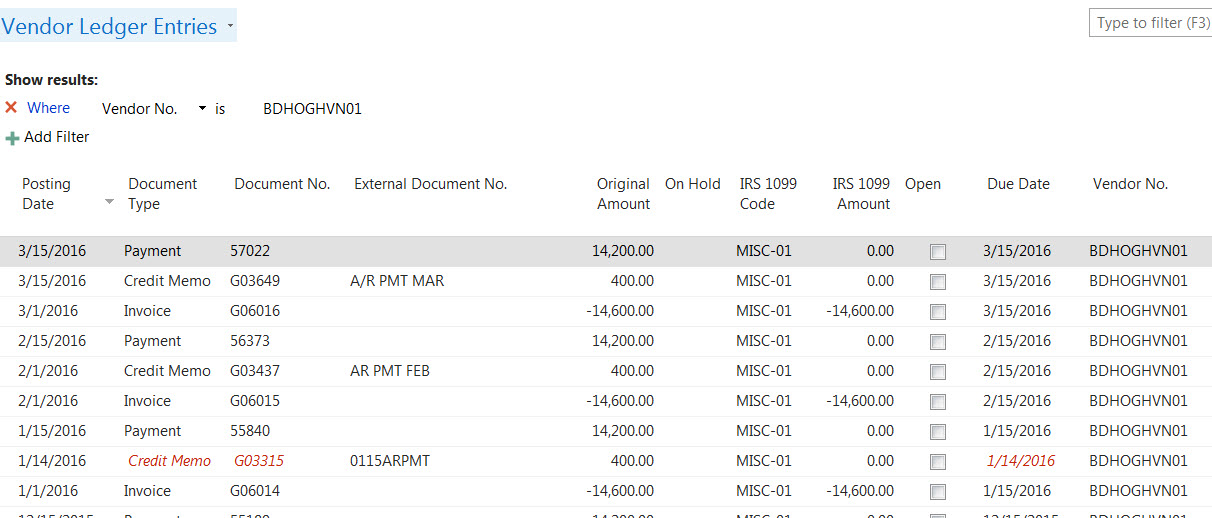
1099-report-entries.jpg3630.bd-haven-jan-feb-mar-entries.jpg

Is there a reason why my 1099 report is not showing the correct amount? If you look at the screen shot of my entries for B & D, I have deducted 400.00 from them each month and currently when I run the report, it is off by 400. 1099 Report is showing 43400.00 and it should be 43800.00. Thanks

This is the way I run the 1099 report

*This post is locked for comments

I have the same question (0)
  • Community Member Profile Picture
    on at

    Can you tell which 1099 report are you referring? Exact Report Name and Menu Path?

  • Suggested answer
    Alexander Ermakov Profile Picture
    28,096 on at

    My best guess it is because of the dates.

    To troubleshoot this, try changing the date at which you build the report and see if your deducted 400 started to affect (put the date of the report e.g. one month further). I suppose the date of the application of your deduction credit-memo to invoice is different from the credit-memo date.

  • Rashed Profile Picture
    3,765 on at

    From the screenshot your credit memo line the IRS 1099 Amount fields is zero.  Update the amount to reflect the Original amount and it will print correctly on the 1099 report. 

    Looks like the credit memo did not copy over the 1099 Code fields when you posted the credit memo. So above process will allow you to fix the amount manually. 

  • mmv Profile Picture
    11,471 on at

    Hi,

    It could be due to the Date Filter.  You may try changing the DateFilter and check which entry is not reflected.

  • Community Member Profile Picture
    on at

    The 1099 amount that I need to report is the invoice amount. The credit memo is a deductions for a/r's that are due and deducted from payment. I need to fully reflect the invoice amount of 14600.00 per month on the 1099. What doesn't make sense is that I have been deducting 400 each month and now I am off 400 only.

  • Community Member Profile Picture
    on at

    I changed the date range to be 010116..123116 and no change to 1099 vendor report.

  • Community Member Profile Picture
    on at

    When I run the 1099 report one month at a time, Jan and Feb are fine.

    Mar is not correct. If I am looking at the vendor ledger entries IRS 1099 Amount column and the entries are correct, I don't understand why it is not showing it correctly on the report. I have many 1099's that I have to know are correct for three companies. Thanks

  • Community Member Profile Picture
    on at

    Vendor 1099 information is the report I am running

  • Suggested answer
    Alexander Ermakov Profile Picture
    28,096 on at

    Run it now for April. What would be the result?

  • Community Member Profile Picture
    on at

    Nothing has changed.

Under review

Thank you for your reply! To ensure a great experience for everyone, your content is awaiting approval by our Community Managers. Please check back later.

Helpful resources

Quick Links

Responsible AI policies

As AI tools become more common, we’re introducing a Responsible AI Use…

Neeraj Kumar – Community Spotlight

We are honored to recognize Neeraj Kumar as our Community Spotlight honoree for…

Leaderboard > 🔒一 Microsoft Dynamics NAV (Archived)

Last 30 days Overall leaderboard

Featured topics

Product updates

Dynamics 365 release plans



