web
You’re offline. This is a read only version of the page.
close
Skip to main content

Announcements

No record found.

News and Announcements icon
Community site session details

Community site session details

Session Id :
Small and medium business | Business Central, N...
Answered

Business central issue

(7) ShareShare
ReportReport
Posted on by 52
Hello , BC Community
I'm working on Bc but I have Issue may anyone can help me to understand system behavior or help me to solve this Issue.
1-I post expenses entry from general journal this expenses with foreign currency and I change currency rate Manually from AssistEdit next to the Currency Code 
and the balance account is Bank account with the same foreign currency code and also, change rate manually.
 
General journal entry:
  Type Currency Rate Amount Amount LCY
Dr G/L account USD 49.62 9000 446580
Cr Bank account USD 49.62 9000 446580
  Bank ledger entry USD 49.62 9000 446580
Every thing is right and this is screen shot from the system
When I post this entry the system show Source currency Amount As 5582.25 but it must be 9000.
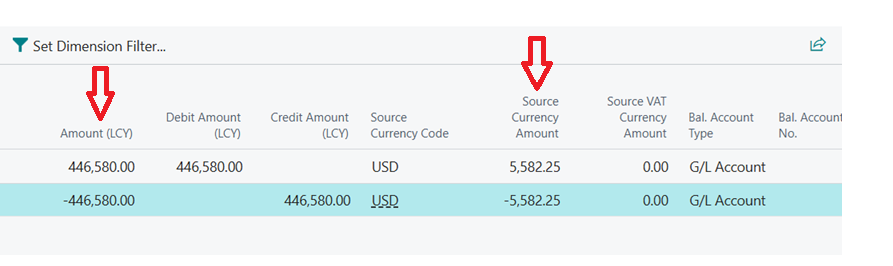
The local currency still the same and system change foreign currency amount. What actually system do divide amount LCY / Currency rate in Currency card in this date.
totally ignored rate entered manually in transaction.
 
What I wandered here I do this transaction before several times with the same sequence and the system not change any thing I don't know what happened May any one face this Issue?
 
I have the same question (0)
  • Suggested answer
    Jainam M. Kothari Profile Picture
    15,732 Super User 2026 Season 1 on at
    Hello,
     
    Business Central recalculates the Source Currency Amount during posting using the exchange rate from the Currency Exchange Rate table for that date, not the manually entered rate in the journal.
     
    This happens when a valid rate exists for the posting date, even if you override the rate in the journal.
     
    To fix this, either remove or adjust the exchange rate for that date, or customize the posting logic to force the system to respect the manual rate.
  • CU19111019-0 Profile Picture
    52 on at
    Thank you ,Jainam
    But I post this entries before and system didn't change Source currency amount so I wondered what happened.
     
  • Suggested answer
    OussamaSabbouh Profile Picture
    12,803 Super User 2026 Season 1 on at
    Hello ,
     
    What you expected is correct, can you check the bc version or if there is an extension published adjusting the system calculation?
  • CU19111019-0 Profile Picture
    52 on at
    Thank You, Oussama
    I was working in BC version 26.5 and system update to version 27.
    I try the same process in anther environment in version 26.5 and it work correctly I think this update make this Issue.
    May I open support ticket to Microsoft.
  • Suggested answer
    Pallavi Phade Profile Picture
    5,420 Super User 2026 Season 1 on at
    Namaste @CU19111019-0
     
    Can you please check the same behaviour again without altering the exchange rate in general journal  . 
    Source Currency amount is calculated in Codeunit 12 - Event . 


    Warm Regards
    Pallavi Phade
     
  • CU19111019-0 Profile Picture
    52 on at
    Thank you Pallavi
    I did it and don't change Currency rate in general journal the system get rate (Factor) from currency card and it didn't change foreign currency amount as below.
    but if I change it the system recalculate source currency amount again.
  • Suggested answer
    Rishabh Kanaskar Profile Picture
    6,219 Super User 2026 Season 1 on at
    Hi,
     
    This is not a bug but a design change in v27. The system now recalculates the source currency amount using the Currency Exchange Rate table for the posting date, ignoring the manually entered rate for display purposes in some views. If you want Microsoft to review, raise a support ticket or submit feedback on Business Central Ideas.
     
    Thanks
    Rishabh
  • Verified answer
    CU19111019-0 Profile Picture
    52 on at
    Thank you, Rishabh.

    My environment was updated today to version 27.1, and I tested my process again. Everything worked as expected, so it looks like Microsoft has resolved this bug.

Under review

Thank you for your reply! To ensure a great experience for everyone, your content is awaiting approval by our Community Managers. Please check back later.

Helpful resources

Quick Links

Introducing the 2026 Season 1 community Super Users

Congratulations to our 2026 Super Stars!

Congratulations to our 2025 Community Spotlights

Thanks to all of our 2025 Community Spotlight stars!

Leaderboard > Small and medium business | Business Central, NAV, RMS

#1
OussamaSabbouh Profile Picture

OussamaSabbouh 1,926 Super User 2026 Season 1

#2
YUN ZHU Profile Picture

YUN ZHU 1,158 Super User 2026 Season 1

#3
Khushbu Rajvi. Profile Picture

Khushbu Rajvi. 533 Super User 2026 Season 1

Last 30 days Overall leaderboard

Featured topics

Product updates

Dynamics 365 release plans



