web
You’re offline. This is a read only version of the page.
close
Skip to main content

Notifications

Announcements

Community site session details

Community site session details

Session Id :
Customer experience | Sales, Customer Insights,...
Suggested Answer

How to connect a LinkedIn Company Page to Dynamics 365 for Marketing?

(0) ShareShare
ReportReport
Posted on by 10

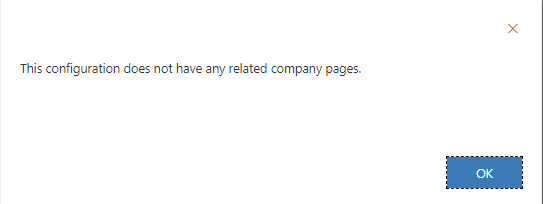
Not long ago, I was able to schedule and post content to my company's LinkedIn page, for which I have admin access. Recently, I have not been able to select the company page. I understand this same question was asked back in 2019 and 2020, but Microsoft users had to "vote" to request that feature. I only started using the Dynamics 365 Marketing App earlier this year, but had no issues with this feature. Since I was able to use this feature not long ago, I'm wondering what happened. When I re-configure my LinkedIn account, it doesn't give me any options to add a related page. Am I missing something? Was the feature recently disabled?
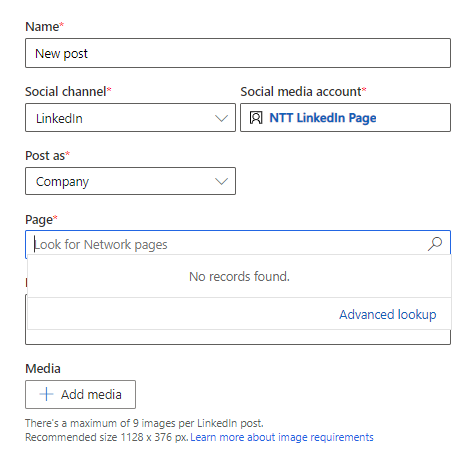
pastedimage1664207101728v1.png

pastedimage1664207116048v2.png

I have the same question (0)
  • FidelBrut Profile Picture
    5 on at

    Read the official Microsoft documentation on this issue, everything is explained there quite clearly.

  • ColmenSativa Profile Picture
    30 on at

    To use (including trial) this feature, you need a LinkedIn profile, which will require LinkedIn Campaign Manager to be enabled. You can then create ad campaigns, generate test interests, and sync Matched Audiences for free. But be aware that if you want to run an actual ad campaign on LinkedIn, LinkedIn may charge you for this in accordance with the LinkedIn Terms of Service. For more information on connecting a LinkedIn Company Page to Dynamics 365 for Marketing, you can read here https://lagrowthmachine.com/linkedin-marketing/.

  • Suggested answer
    Tereza Kirk Profile Picture
    Moderator on at

    Colin Stanford , if you have followed guidance in https://learn.microsoft.com/en-us/dynamics365/marketing/mkt-settings-social-media and your Linkedin account has connected Company pages and they are not showing up in the list of pages to select, it isn't expected behaviour. 

    Please file a support ticket to ensure we can assist further. https://admin.powerplatform.microsoft.com/?referer=mbssupport  Thanks, PM, Microsoft

Under review

Thank you for your reply! To ensure a great experience for everyone, your content is awaiting approval by our Community Managers. Please check back later.

Helpful resources

News and Announcements

Season of Giving Solutions is Here!

Quick Links

Responsible AI policies

As AI tools become more common, we’re introducing a Responsible AI Use…

Neeraj Kumar – Community Spotlight

We are honored to recognize Neeraj Kumar as our Community Spotlight honoree for…

Leaderboard > Customer experience | Sales, Customer Insights, CRM

#1
Pallavi Phade Profile Picture

Pallavi Phade 98

#2
Tom_Gioielli Profile Picture

Tom_Gioielli 59 Super User 2025 Season 2

#3
TAHER Mehdi Profile Picture

TAHER Mehdi 37

Last 30 days Overall leaderboard

Product updates

Dynamics 365 release plans



