web
You’re offline. This is a read only version of the page.
close
Skip to main content

Notifications

Announcements

No record found.

Community site session details

Community site session details

Session Id :
Customer experience | Sales, Customer Insights,...
Answered

Plugin is stuck, won't unregister using XRM toolbox

(0) ShareShare
ReportReport
Posted on by 10

Having an issue with unregistering a plugin.

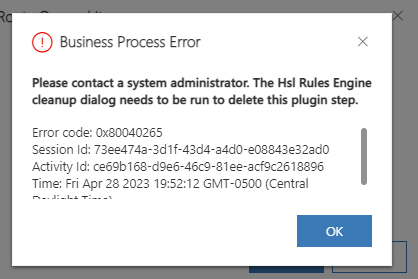
I created a new plugin, registered it with no issues.  It errored out on the first run (C# code within the plugin). I fixed the code and updated it.  When performing an update that triggers the plugin, I received the following error:

"Business Process Error. Please contact s system admin. The HSL Rules Engine cleanup dialog needs to be run and delete this plugin step". 
pastedimage1682786266428v1.png

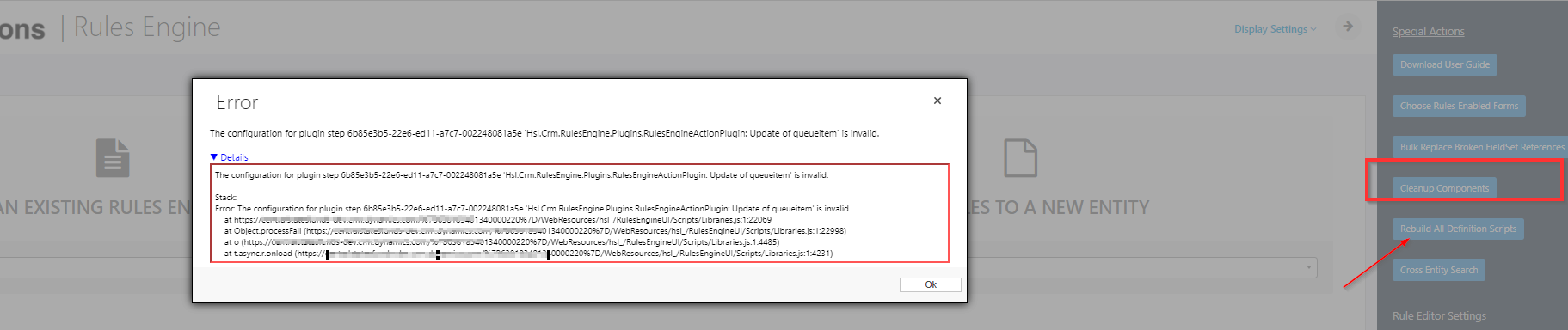
So I tried doing that but also received an error. I tried unregistering it using CRM tool box & re-registering, as well as unregistering, changing the the name, and re-registering. To no avail.
pastedimage1682786742913v4.png

'The configuration for plugin step 6b85e3b5-22e6-ed11-a7c7-002248081a5e 'Hsl.Crm.RulesEngine.Plugins.RulesEngineActionPlugin: Update of queueitem' is invalid." 

Details: The configuration for plugin step 6b85e3b5-22e6-ed11-a7c7-002248081a5e 'Hsl.Crm.RulesEngine.Plugins.RulesEngineActionPlugin: Update of queueitem' is invalid. Stack: Error: The configuration for plugin step 6b85e3b5-22e6-ed11-a7c7-n02248081a5e 'Hsl.Crm.RulesEngine.Plugins.RulesEngineActionPlugin: Update of queueitem' is invalid. at ourcompany-dev.crm.dynamics.com/.../Libraries.js:1:22069 at Object.processFail (ourcompany-dev.crm.dynamics.com/.../Libraries.js:1:22998) at o xxx/WebResources/hsl_/RulesEngineUI/Scripts/Libraries.js:1:4485) at t.async.r.onload (ourcompany-dev.crm.dynamics.com/.../Libraries.js:1:4231)


Please help.

I have the same question (0)
  • Suggested answer
    Guido Preite Profile Picture
    54,086 Moderator on at

    that Hsl.Crm.RulesEngine.Plugins looks like a product of Hitachi Solutions (this one)

    https://appsource.microsoft.com/en-us/product/web-apps/hitachi-solutions-america.hs_businessrulesengine

    if it is causing issue with the deployment of other plugins you will need to contact Hitachi to fix this problem

  • Verified answer
    ankit_singhal Profile Picture
    560 on at

    This is Hitachi Solutions Business Rules Engine. I think you are using Hitachi solution. When you are trying to register your plugin then there may be some dependency on that solution. Try to disable all thrid party plugin then register your plugin or connect with Hitachi.

Under review

Thank you for your reply! To ensure a great experience for everyone, your content is awaiting approval by our Community Managers. Please check back later.

Helpful resources

Quick Links

Responsible AI policies

As AI tools become more common, we’re introducing a Responsible AI Use…

Neeraj Kumar – Community Spotlight

We are honored to recognize Neeraj Kumar as our Community Spotlight honoree for…

Leaderboard > Customer experience | Sales, Customer Insights, CRM

#1
Tom_Gioielli Profile Picture

Tom_Gioielli 171 Super User 2025 Season 2

#2
#ManoVerse Profile Picture

#ManoVerse 83

#3
Jimmy Passeti Profile Picture

Jimmy Passeti 50 Most Valuable Professional

Last 30 days Overall leaderboard

Product updates

Dynamics 365 release plans



