This will be useful to
1. IT firms that are not yet Microsoft partners but want to build capacity for Microsoft Dynamics 365 for Finance and Operations
2. An IT professional who wants to learn Dynamics 365 for finance and operations but does not work for a Microsoft partner firm.
NB:
- You still need a MS Partner to download the VHD for you from LCS.
- You still need to pay for Azure subscription or get a free one if you can.
Below are the steps: (You can google articles for each of these for better understanding)
- Convert the disk from dynamic to a fixed disk (Azure will not deployment a dynamics VHD to a Managed disk)
- You can use Hyper-V for this conversion, raw PowerShell command or Add-AzureVHD PowerShell module which converts the disk as it is uploading (I used Hyper-V)
https://docs.microsoft.com/en-us/azure/virtual-machines/windows/prepare-for-upload-vhd-image#use-hyper-v-manager-to-convert-the-disk
2. Create a new resource group in Azure and use it for all your resources
3. Create a new Azure storage account in your resource group
4. Upload your converted VHD to the storage account in your Azure tenant.
a) Create a new Blob Storage (Container) and upload
b) Use AZCopy and Powershell or AzCopy and Command-line
https://docs.microsoft.com/en-us/azure/storage/common/storage-use-azcopy-v10
I used option 2 (Uploading with SAS).
5. Create a managed disk in your Resource Group
6. Attach the uploaded VHD to the managed disk ensuring to set OS type to Windows
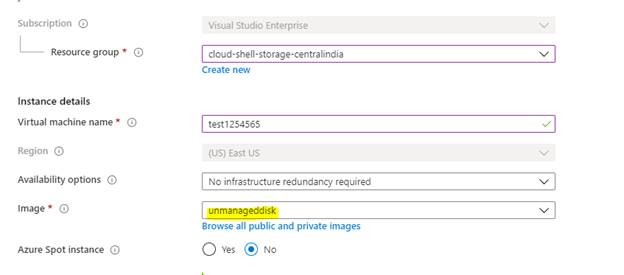
7. Create a VM from the managed disk by simply opening the newly created disk and you should be able to see “Create a VM” and “Create a Snapshot”. Click on create a new VM and in the source you should be to see the picture as below: Where the image* is the VHD you uploaded to your storage account.
8. Connect to your VM (default user/password are Administrator/pass@word1
9. Run the Admin provisioning tool on the desktop to set the D365 admin to either your O365 account or Live account.
10. Type usnconeboxax1aos.cloud.onebox.dynamics.com/ in your Internet Explorer and voila!







