web
You’re offline. This is a read only version of the page.
close
Skip to main content

Announcements

News and Announcements icon
Community site session details

Community site session details

Session Id :
Microsoft Dynamics CRM (Archived)

Link to network folder, with javascript, why is it not working?

(0) ShareShare
ReportReport
Posted on by 886

Hi,

I cannot get it to working and I get an error when loading the form. This is my setup.

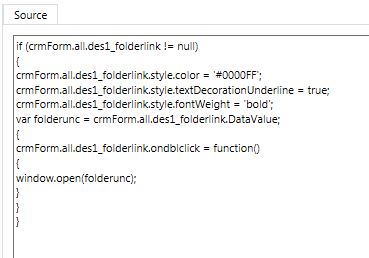
1) I have created a webresource with some code I found in these forums.
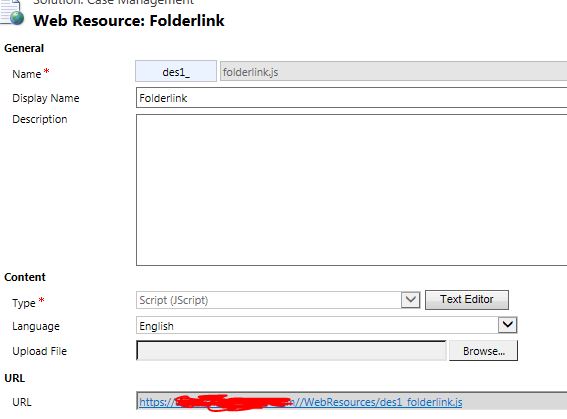
form2.JPG

4062.code.JPG

2) I have enabled it on my form (On Load)
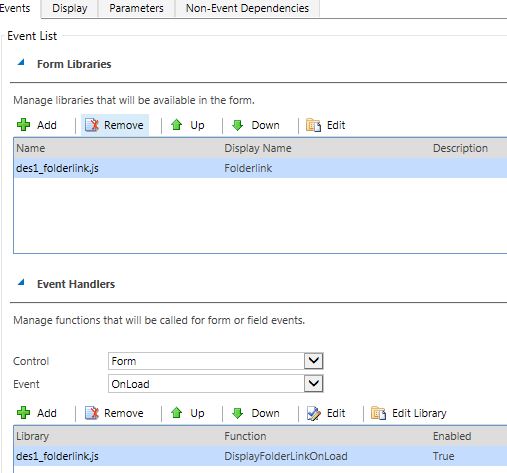
form1.JPG

3) Im getting this error when loading the form
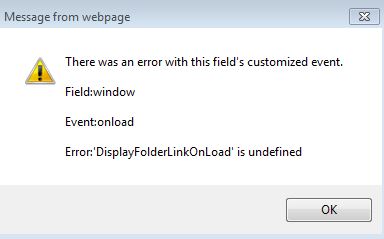
4062.error.JPG

What can be wrong? The field I have created is this than im trying to use
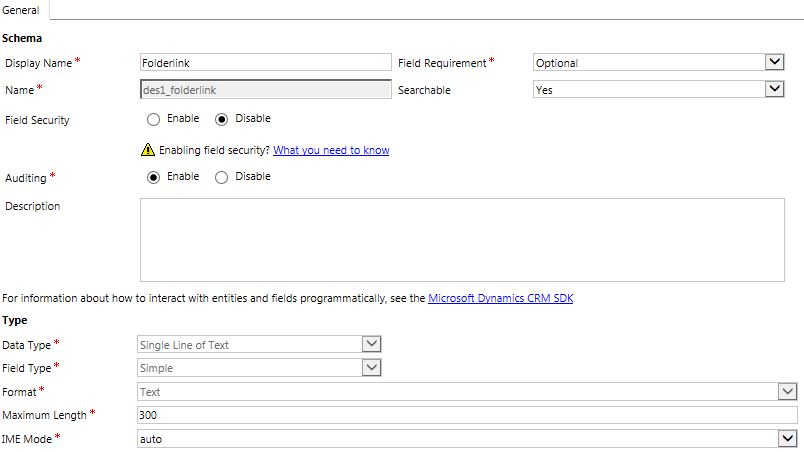
1033.Field.JPG

*This post is locked for comments

I have the same question (0)
  • Suggested answer
    Sreevalli Profile Picture
    3,264 on at

    Hi,

    Do you have "Folderlink" field on the form? we must have it on form, just hide it if you doesn't want to display

  • Suggested answer
    gdas Profile Picture
    50,091 Moderator on at

    Hi ,

    You have not define any function in the javascript web resource . You need to put  your code inside function -

    function DisplayFolderLinkOnLoad()

    {

       // Put your code here 

    }

  • rskadk1 Profile Picture
    886 on at

    Thanks for your answer. I don't get an error know. However the code doesn't work proberly. The field Is not formatted as a hyperlink...


    0216.error.JPG


    However if I double click in the text field I get an error (A new page is opened in internet explorer - instead the file windows file explorer should be opened)

    0216.error.JPG

    The value I put into the field "des1_Folderlink" is like this

    S:\Sites\Folder\Folder2

  • Suggested answer
    Sreevalli Profile Picture
    3,264 on at

    I dont think we can open local folder links directly from CRM. BTW, what is the final URL you are ended up after opening the page.

  • rskadk1 Profile Picture
    886 on at

    The final url is test.company.com/undefined

    But it should not open in the browser, but in the windows explorer instead.. Im pretty sure I read that some got it working..

  • rskadk1 Profile Picture
    886 on at

    No one that can help why it's not working or if its possible at all?

  • Suggested answer
    Sreevalli Profile Picture
    3,264 on at

    Hi,

    The final URL is adding https://, I got it when I click the above link - test.company.com/undefined

    URL filed will always add https:// (if not there), and we cannot open local drive folders from CRM

  • rskadk1 Profile Picture
    886 on at

    I found this webpage. And following the guide

    blog.zealots.solar

    It's almost working. When i place my mouse curser on the icon I can see the path is file:///C:/ (The C:/ is matching what I wrote into the path field)

    But nothing is happening if I click on the icon.

    If I paste the link into internet explorer tab and hit enter it will open windows explorer.

  • Sreevalli Profile Picture
    3,264 on at

    Its useful, thanks for sharing

  • rskadk1 Profile Picture
    886 on at

    Yes I hope so - now we just need to get it working...

Under review

Thank you for your reply! To ensure a great experience for everyone, your content is awaiting approval by our Community Managers. Please check back later.

Helpful resources

Quick Links

Season of Sharing Community Challenge Launch!

Jump in, show your community spirit, and win prizes!

Women in Power Builds Momentum

Expanding mentorship, skilling, and AI innovation

Congratulations to the May Top 10 Community Leaders

These are the community rock stars!

Leaderboard > 🔒一 Microsoft Dynamics CRM (Archived)

#1
ScottDurow Profile Picture

ScottDurow 2

#2
GJones Profile Picture

GJones 1

Last 30 days Overall leaderboard

Featured topics

Product updates

Dynamics 365 release plans