web
You’re offline. This is a read only version of the page.
close
Skip to main content

Notifications

Announcements

No record found.

Community site session details

Community site session details

Session Id :
Finance | Project Operations, Human Resources, ...
Answered

How to Hide "Parameters" tab in Dialog created using class. and add fields outside any tab

(0) ShareShare
ReportReport
Posted on by 225

Hello,

I am creating dialog using class when PO record saved.

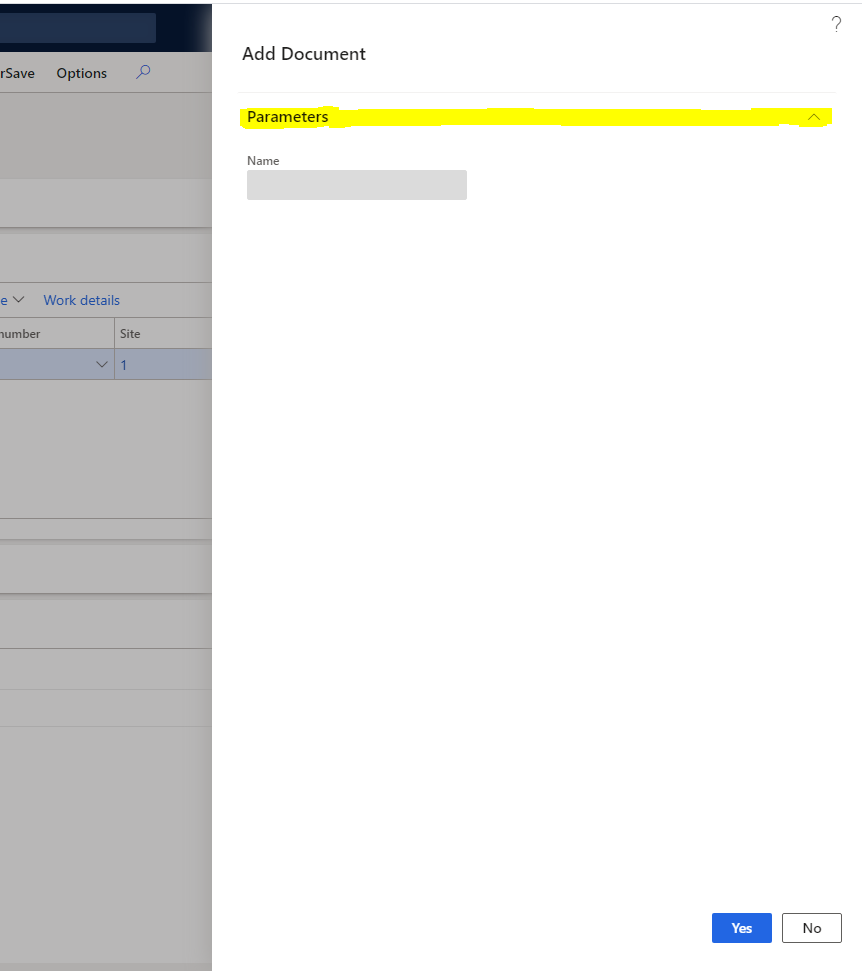
I want to hide "Parameters" Tab. and want to display some fields with Yes/No Buttons at the bottom.

Right now when I add any field or text it is going under Parameters Tab. and if I try to hide Parameters tab using below code my fields are also not visible bcz they are under that tab:

FieldTab = dialog.formBuildDesign().control('FieldTab');
FieldTab.visible(false);

I don't want any collapsible tab. Directly want to display fields and Yes/No Buttons. can anyone share code snippet for same. I am sharing my sample below:

//Title : Simple dialog creation
Dialog dialog;
DialogField dialogField;
DialogGroup dialogGroup;
FormBuildCommandButtonControl cancelButton,oKButton;
FormBuildTabPageControl FieldTab;

// creating new dailog instance and title
dialog = new Dialog("Add Document");

FieldTab = dialog.formBuildDesign().control('FieldTab');
//FieldTab.caption("Would you like to add a new Document to the following record:");
FieldTab.visible(false);

// adding field it's must be EDT, if relations true means enable lookup
dialogField = dialog.addField(extendedTypeStr(Name));
dialogField.enabled(false);

//Changing text of Dialog Buttons
oKButton = dialog.formBuildDesign().control('OkButton');
cancelButton = dialog.formBuildDesign().control('CancelButton');
oKButton.text("Yes");
cancelButton.text("No");

// calling run method for build a dialog
dialog.run();
// option Ok or cancel
if(dialog.closedOk())
{
// if click ok button they will get and display user value
info(strFmt("Clicked on Yes"));
}4061.dialog.PNG
I have the same question (0)
  • Suggested answer
    nmaenpaa Profile Picture
    101,162 Moderator on at

    Hi Pratik,

    one option is to create a form and use pattern "Simple Dialog".

  • Pratik Rami Profile Picture
    225 on at

    can I just disable collapsible behavior of this tab ?

  • Verified answer
    nmaenpaa Profile Picture
    101,162 Moderator on at

    I think this "Parameters" tab is always shown on all x++ dialogs.

    And all tabs are collapsible in x++ dialogs in D365FO.

    I could be wrong but looking at the system and all the dialogs that I've seen, it seems like that.

    Would it be a problem to show this tab? After all that's how all the other x++ dialogs in the system look. So your users are familiar with it.

  • Pratik Rami Profile Picture
    225 on at

    I don't have any Problem. Actually we are new to F&O. and initially we have planned our design like fields will be visible always. But no issue. Thank you so much for the help :)

Under review

Thank you for your reply! To ensure a great experience for everyone, your content is awaiting approval by our Community Managers. Please check back later.

Helpful resources

Quick Links

Responsible AI policies

As AI tools become more common, we’re introducing a Responsible AI Use…

Neeraj Kumar – Community Spotlight

We are honored to recognize Neeraj Kumar as our Community Spotlight honoree for…

Leaderboard > Finance | Project Operations, Human Resources, AX, GP, SL

#1
André Arnaud de Calavon Profile Picture

André Arnaud de Cal... 456 Super User 2025 Season 2

#2
Martin Dráb Profile Picture

Martin Dráb 429 Most Valuable Professional

#3
BillurSamdancioglu Profile Picture

BillurSamdancioglu 239 Most Valuable Professional

Last 30 days Overall leaderboard

Product updates

Dynamics 365 release plans



