web
You’re offline. This is a read only version of the page.
close
Skip to main content

Notifications

Announcements

No record found.

Community site session details

Community site session details

Session Id :
Customer experience | Sales, Customer Insights,...
Answered

Getting variables from survey responses using Power Automate

(2) ShareShare
ReportReport
Posted on by 35

I created a trigger in Power Automate for when a response is submitted. I want to collect the customer responses and also the variables into Power Automate. How do I do it?

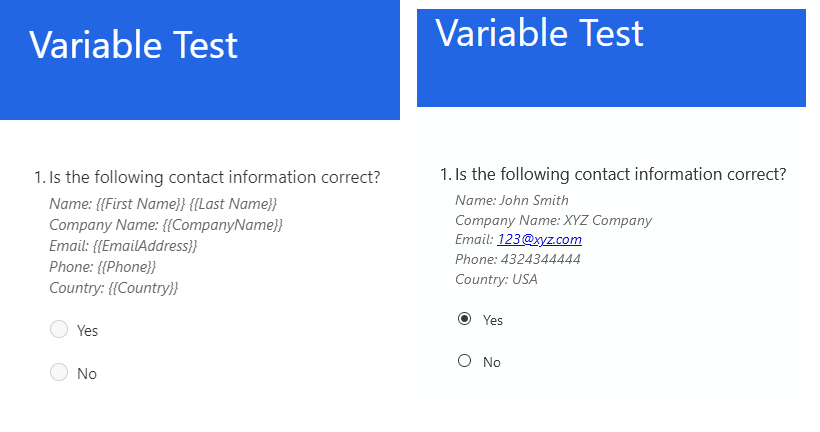
Here's my example survey. The left is the survey design tool with the variables, the right is a customer's survey with the variables filled in.
5226.Untitled.png

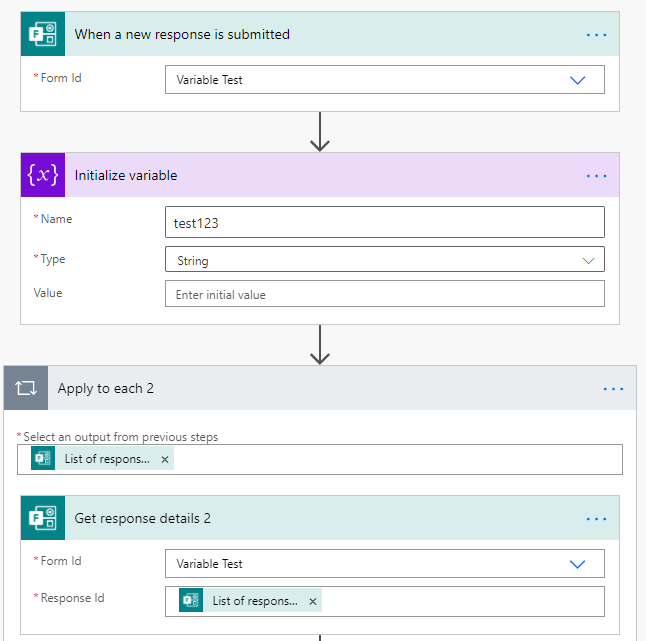
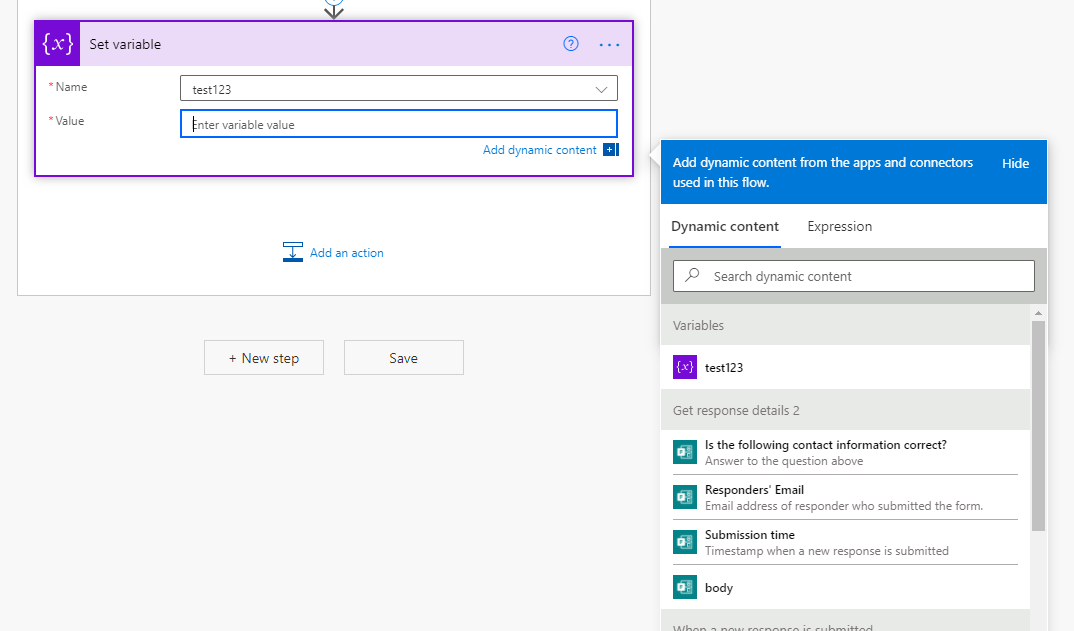
In power automate, I set a trigger for when a new response is submitted and I get the response details
pastedimage1610770473609v1.png

pastedimage1610770532440v2.png

The variables from the survey aren't listed in the response details, only the responses. How do I get them? Is there another way to do it?

I have the same question (0)
  • Verified answer
    Welly Lee Profile Picture
    on at

    Hi Jason,

    Please use "Common Data Service" trigger in power automate for "When a record is created" 

    pastedimage1610813447801v1.png

    Select the same environment that your Customer Voice project is created

    pastedimage1610813614292v3.png

    Select "Customer Voice survey response" for entity name

    pastedimage1610813638253v4.png

    You can retrieve the survey variable from "Context Data" field and survey responses from "Details of survey response" field (see below:

    pastedimage1610813875902v5.png

  • JasonBini Profile Picture
    35 on at

    Thanks Welly! Any hints on where I can get the schema for "context data" and "details of survey response"?

    Also, specifically for the survey responses, can we still use the Forms "Get response details" action? Or is that going away?

    pastedimage1611009530855v1.png

  • Suggested answer
    Welly Lee Profile Picture
    on at

    Schema for details of survey response:

    {

        "type": "array",

        "items": {

            "type": "object",

            "properties": {

                "questionId": {

                    "type": "string"

                },

                "response": {

                    "type": "string"

                }

            },

            "required": [

                "questionId",

                "response"

            ]

        }

    }

    Schema for survey variables:

    {

        "type": "object",

        "properties": {

            "EmbedContextParameters": {},

            "PipeData": {

                "type": "object",

                "properties": {

                    "<Survey Variable>": {

                        "type": "string"

                    },

                }

            }

        }

    }

    where you need to replace <Survey variable> with the actual survey variable names. For example:

    {

        "type": "object",

        "properties": {

            "EmbedContextParameters": {},

            "PipeData": {

                "type": "object",

                "properties": {

                    "First Name": {

                        "type": "string"

                    },

                    "Last Name": {

                        "type": "string"

                    },

                    "locale": {

                        "type": "string"

                    }

                }

            }

        }

    }

    You can continue to use Microsoft Forms response action but you will not be able to get the survey variables using Microsoft Forms action. We are also working on Customer Voice survey response action to simplify the Power Automate workflow creation which is targeted to be released by April 2021.


  • JasonBini Profile Picture
    35 on at

    Awesome. This works! If you could add the option in the new response action to collect the variables, that would be great.

    One last thing for anyone reading this thread: for the top level Common Data Service trigger "When a record is created", remember to add a Trigger Condition for the survey you care about. Otherwise your flow could trigger for other surveys.

    The expression should include: @equals(triggerBody()?['msfp_sourcesurveyidentifier'], '<your survey identifier>')

    The survey identifier is found in the URL when you're in the survey designer. It's the long string of characters after "FormId="

    pastedimage1611013814053v1.png

  • Mattaroon Profile Picture
    10 on at

    Thanks for the info. I have a Flow set up as above with no trigger conditions but it won't trigger when any CV survey responses are submitted. I can see the responses if I use the Forms Trigger but neither the CDS nor the CDS (Current Environment) triggers ever actually fire. Are there permissions on the CDS that need to be set?

  • Suggested answer
    Welly Lee Profile Picture
    on at

    The user account for the power automate workflow must have access to the survey. 

  • Mattaroon Profile Picture
    10 on at

    The Flow user is the one who created the Survey (but not necessarily the one who sent it). I just ran a test flow that has an Action for List records on the CDS (ordered by createdon) and I can see SOME of the responses but nothing that was submitted today.

  • JRowe Profile Picture
    5 on at

    Any further development on Customer Voice Survey Response actions?  I have used the above solution in my flows, which is now Dataverse, and over the last 3 weeks, the time to trigger the event is several hours after the survey response is generated.  We are trying to use this for near real time survey reporting in a workflow in a meeting, so this delay is making it unusable.

  • Oxxmossis Profile Picture
    5 on at

    I too would like to know if there are any updates on the forthcoming Action.  I recently found this solution and it will certainly serve my needs but a more streamlined option would be great.  Many thanks to all contributors. :)

Under review

Thank you for your reply! To ensure a great experience for everyone, your content is awaiting approval by our Community Managers. Please check back later.

Helpful resources

Quick Links

Responsible AI policies

As AI tools become more common, we’re introducing a Responsible AI Use…

Neeraj Kumar – Community Spotlight

We are honored to recognize Neeraj Kumar as our Community Spotlight honoree for…

Leaderboard > Customer experience | Sales, Customer Insights, CRM

#1
Tom_Gioielli Profile Picture

Tom_Gioielli 170 Super User 2025 Season 2

#2
#ManoVerse Profile Picture

#ManoVerse 70

#3
Jimmy Passeti Profile Picture

Jimmy Passeti 50 Most Valuable Professional

Last 30 days Overall leaderboard

Product updates

Dynamics 365 release plans
