web
You’re offline. This is a read only version of the page.
close
Skip to main content

Notifications

Announcements

No record found.

Community site session details

Community site session details

Session Id :
Customer experience | Sales, Customer Insights,...
Answered

How to create Auto Number Pluging for serial number field in case entity in MS dynamics 365 online and I need the plugin code with steps also as I am new in D365 online?

(0) ShareShare
ReportReport
Posted on by

Argent

I have the same question (0)
  • Verified answer
    cloflyMao Profile Picture
    25,210 on at

    Hi Sougata,

    1. Download plugin registration tool:

    https://docs.microsoft.com/en-us/dynamics365/customerengagement/on-premises/developer/download-tools-nuget

    2. Follow tutorial below to create a VS project and register it as plugin.

    https://carldesouza.com/creating-dynamics-crm-plugin-from-scratch/

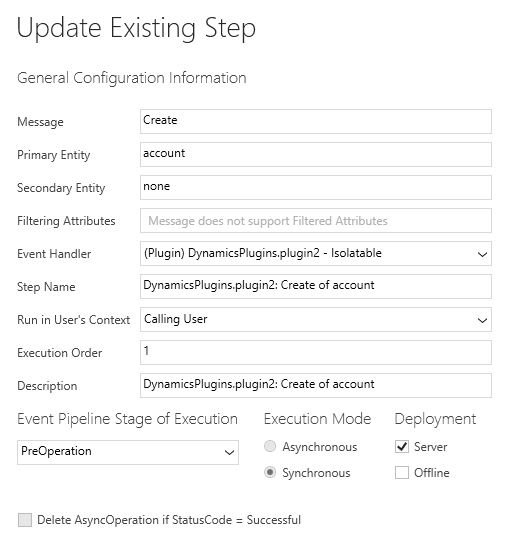
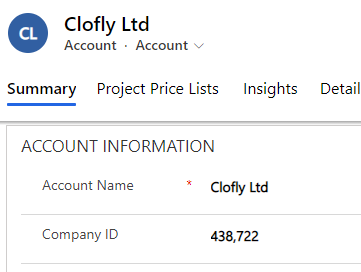
    3. My sample code for auto number, it uses Random class to generate auto number between 100000 to 999999, and will be trigger on creation of Account entity.

    You can need to replace crfe2_companyid parameter of this line "entity.Attributes.Add("crfe2_companyid", number);" with logical name of your own numeric field.

    (And change the target entity to Case for your situation.)

    using Microsoft.Xrm.Sdk;
    using Microsoft.Xrm.Sdk.Query;
    using System;
    using System.Text;
    
    namespace DynamicsPlugins
    {
        public class plugin2 : IPlugin
        {
            public void Execute(IServiceProvider serviceProvider)
            {
                IPluginExecutionContext context = (IPluginExecutionContext)serviceProvider.GetService(typeof(IPluginExecutionContext));
                ITracingService tracingService = (ITracingService)serviceProvider.GetService(typeof(ITracingService));
    
                IOrganizationServiceFactory servicefactory =
                    (IOrganizationServiceFactory)serviceProvider.GetService(typeof(IOrganizationServiceFactory));
                IOrganizationService service =
                    servicefactory.CreateOrganizationService(context.UserId);
    
                if (context.InputParameters.Contains("Target") && context.InputParameters["Target"] is Entity)
                {
                    Entity entity = (Entity)context.InputParameters["Target"];
                    if (entity.LogicalName != "account")
                    {
                        return;
                    }
                    if (context.Depth > 2)
                    {
                        tracingService.Trace("Context depth is: {0}", context.Depth);
                        return;
                    }
                    try
                    {
                        if (entity.Attributes.Contains("name"))
                        {
                            Random rnd = new Random();
                            int number = rnd.Next(100000, 1000001);
                            entity.Attributes.Add("crfe2_companyid", number);
                        }
                    }
                    catch (Exception ex)
                    {
                        tracingService.Trace("Error of Plugin: {0}", ex.ToString());
                        throw;
                    }
                }
    
            }
    
        }
    }
    pastedimage1608868296717v1.png

    pastedimage1608868424555v2.png

    Additionally, we can also create an auto number field in OOB way:

    https://gestisoft.com/en-ca/how-to-create-auto-number-fields-in-dynamics-365/

    Or running a console application to do it:

    https://passion4dynamics.com/tag/create-auto-number-field-using-c/

    Regards,

    Clofly

  • Community Member Profile Picture
    on at

    Hi Clofly,

    Thank you for your help.

    But I have a small doubt that is "You used random auto number to generate between 100000 to 999999. But if I want specific auto number like for 1st case the auto number will CA-00001 and for 2nd case the auto number will CA-00002 and so on."

    For this case what have to do as this is my criteria?

    Regards,

    Sougata

  • Verified answer
    cloflyMao Profile Picture
    25,210 on at

    Hi Sougata,

    You can try this code to achieve such requirement:

    using Microsoft.Xrm.Sdk;
    using Microsoft.Xrm.Sdk.Query;
    using System;
    using System.Text;
    
    namespace DynamicsPlugins
    {
        public class plugin2 : IPlugin
        {
            public void Execute(IServiceProvider serviceProvider)
            {
                IPluginExecutionContext context = (IPluginExecutionContext)serviceProvider.GetService(typeof(IPluginExecutionContext));
                ITracingService tracingService = (ITracingService)serviceProvider.GetService(typeof(ITracingService));
    
                IOrganizationServiceFactory servicefactory =
                    (IOrganizationServiceFactory)serviceProvider.GetService(typeof(IOrganizationServiceFactory));
                IOrganizationService service =
                    servicefactory.CreateOrganizationService(context.UserId);
    
                if (context.InputParameters.Contains("Target") && context.InputParameters["Target"] is Entity)
                {
                    Entity entity = (Entity)context.InputParameters["Target"];
                    if (entity.LogicalName != "incident")
                    {
                        return;
                    }
                    if (context.Depth > 2)
                    {
                        tracingService.Trace("Context depth is: {0}", context.Depth);
                        return;
                    }
                    try
                    {
                        if (entity.Attributes.Contains("title"))
                        {
                            var caseQuery = new QueryExpression
                            {
                                EntityName = "incident",
                                ColumnSet = new ColumnSet("title")
                            };
                            DataCollection cases = service.RetrieveMultiple(caseQuery).Entities;
    
                            int totalCases = cases.Count;
    
                            totalCases  = 1;
    
                            String caseNumber = "";
    
                            if (totalCases < 100000)
                            {
                                caseNumber = "CA-"   String.Format("{0:D5}", totalCases);
                            } 
                            else
                            {
                                caseNumber = "CA-"   totalCases;
                            }
    
                            entity.Attributes.Add("crfe2_casenumber", caseNumber);
                        }
                    }
                    catch (Exception ex)
                    {
                        tracingService.Trace("Error of Plugin: {0}", ex.ToString());
                        throw;
                    }
                }
    
            }
        }
    }
    

    pastedimage1608876548406v1.png

    It will retrieve all cases and get number of cases.(Include Active, Resolved and Cancelled.)

    Then the total will increase by 1 and convert into string format.

    Test:

    There are 44 cases in my CRM, so value of the 45th case will be CA-00045.

    2577.m1.JPG

    Regards,

    Clofly

  • Community Member Profile Picture
    on at

    Thanks a lot Clofly

  • Verified answer
    cloflyMao Profile Picture
    25,210 on at

    Hi Sougata,

    If you had found any answer helped, please kindly mark as verified to close the thread, it would be really appreciated. :)

    pastedimage1608878959690v1.png

    Regards,

    Clofly

  • Sheershendu Profile Picture
    40 on at

    Hi Clofly,

    I want to assign Entitlement to Case using Plugin also I have to attach SLA with the Entitlement. So, as I am new to this can you please help me step wise along with the code?

    Thanks & Regards,

    Sheershendu Bhattacharjee

  • Community Member Profile Picture
    on at

    Hi Clofly,

    I want to cleanup or delete rows PrincipalObjectAccess (POA) using c# for MS D365 Online.

    Can you tell me the steps how to do that using c#?

    community.dynamics.com/.../how-to-cleanup-principalobjectaccess-poa-using-c-for-ms-d365-online

    Regards,

    Sougata

Under review

Thank you for your reply! To ensure a great experience for everyone, your content is awaiting approval by our Community Managers. Please check back later.

Helpful resources

Quick Links

Responsible AI policies

As AI tools become more common, we’re introducing a Responsible AI Use…

Neeraj Kumar – Community Spotlight

We are honored to recognize Neeraj Kumar as our Community Spotlight honoree for…

Leaderboard > Customer experience | Sales, Customer Insights, CRM

#1
Tom_Gioielli Profile Picture

Tom_Gioielli 170 Super User 2025 Season 2

#2
#ManoVerse Profile Picture

#ManoVerse 70

#3
Jimmy Passeti Profile Picture

Jimmy Passeti 50 Most Valuable Professional

Last 30 days Overall leaderboard

Product updates

Dynamics 365 release plans



