web
You’re offline. This is a read only version of the page.
close
Skip to main content

Notifications

Announcements

No record found.

Community site session details

Community site session details

Session Id :
Customer experience | Sales, Customer Insights,...
Answered

How to change the name of 'Timeline'?

(2) ShareShare
ReportReport
Posted on by 455

Hi Guys,

In the new version, Notes is changed as Timeline. I want to change the name of timeline, I tried to change the name of the below figure, but it is not work. Does anyone know how to change its name?

Annotation-2020_2D00_07_2D00_10-120354.png

Annotation-2020_2D00_07_2D00_10-120455.png

I have the same question (0)
  • Suggested answer
    Bipin D365 Profile Picture
    28,983 Moderator on at

    Hi,

    I don't think it is possible OOB.

    But you can try exporting the solution and manipulate the XML and import the solution back to your CRM instance.

    If found helpful, Please mark my answer verified.

  • Verified answer
    cloflyMao Profile Picture
    25,210 on at

    Hi Huang,

    It is name property instead of label property, thus the change won't be applied to timeline section.

    To the best of my knowledge, the text/title of timeline couldn't be modified, it is front-side behavior and by design in UCI.

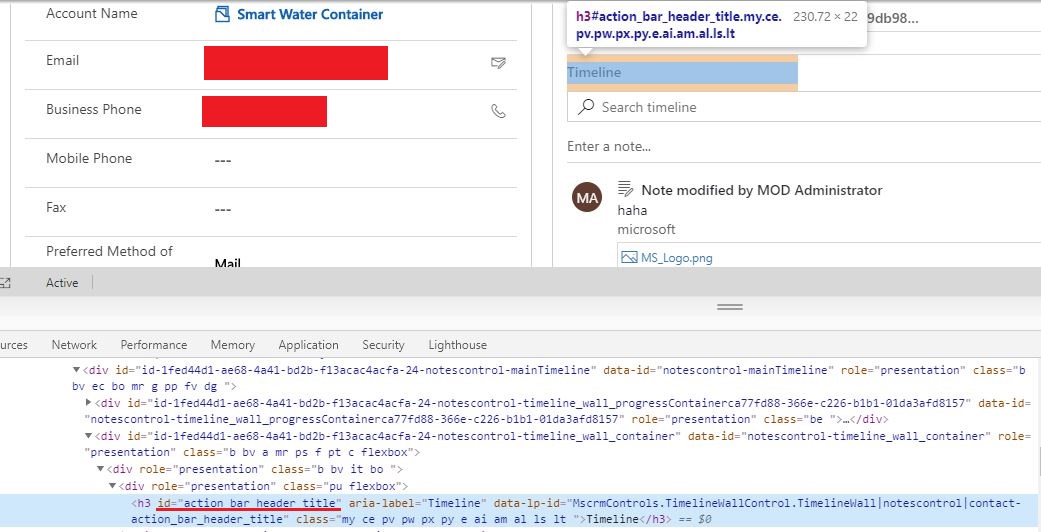
    Due to the Timeline element has a recognizable id value,
    7674.JPG

    thus we could change the text with unsupported javascript code,

    it will execute at form OnLoad event and wait 2 seconds for form being completely loaded, 

    then get the timeline element by document.getElementById function to change its text.

    function onFormLoad() {
        setTimeout(function() {
            if (parent.document.getElementById('action_bar_header_title')) {
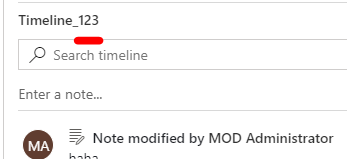
                parent.document.getElementById('action_bar_header_title').innerText = 'Timeline_123';
            }
        }, 2000);
    }

    Modification:
    pastedimage1594362313944v3.png

    Regards,

    Clofly

  • Suggested answer
    Stone Huang Profile Picture
    455 on at

    Thank you so much, I tried your method, it works. But it first show 'Timeline', then change to 'Timeline_123'.

    As for setTimeout you added, my understanding is that it needs to wait until entire page is loaded completely, then run this modify step. Otherwise it may be not load completely if our code first modify, at this time, may be our code is not work. My understanding is right?

    Thanks,

    Dejun

  • cloflyMao Profile Picture
    25,210 on at

    Hi Dejun,

    Yes, you are right.

    Regards,

    Clofly

Under review

Thank you for your reply! To ensure a great experience for everyone, your content is awaiting approval by our Community Managers. Please check back later.

Helpful resources

Quick Links

Responsible AI policies

As AI tools become more common, we’re introducing a Responsible AI Use…

Neeraj Kumar – Community Spotlight

We are honored to recognize Neeraj Kumar as our Community Spotlight honoree for…

Leaderboard > Customer experience | Sales, Customer Insights, CRM

#1
Pallavi Phade Profile Picture

Pallavi Phade 98

#2
Tom_Gioielli Profile Picture

Tom_Gioielli 60 Super User 2025 Season 2

#3
Gerardo Rentería García Profile Picture

Gerardo Rentería Ga... 43 Most Valuable Professional

Last 30 days Overall leaderboard

Product updates

Dynamics 365 release plans
