web
You’re offline. This is a read only version of the page.
close
Skip to main content

Notifications

Announcements

No record found.

Community site session details

Community site session details

Session Id :
Microsoft Dynamics 365 | Integration, Dataverse...
Answered

Bing Maps on Account Form

(0) ShareShare
ReportReport
Posted on by 155

Hi 

I'm using D365 (9.1.0000.10733) and want to use Bing Maps on one of the Account entity forms. It's disabled. 

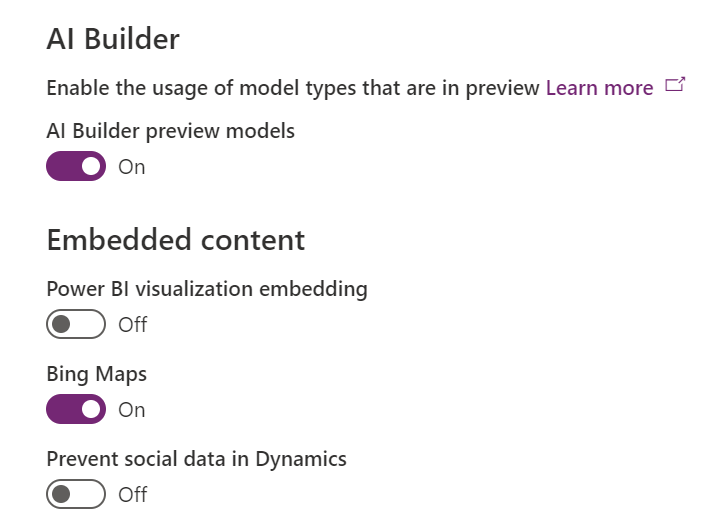
Unfortunately, now you can't access Settings -> Administration -> System Settings as they have been exported to the new location in admin.powerapps.com where I can see that the Bing Maps are enabled in Features section. 

Account.PNG

7585.Capture.PNG

I have the same question (0)
  • Arafat Profile Picture
    155 on at

    I don't know why I can't edit this question but yes, I am not able to see the option enabled. Please let me know if I am missing something so I can add it.

  • LuHao Profile Picture
    40,892 on at

    Hi Arafat,

    When you enable Bing Maps in the power platform environment settings, the Account form will automatically add the Map Section, which does not require you to manually add it in the form editor.

    In addition, if the bing map has already exists in the form, the Bing Maps button under the INSERT tab is disabled.

    pastedimage1576044673863v1.png

    So I would recommend you first double-check if your Account form already has the Bing Map.

  • Arafat Profile Picture
    155 on at

    Hello Hao!

    Thank you for swift response. You are absolutely right. However, my requirement got changed and we had to bring that Map to a custom entity's form.

    Is it possible? I am sure that form does not already have the Map but the button is still disabled.

    Looking forward to your response.

  • Verified answer
    LuHao Profile Picture
    40,892 on at

    Hi Arafat,

    Unfortunately, OOTB Bing Maps cannot be added to custom entity forms.

    Bing Maps can be displayed on a form for the account, contact, lead, quote, order, invoice, competitor, and system user entities.

    From https://docs.microsoft.com/en-us/dynamics365/customerengagement/on-premises/customize/configure-bing-maps-legacy

    This is a same theme, you could try its solution: 

    https://community.dynamics.com/365/sales/f/dynamics-365-for-sales-forum/262153/bing-map-customization-on-custom-entity-form

    In addition, you could try it: 

    https://www.kms-software.com/news/2018/02/microsoft-dynamics-365-adding-the-bing-map-control-to-forms-of-custom-entities/

  • H V Profile Picture
    351 on at

    Hello,

    If you want to view or manage Custom Entity records on Bing Map, then you can use Microsoft Certified AppJetty's Quick Maps Plugin. It is also available on Microsoft AppSource. You can take a demo from https://www.appjetty.com/dynamicscrm-quick-maps.htm

    pastedimage1578560860657v1.jpeg

    Remarkable Features

    • Heat Map
    • Route Optimization & Sharing
    • Territory Management
    • Reporting & Analytical Dashboards
    • Check in-Check out
    • User level Configuration
    • Search by region, shape and proximity

Under review

Thank you for your reply! To ensure a great experience for everyone, your content is awaiting approval by our Community Managers. Please check back later.

Helpful resources

Quick Links

Responsible AI policies

As AI tools become more common, we’re introducing a Responsible AI Use…

Neeraj Kumar – Community Spotlight

We are honored to recognize Neeraj Kumar as our Community Spotlight honoree for…

Leaderboard > Microsoft Dynamics 365 | Integration, Dataverse, and general topics

#1
Siv Sagar Profile Picture

Siv Sagar 93 Super User 2025 Season 2

#2
#ManoVerse Profile Picture

#ManoVerse 76

#3
Martin Dráb Profile Picture

Martin Dráb 64 Most Valuable Professional

Last 30 days Overall leaderboard

Product updates

Dynamics 365 release plans