web
You’re offline. This is a read only version of the page.
close
Skip to main content

Announcements

News and Announcements icon
Community site session details

Community site session details

Session Id :
Finance | Project Operations, Human Resources, ...
Suggested Answer

Extensible data security (XDS): Table method xds() is not working

(1) ShareShare
ReportReport
Posted on by

Hello all!

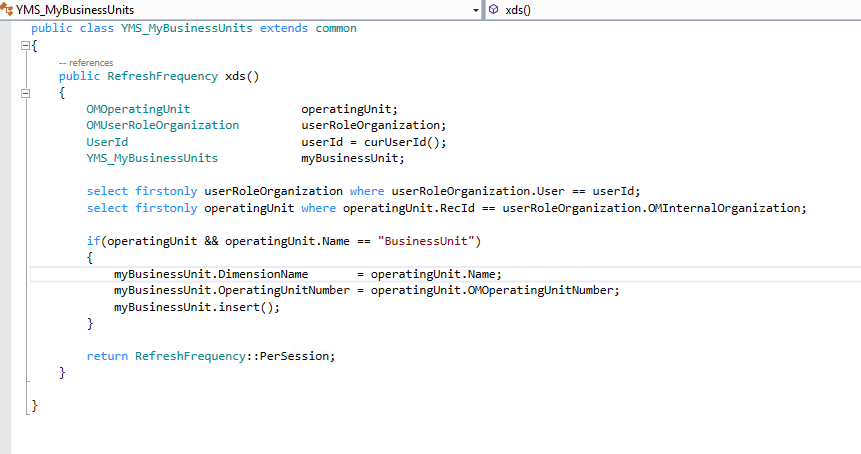
I am working on a Security policy where I need to restrict Sales orders on the basis of Business unit/Operating unit assigned to the user. Everything is working here if i manually add data to the "MyBusinessUnits" temporary table. My issue is that the xds() method is not working and therefore the temp table is not being populated with the desired data in order to filter the Sales orders.

Below are the screenshots: 

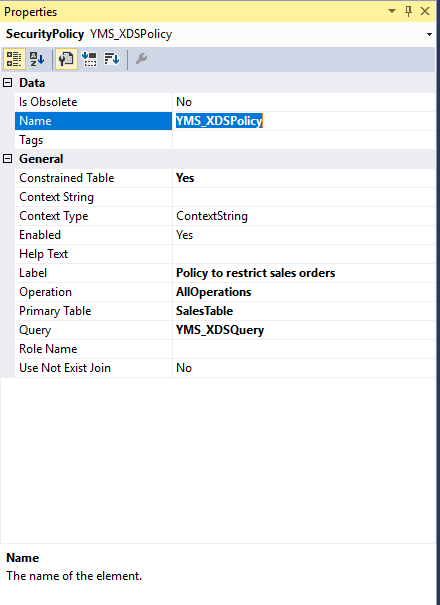
1. Properties of the Policy
pastedimage1599033818629v1.png

2. xds method

pastedimage1599033883980v2.png

3. Policy query

pastedimage1599033912229v3.png

Is there any configuration that i am missing that is causing the xds() to not execute?

I have the same question (0)
  • alexmeyer.itguy Profile Picture
    670 on at

    Sohan,

    It doesn't appear that you have set up the association between your XDS policy and the role assigned to the user, in your first screenshot I would expect either the 'Context String' or 'Role Name' properties to be filled out to dictate which role(s) this XDS policy would apply to.

    I wrote about the XDS feature here: alexdmeyer.com/.../

    And another Microsoft MVP Andre Arnaud de Calavon: dynamicspedia.com/.../

  • Suggested answer
    André Arnaud de Calavon Profile Picture
    305,475 Super User 2026 Season 1 on at

    Hi Sohan,

    The context string and role name can be blank. In that case the policy would be active for all non-administrator users.

    Have you verified if the temporary table is set to 'TempDB' and not 'InMemory'?

    Do you have business units assigned via the Organization assignments on security roles? In other words, do you have records with a business unit in the UserRoleOrganization table? More specific, you are only retrieving the first record. This could also be a LE assignment and not a business unit. Then it is also not working.

    I made an example how to use the Organization assignment on operating units and XDS: dynamicspedia.com/.../

    In this example, I used also the same statement, but only to find out if there was any organization assignment for this user. Otherwise, it could return all operating units. You can probably copy the sample code and change this to business units instead of retail channels.

  • Community Member Profile Picture
    on at

    Thanks for the response Alex, Here I want the policy to be applied for all Non admin users. The policy is working 100% as the non admin users are not being able to see any Sales orders (because no records are being inserted in to MyBusinessUnits table). The problem is with the xds method only.

  • Community Member Profile Picture
    on at

    Thanks Andre for your response. I have already made the table as 'TempDB', and yes the business unit is assigned via the Organization assignments.

    The point is that I ran the same code written in xds method and does what it is supposed to do. And as i mentioned in the question itself that I made the table regular and manually inserted the records in it. after which the policy worked just fine.

    The only thing is that the xds method is not doing its job. Is ther a way i can info something or see if the method even gets called?

  • Suggested answer
    André Arnaud de Calavon Profile Picture
    305,475 Super User 2026 Season 1 on at

    Hi Sohan,

    Did you both build the full model and also synchronized the database in your environment? If you did skip the DB sync, then the policy is not working correctly.

Under review

Thank you for your reply! To ensure a great experience for everyone, your content is awaiting approval by our Community Managers. Please check back later.

Helpful resources

Quick Links

Season of Sharing Community Challenge Launch!

Jump in, show your community spirit, and win prizes!

Women in Power Builds Momentum

Expanding mentorship, skilling, and AI innovation

Congratulations to the April Top 10 Community Leaders

These are the community rock stars!

Leaderboard > Finance | Project Operations, Human Resources, AX, GP, SL

#1
Giorgio Bonacorsi Profile Picture

Giorgio Bonacorsi 676

#2
Abhilash Warrier Profile Picture

Abhilash Warrier 633 Super User 2026 Season 1

#3
André Arnaud de Calavon Profile Picture

André Arnaud de Cal... 624 Super User 2026 Season 1

Last 30 days Overall leaderboard

Product updates

Dynamics 365 release plans