web
You’re offline. This is a read only version of the page.
close
Skip to main content

Notifications

Announcements

No record found.

Community site session details

Community site session details

Session Id :
Customer experience | Sales, Customer Insights,...
Answered

Logic App Error when attempting to push to CRM

(0) ShareShare
ReportReport
Posted on by 75

I am trying to push some data into CRM utilizing the logic app and the parameter fields.
Some of the fields get pushed through, while others do not. I am trying to understand what is the logic behind this?


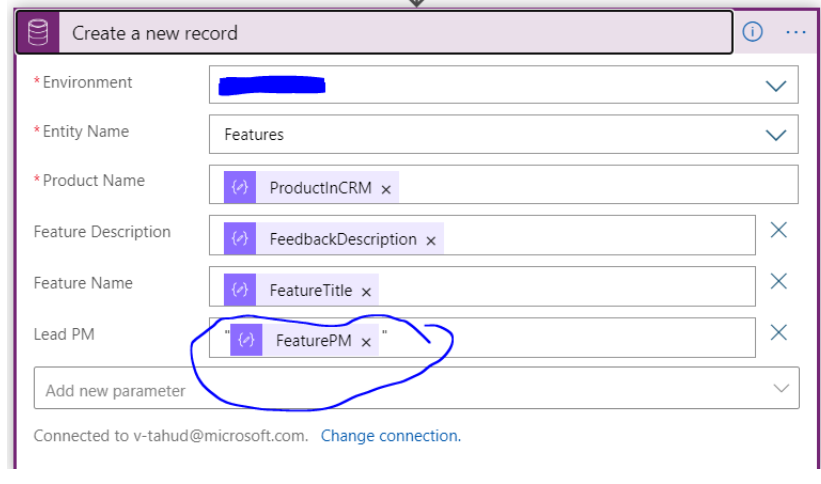
All of the fields go through except the LeadPM field. I get this error:
"message": "Syntax error: character '\"' is not valid at position 1 in '(\"Yu li\")'."

This is what I have done so far:
pastedimage1596480100857v1.png


When I got this error, I added "" and this did not work, so then I added '' and this did not work either. I finally did not add any quotes and am still getting this error. Any insight on this would be greatly appreciated.

I have the same question (0)
  • a33ik Profile Picture
    84,331 Most Valuable Professional on at

    Hello,

    What's type of Lead PM field and what do you pass inside?

  • jasmine202020 Profile Picture
    75 on at

    Hi it is a string like "John Yu" and I pass the dynamic field:

    pastedimage1596485942173v1.png

    pastedimage1596486013792v2.png

  • Verified answer
    a33ik Profile Picture
    84,331 Most Valuable Professional on at

    It seems that your field is a lookup. In this case your approach would not work. Format for the lookup field to update should look like

    /entitynamerecordset(ID of the record) something like:

    /contacts(89153C7D-E45E-E611-80F6-1458D05A5490)

    Apply changes to the value you pass to the lookup field and you're ok.

  • jasmine202020 Profile Picture
    75 on at

    Hi Andrew,

    Would it be something like this then?, because the name is already within the JSON...

    pastedimage1596489786448v3.png

    The name is already within the JSON schema:

    pastedimage1596489720934v2.png

    I am unsure how to write it dynamically. Please give me your suggestion.

  • Verified answer
    a33ik Profile Picture
    84,331 Most Valuable Professional on at

    I don't think that will work. You need the id of that relaated record and if you have only the name then you will have to get the id based on the name. You can use "List Records" step and get id from the result.

  • jasmine202020 Profile Picture
    75 on at

    Ok where can I find "List Records" step? I will look at this

    Thank you

  • Verified answer
    a33ik Profile Picture
    84,331 Most Valuable Professional on at

    Check following - docs.microsoft.com/.../connect-common-data-service

Under review

Thank you for your reply! To ensure a great experience for everyone, your content is awaiting approval by our Community Managers. Please check back later.

Helpful resources

Quick Links

Responsible AI policies

As AI tools become more common, we’re introducing a Responsible AI Use…

Neeraj Kumar – Community Spotlight

We are honored to recognize Neeraj Kumar as our Community Spotlight honoree for…

Leaderboard > Customer experience | Sales, Customer Insights, CRM

#1
Tom_Gioielli Profile Picture

Tom_Gioielli 70 Super User 2025 Season 2

#2
Gerardo Rentería García Profile Picture

Gerardo Rentería Ga... 33 Most Valuable Professional

#3
Daniyal Khaleel Profile Picture

Daniyal Khaleel 32 Most Valuable Professional

Last 30 days Overall leaderboard

Product updates

Dynamics 365 release plans
