web
You’re offline. This is a read only version of the page.
close
Skip to main content

Notifications

Announcements

No record found.

Community site session details

Community site session details

Session Id :
Finance | Project Operations, Human Resources, ...
Answered

Budget check performance is not working

(0) ShareShare
ReportReport
Posted on by

Hello,

I am configuring the Budget Control configuration for a new customer. But for some reason it does not work - neither for Purchase requisitions nor for pending vendor invoices. I hope someone has an idea what the reason behind this could be. I have also compared my setup with the setup in our standard environment - where the budget check performance is working - but I could not find any mistakes.

First of all, my goal is it that the customer should get for a range of users only a warning message that the budget fund has been exceeed. More not.

My setups so far in the Budget Control configuration:

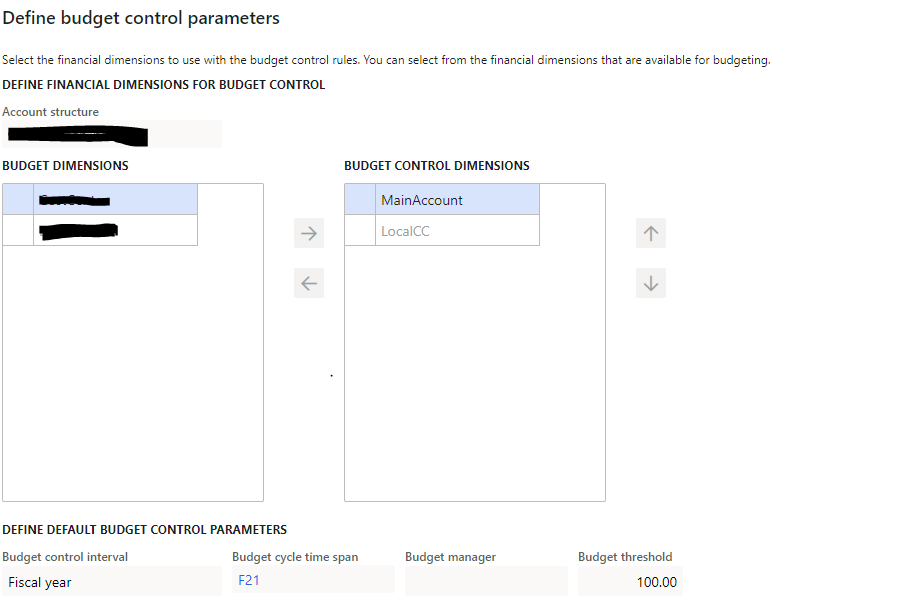
Define Parameters: Here I have setup the P&L structure and chosen only the Financial Dimensions where I want to perform the Budget check performance. I have also chosen a Budget control interval and Budget cycle time span. The Dimension Local CC is a customer defined dimension
pastedimage1619430635081v1.png


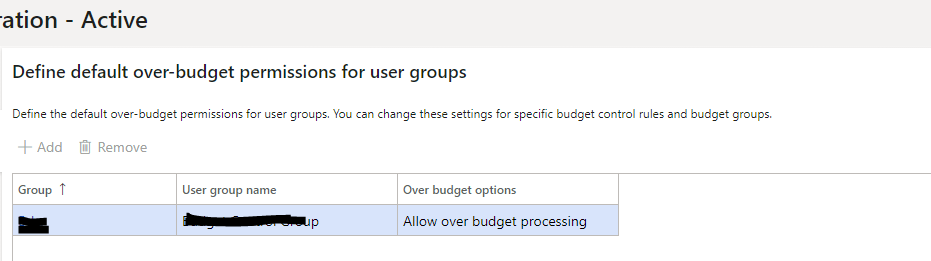
Over Budget Permissions: See screensht below. The User group has also been setup and I am part of that User group.
pastedimage1619430711395v2.png

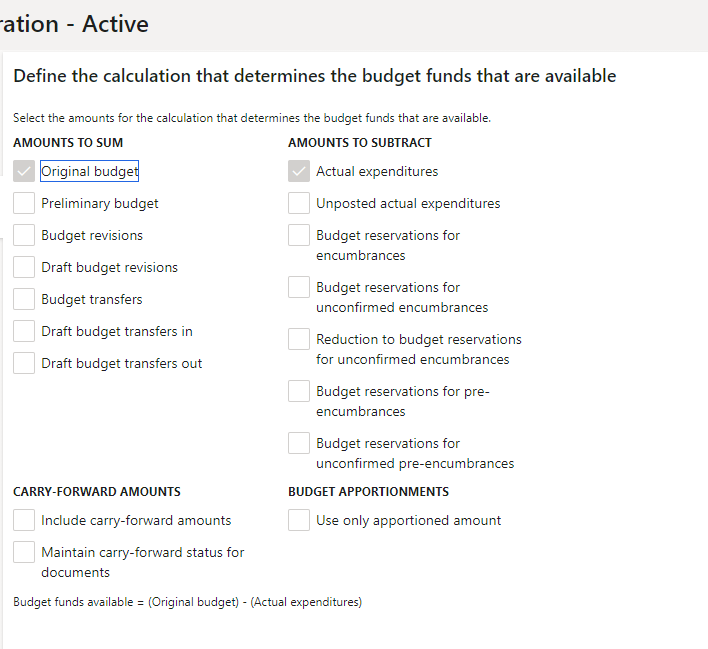
Budget funds available: Only "Original Budget" and "Actual Expenditures" have been selected so far.
pastedimage1619430767490v3.png

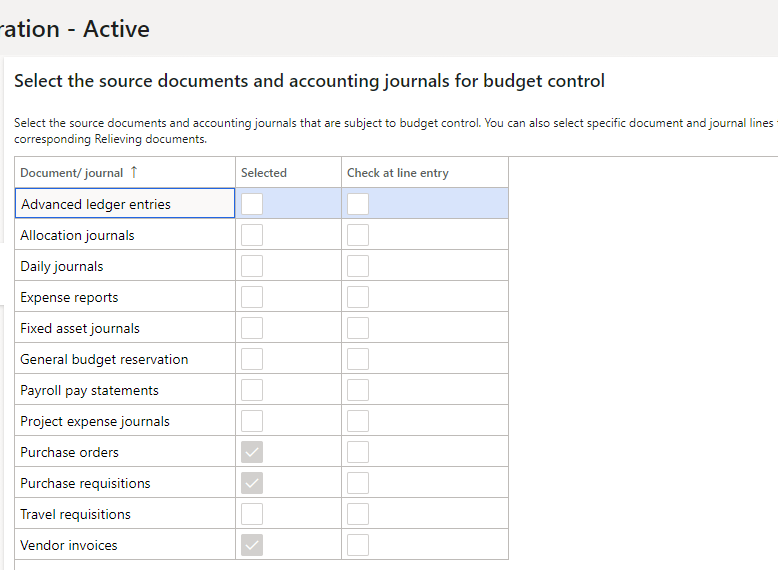
Documents and journals: PO, PR and Vendor invoices have been selected so far for test purposes
pastedimage1619430824650v4.png

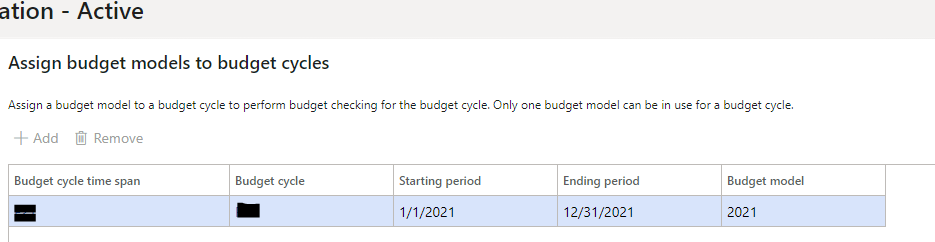
Assign Budget models: Fiscal year 2021 has been chosen so far. All posting dates where for this year.
pastedimage1619430961105v5.png

Define Budget Control rules: I have setup as criteria for main accounts "is between and includes" 60000 through 99999. For the Local CC - which is a customer defined Financial Dimension - I have choosen "begins with" G100000. 

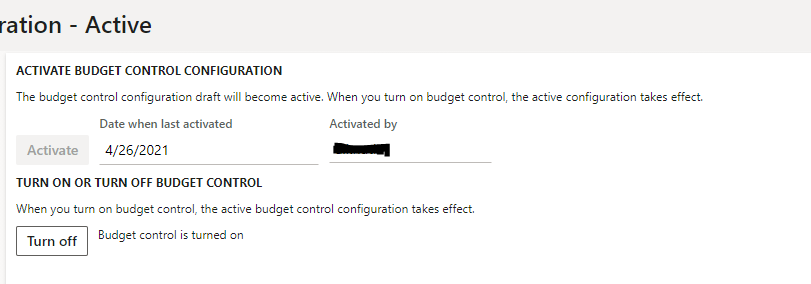
Activate Budget Control: See screenshot below -> it is active and turned on.
pastedimage1619431287230v7.png

Any idea what to do? When I click "Perform Budget check" for a Purchase requisition or a pending vendor invoice, nothing works. I have also chosen the right Dimension value (for example: G100000) and main account (between 60000 and 99999) when I try to check the Purchae requisition or pending vendor invoice.

Best regards

Schewa

I have the same question (0)
  • Suggested answer
    MauricioSaldana Profile Picture
    on at

    Hi Schewa,

    Did you create the budget register entry? asking since is not mentioned on here.

    Try by enabling check at line entry on the below screen

    pastedimage1619440608337v1.png

    If that is not working try by creating a budget control rule and see it something changes.

    Regards

    Mauricio

  • Verified answer
    Ludwig Reinhard Profile Picture
    Microsoft Employee on at

    Hi Schewa,

    Have you created a 'brand new' invoice and tried to perform the budget check?

    For existing ones that are pending things might not work if you turn on budget control subsequently.

    Also, can you share screenprints of your budget control rules and the main accounts used in your pending vendor invoice?

    Many thanks,

    Ludwig

  • Community Member Profile Picture
    on at

    A Budget register entry should not be necessary, but I have nevertheless done it, that does not help. I had created a Budget rule but that did not work - see my first post above.

  • Community Member Profile Picture
    on at

    @Ludwig: I have checked the Budget rules again. I have found a mistake in the settings. For the dimension "Local CC" I had setup "begins with." But this is wrong since I will not be able to finde other Local CC's. I have changed that to "greater than." Since I have done it, it works. :)

    Now I can perform Budget checks for old Purchase requisitions and new Purchase requisitions.

    Thanks to both of you for your help.

    Best regards

    Schewa

Under review

Thank you for your reply! To ensure a great experience for everyone, your content is awaiting approval by our Community Managers. Please check back later.

Helpful resources

Quick Links

Responsible AI policies

As AI tools become more common, we’re introducing a Responsible AI Use…

Neeraj Kumar – Community Spotlight

We are honored to recognize Neeraj Kumar as our Community Spotlight honoree for…

Leaderboard > Finance | Project Operations, Human Resources, AX, GP, SL

#1
Martin Dráb Profile Picture

Martin Dráb 660 Most Valuable Professional

#2
André Arnaud de Calavon Profile Picture

André Arnaud de Cal... 549 Super User 2025 Season 2

#3
Sohaib Cheema Profile Picture

Sohaib Cheema 307 User Group Leader

Last 30 days Overall leaderboard

Product updates

Dynamics 365 release plans
