web
You’re offline. This is a read only version of the page.
close
Skip to main content

Notifications

Announcements

No record found.

Community site session details

Community site session details

Session Id :
Microsoft Dynamics AX (Archived)

How to link the budget participants in the Budget Planning Process to my actual users

(0) ShareShare
ReportReport
Posted on by 14,855

Dear 

I am trying replicate the Budget Planning Process from USMF 2014 Budget virtual machine testing environment 

I am creating the workflow that the budget plan will be subject to when it distributed to the departments
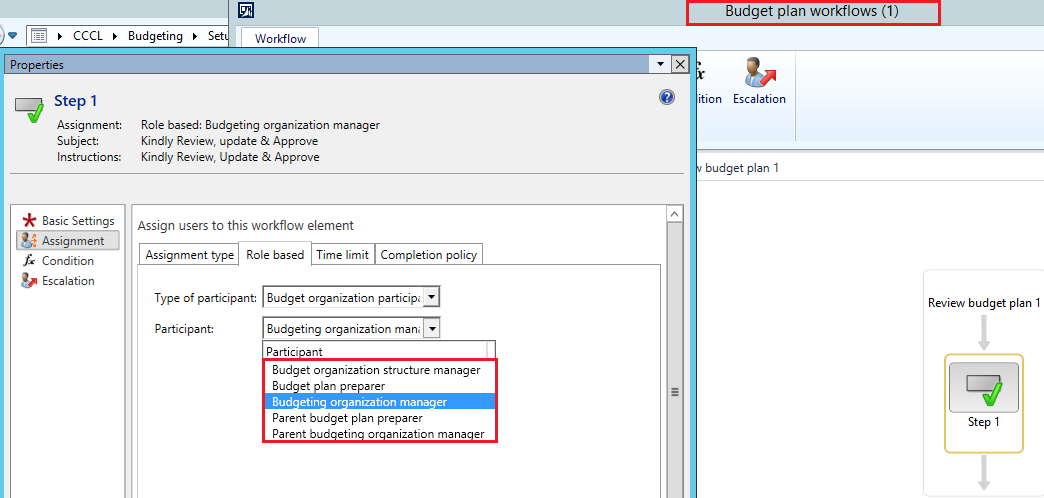
participants.png

now the question is , how do i attached these participants to the Users?

how do i link the below to my users

  • Budget organization structure manager
  • budget plan preparer
  • Budget organization manager
  • Parent budget plan preparer
  • parent budget organization manager

regards

*This post is locked for comments

I have the same question (0)
  • Sigita Profile Picture
    on at

    Budget organization manager is a person indicated in Organizational unit field "Manager" under Organization administration. System will check Responsibility center indicated in budget plan document header and use the person in Organizational unit setup for that responsibility center

    Parent budget organization manager - the same setup field "Manager", just will look in the org hierarchy to one level above budget plan responsibility center

    Budget organization structure manager - again the same setup field, just in the top level of org hierarchy for budget plan in the workflow.

    Budget plan preparer - person who prepared a budget plan. It's a separate atribute in budget plan document header. If user creates a doc manually it get's filled in from that user. If document is created by the workflow, it is being filled in with budget organization manager for particular responsibility center (see above)

    Hope this helps.

  • Abdo Khoury Profile Picture
    14,855 on at

    Dear Sigita

    thank you for the valuable information you provided above, but something still puzzles me, as you can see below the responsibility center is IT Department 

    7080.Budget-Planning-Process.png

    which is weird because if you look at the Budget planning process "USMF 2014 Budgeting" below you will see that is it following the budgeting - Department hierarchy 

    7080.Budget-Planning-Process.png

    and if you notice that the hierarchy used below has got the Finance on top, shouldn't the "Finance" be the responsibility center.  

    Hierachy.png

    why am I getting the IT Department as responsibility center ?

    if you can clarify this point, it would be great , thank you 

    regards

  • Abdo Khoury Profile Picture
    14,855 on at

    Thank you for the above, 

    But How do I define which GL accounts should be produced for each department budget plan 

    meaning 

    my Budget plan is now complete and i created Budget Plan from General Ledger from the Periodic routines

    i have 3 departments in my administration panel

    Accounting on top as the responsibility centre and two other departments

    but the two other departments didn't receive anything

    my question is , where do i define which accounts related to each department , that they are supposed to receive when i activate my Budget Plan  

    this is what i understood that should happen 

    1. budget plan =>
    2. Activate =>
    3. Generate Budget Plan from GL (or pan)=>
    4. generate 3 separate budget Plan entries (to each department/based on how many i have) =>
    5. edit entries (by each department separately)=>
    6. aggregate budget entries (in a single one)

    I fail to understand how do i define which accounts are related to each department. i cant see to get the system to produce 3 budget plans(or entries) for each department and then aggregate them later on

    your feedback is mostly appreciated

  • Sigita Profile Picture
    on at

    Patrick - this is because of your user security settings. Your user is configured to work only with IT department, that's why you see IT only in the lookup

  • Sigita Profile Picture
    on at

    This is determined by financial dimension combination used on a line. To be able to distribute data from parent budget plan to children budget plans, dimension values on lines got to have a dimension matching responsibility center used in your budget plan hierarchy. I.e. if line has department value set to 023, and responsibility center of child budget plan is department 023, this line will be copied to child budget plan.

  • Abdo Khoury Profile Picture
    14,855 on at

    hi sigita

    thank you for the below, can you please elaborate more

    is this something to be done from the Account structure?

Under review

Thank you for your reply! To ensure a great experience for everyone, your content is awaiting approval by our Community Managers. Please check back later.

Helpful resources

Quick Links

Responsible AI policies

As AI tools become more common, we’re introducing a Responsible AI Use…

Neeraj Kumar – Community Spotlight

We are honored to recognize Neeraj Kumar as our Community Spotlight honoree for…

Leaderboard > 🔒一 Microsoft Dynamics AX (Archived)

#1
Martin Dráb Profile Picture

Martin Dráb 4 Most Valuable Professional

#1
Priya_K Profile Picture

Priya_K 4

#3
MyDynamicsNAV Profile Picture

MyDynamicsNAV 2

Last 30 days Overall leaderboard

Featured topics

Product updates

Dynamics 365 release plans



