web
You’re offline. This is a read only version of the page.
close
Skip to main content

Announcements

No record found.

News and Announcements icon
Community site session details

Community site session details

Session Id :
Microsoft Dynamics AX (Archived)

relationships between the two tables

(0) ShareShare
ReportReport
Posted on by 7

Goodmorning everyone
For internal company needs, I have to develop an application that will read the data directly in the AX database.
I have to make a select between these two tables
PURCHLINE and KIL_METALATTRIBUTES.
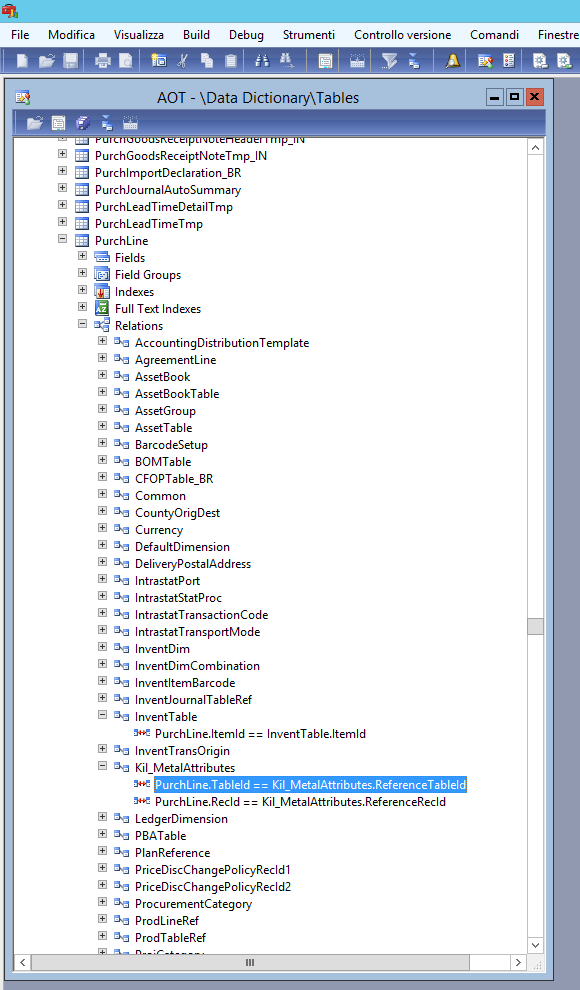
6811.Relazioni.png
If I go to see the relationships between the two:
PURCHLINE.recid == KIL_METALATTRIBUTES.ReferenceRecid
and
PURCHLINE.TableId == KIL_METALATTRIBUTES.ReferenceTableid
The problem is that the PURCHLINE.TableId column does not exist.
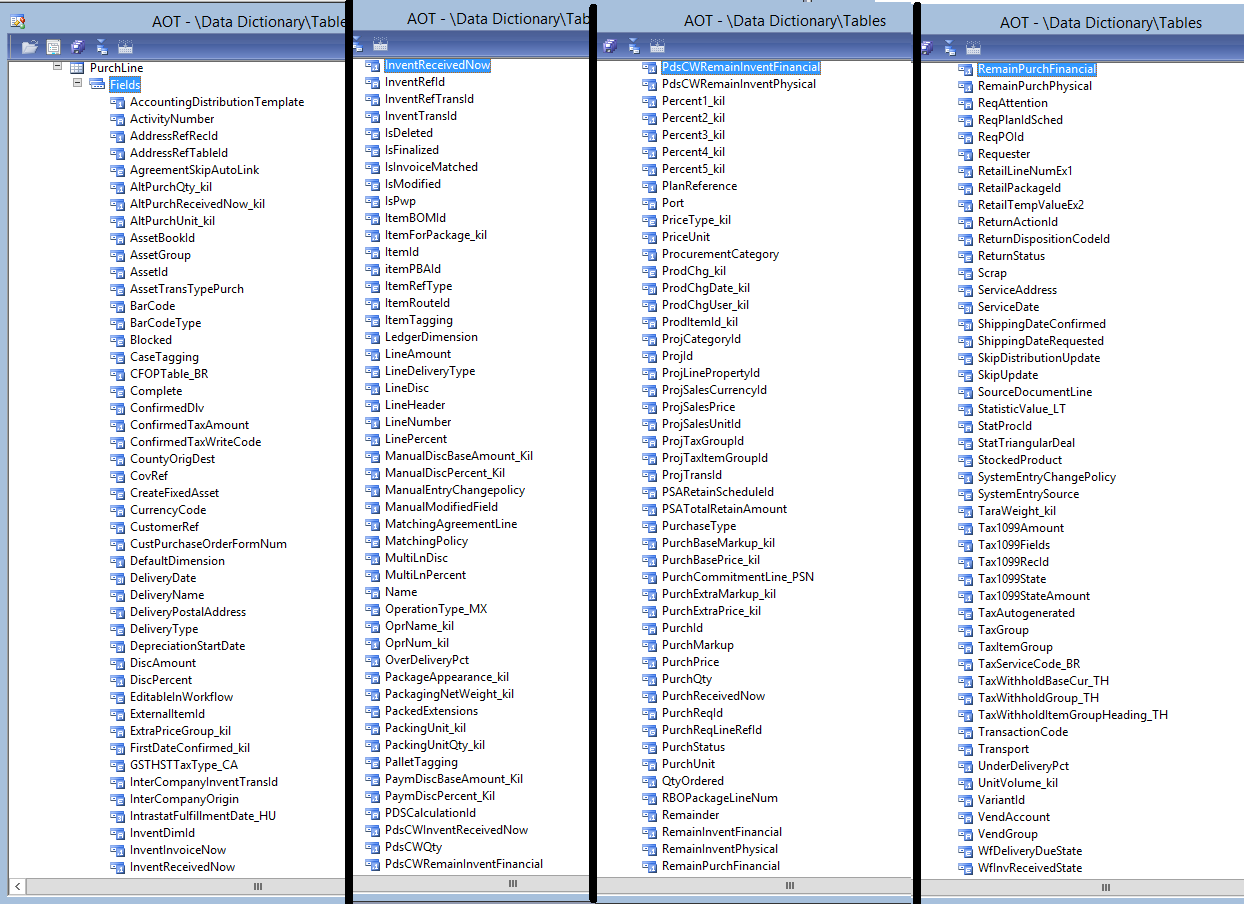
8267.campi.png
Without it I can't find a unique result. Do you have any idea how to help me?

*This post is locked for comments

I have the same question (0)
  • Blue Wang Profile Picture
    Microsoft Employee on at

    Hi Marco,

    TableId is specific to each table and can be used without adding such fields, like RecId.

    If you want to see it, I add data sources through forms.(It's the same as AX.)

    0724.PNG1172.PNG


    But if you want to get the value of TableId, you can look up the system table SysTableIdView.
    To use TableId, you can create class and code.

    I hope it will help you.

  • Martin Dráb Profile Picture
    239,451 Most Valuable Professional on at

    Are you aware of the fact that you won't have access to the production database in cloud? This might make your overall architecture invalid. The right approach is using web services.

    It will also allow you to benefit from all F&O business logic (including TableId field).

    An update: Oh, I see your pictures are not from F&O, so your tag "Dynamics 365 Administration" must be wrong. Ignore the part about access to database; neverthess it's true that you shouldn't access the database directly and you'd benefit from going through the application layer.

    I'll delete the invalid tag and set the product version - please pay more attention to it next time.

  • Marco Ferro Profile Picture
    7 on at

    How can I call it in a query?

  • Blue Wang Profile Picture
    Microsoft Employee on at

    HI Marco,

    In select statement?

    axility.net/.../

  • Marco Ferro Profile Picture
    7 on at

    sorry but I can't understand how I can do to visualize that column with Microsoft SQL management studio and consequently write a query. I'm not using X ++.

  • Blue Wang Profile Picture
    Microsoft Employee on at

    Hi Marco,

    You can't see the TableId field in Microsoft SQL management studio.

    Because the value of TableId is not stored in this table.

    As I mentioned above, you can select  SysTableIdView.

    5516.PNG

  • Marco Ferro Profile Picture
    7 on at
    sorry but I still don't understand.
    Errore.png
  • Suggested answer
    Satish Panwar Profile Picture
    14,673 Moderator on at

    Hi Marco,

    Write a simple job in AX

    tableName2Id("PurchLine").. . This will get you tableId. This is one time need and you don't need this again and it will be static in your query. See below.

    then you write your query...

    where KIL_METALATTRIBUTES.ReferenceTableid = tableid value you get from above.

    Thanks,

    Satish Panwar

    Please help verify answer(s) if they guide you in right direction so other community members can also benefit from your question with verified answer.

  • Blue Wang Profile Picture
    Microsoft Employee on at

    Hi Marco,

    Sorry, I forgot I used F&O and you were AX.

    dextersdax.blogspot.com/.../get-table-name-from-tableid-for.html

Under review

Thank you for your reply! To ensure a great experience for everyone, your content is awaiting approval by our Community Managers. Please check back later.

Helpful resources

Quick Links

Introducing the 2026 Season 1 community Super Users

Congratulations to our 2026 Super Stars!

Meet the Microsoft Dynamics 365 Contact Center Champions

We are thrilled to have these Champions in our Community!

Congratulations to the April Top 10 Community Leaders

These are the community rock stars!

Leaderboard > 🔒一 Microsoft Dynamics AX (Archived)

#1
CP04-islander Profile Picture

CP04-islander 39

#2
Michel ROY Profile Picture

Michel ROY 14

#3
imran ul haq Profile Picture

imran ul haq 8

Last 30 days Overall leaderboard

Featured topics

Product updates

Dynamics 365 release plans
