web
You’re offline. This is a read only version of the page.
close
Skip to main content

Notifications

Announcements

No record found.

Community site session details

Community site session details

Session Id :
Customer experience | Sales, Customer Insights,...
Suggested Answer

How to populate a Modal popup form with fields from its associated record?

(0) ShareShare
ReportReport
Posted on by 15

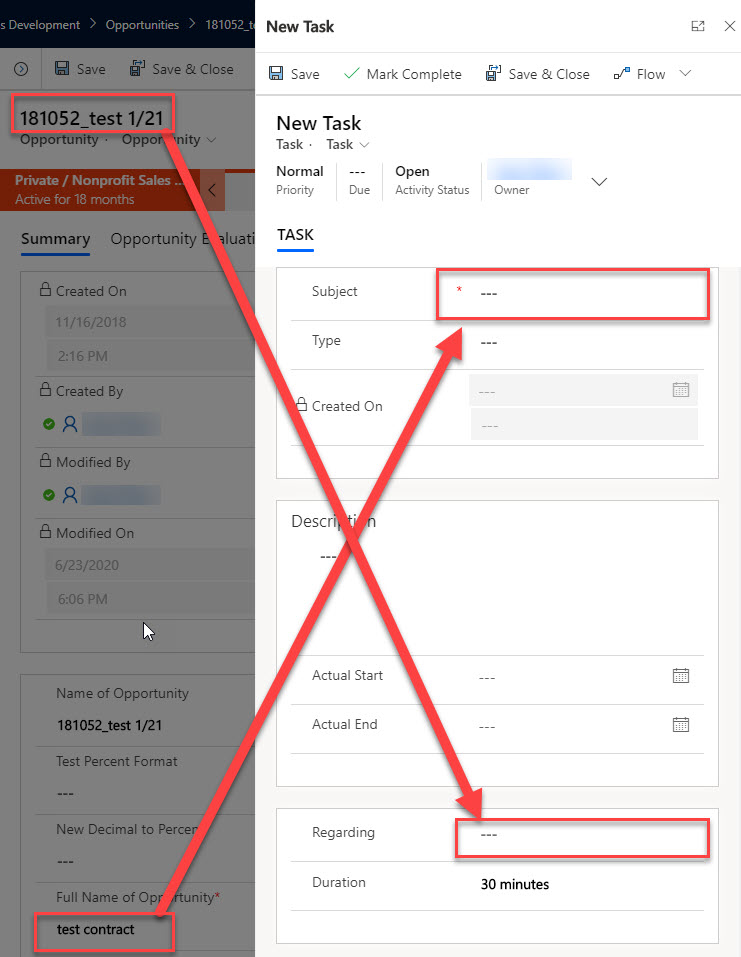
We started with a web resource js that triggers on "New Task" button click on an Opportunity record. What we are trying to do now is take fields from the associated Opportunity record and populate Task Modal popup fields with them. 

Here's the working js code to just open a new Task Modal popup:

function openmodalform() {
 var pageInput = {
 pageType: "entityrecord",
 entityName: "task",
 formType: 2,
 };
 var navigationOptions = {
 target: 2,
 width: {value: 500, unit:"px"},
 position: 2
 };
 
 Xrm.Navigation.navigateTo(pageInput, navigationOptions);
}

 
And here's a visual of how we want fields to carry over automatically:
asdasdasf.jpg

What we currently modified our js code to try to do this is the following. The fields on Opportunity do not carry over to the Task Modal popup.

function openmodalform() {
 var pageInput = {
 pageType: "entityrecord",
 entityName: "task",
 formType: 2,
 };
 var navigationOptions = {
 target: 2,
 width: {value: 500, unit:"px"},
 position: 2
 };
 var opportunityId = Xrm.Page.data.entity.getId().replace(/[{}]/g, '');
 var subject = Xrm.Page.getAttribute("dx_did_autoid").getValue();
 var parameters = {};
 parameters['reguardingobjectid'] = opportunityId;
 parameters['parentcustomeridname'] = title;
 parameters["subject"] = subject;
 
 Xrm.Navigation.navigateTo(pageInput, navigationOptions,parameters);
}


Please let me know if you need any clarification.
I have the same question (0)
  • a33ik Profile Picture
    84,331 Most Valuable Professional on at

    Hello,

    Try following:

    function openmodalform() {

    var pageInput = {

    pageType: "entityrecord",

    entityName: "task",

    formType: 2,

    };

    var navigationOptions = {

    target: 2,

    width: {value: 500, unit:"px"},

    position: 2,

    createFromEntity: Xrm.Page.data.entity.getEntityReference(),

    data: {

     subject: Xrm.Page.getAttribute("dx_did_autoid").getValue()

    }

    };

    Xrm.Navigation.navigateTo(pageInput, navigationOptions);

    }

  • Suggested answer
    Bipin D365 Profile Picture
    28,983 Moderator on at

    Hi,

    Try below code. For lookup you will have to pass type and name.

    	
    function openmodalform() {
    var entityFormOptions = {};
    entityFormOptions["entityName"] = "task";
    entityFormOptions["useQuickCreateForm"] = true;
    
    // Set default values for the Contact form
    var formParameters = {};
    var opportunityId = Xrm.Page.data.entity.getId().replace(/[{}]/g, '');
     var subject = Xrm.Page.getAttribute("dx_did_autoid").getValue();
     var parameters = {};
     parameters['reguardingobjectid'] = opportunityId;
     parameters["reguardingobjectidname"] = Xrm.Page.getAttribute("name").getValue();  
     parameters["reguardingobjectidtype"] = "opportunity";  
     //parameters['parentcustomeridname'] = title;
     parameters["subject"] = subject;
    
    // Open the form.
    Xrm.Navigation.openForm(entityFormOptions, formParameters).then(
        function (success) {
            console.log(success);
        },
        function (error) {
            console.log(error);
        });
    }

    If found helpful, Please mark my answer verified.

  • necsa Profile Picture
    3,455 on at

Under review

Thank you for your reply! To ensure a great experience for everyone, your content is awaiting approval by our Community Managers. Please check back later.

Helpful resources

Quick Links

Responsible AI policies

As AI tools become more common, we’re introducing a Responsible AI Use…

Neeraj Kumar – Community Spotlight

We are honored to recognize Neeraj Kumar as our Community Spotlight honoree for…

Leaderboard > Customer experience | Sales, Customer Insights, CRM

#1
Tom_Gioielli Profile Picture

Tom_Gioielli 137 Super User 2025 Season 2

#2
#ManoVerse Profile Picture

#ManoVerse 57

#3
Jimmy Passeti Profile Picture

Jimmy Passeti 50 Most Valuable Professional

Last 30 days Overall leaderboard

Product updates

Dynamics 365 release plans



