web
You’re offline. This is a read only version of the page.
close
Skip to main content

Announcements

No record found.

News and Announcements icon
Community site session details

Community site session details

Session Id :
Finance | Project Operations, Human Resources, ...
Suggested Answer

D365 for HR: Absence Plan setup - cannot set full entitlement for day 1

(0) ShareShare
ReportReport
Posted on by 5

Hi all, 

I am trying to set up an absence entitlement plan that will provide a full balance of vacation days the moment it is assigned to a worker (i.e a Pro rata plan with the full balance available on day 1)

Below are the settings which I think should enable this:
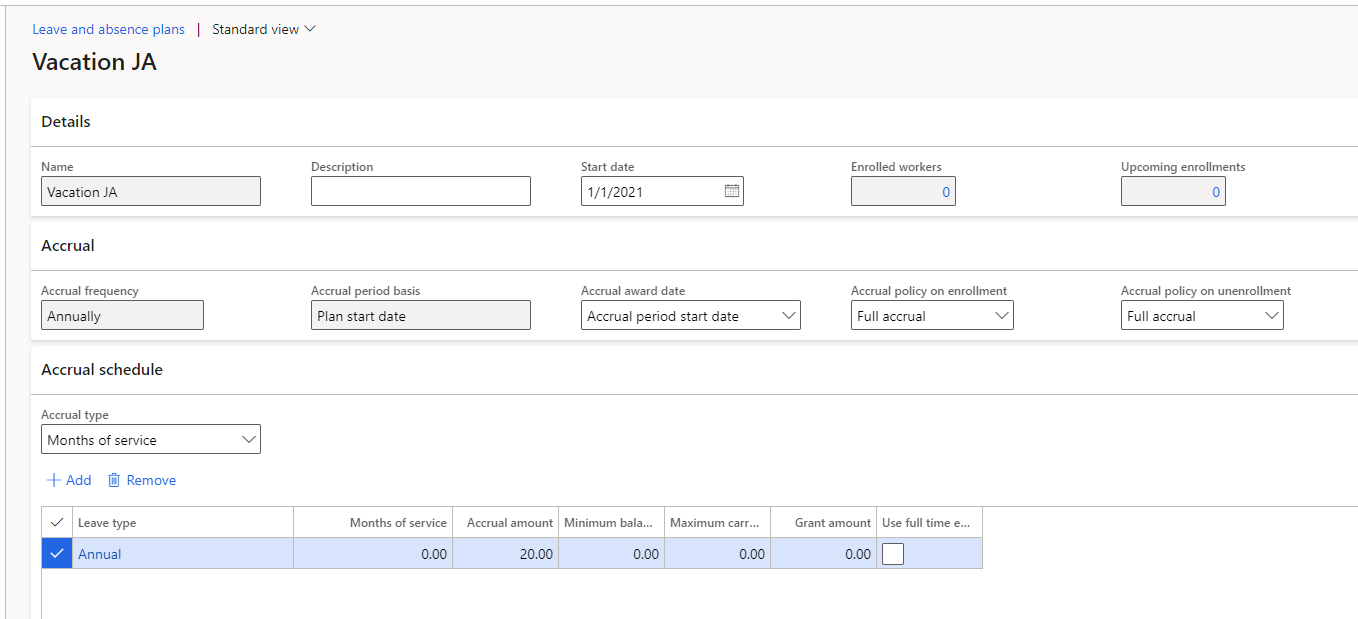
pastedimage1622031664656v1.png

However, when assigned to a worker record the current balance shows as 0 as seen below. I have set up the months of service to = 0 to enable immediate assignment 
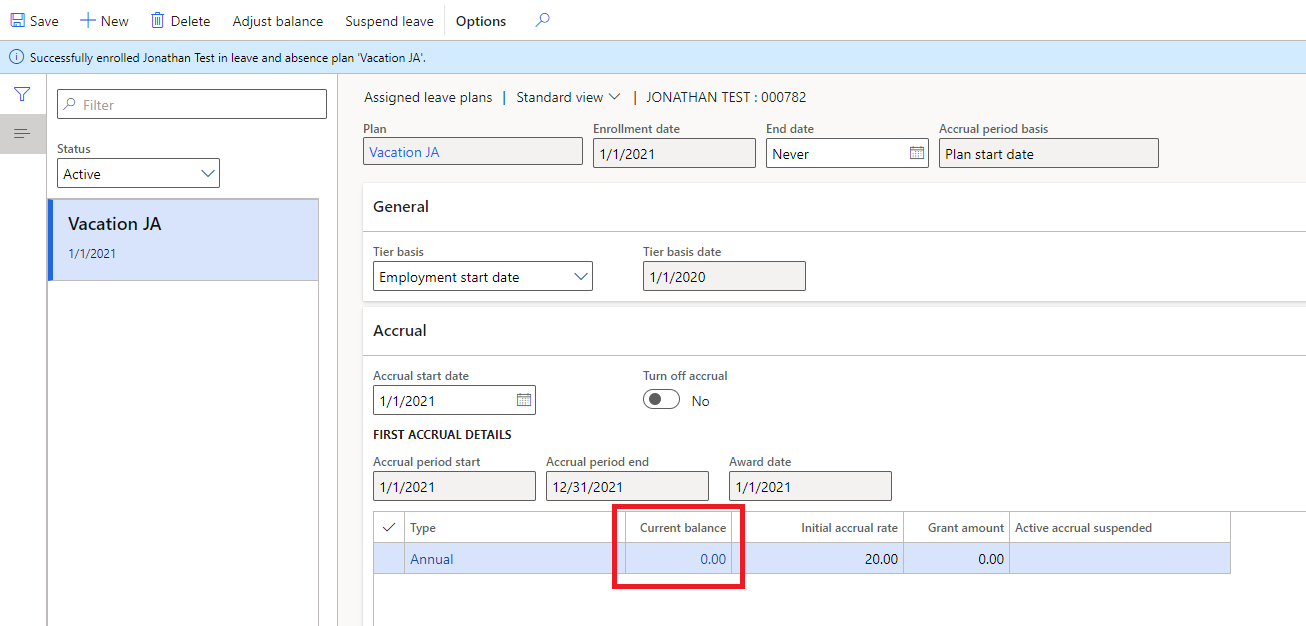
pastedimage1622031845949v2.png

Clicking through on 0.00 under current balance show nothing was assigned. 
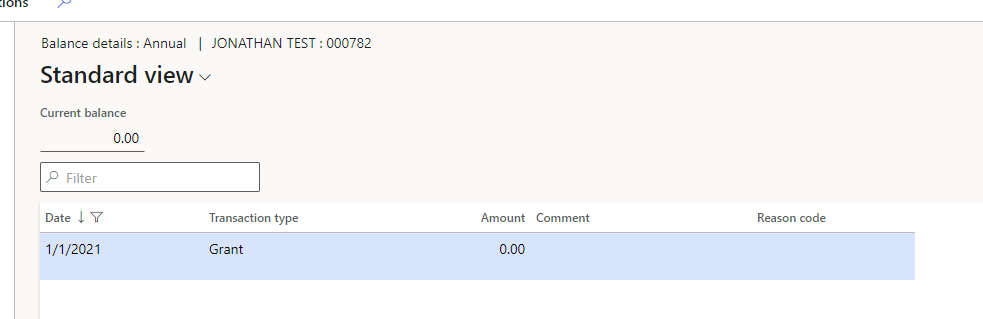
pastedimage1622032025052v3.png

I have tried multiple iterations of setup to no avail. Any guidance would be appreciated. I simply want the full balance to be assigned to the worker at the point the plan is assigned. 

TIA

I have the same question (0)
  • Suggested answer
    Alexandra Socea Profile Picture
    Microsoft Employee on at

    Hi Jonathan!

    After enrolling the employee to the plan, have you ran the accrual process?

    pastedimage1622103845243v1.png

  • Suggested answer
    Ana Stancu Profile Picture
    Microsoft Employee on at

    Hello Jonathan, 

    Did you also run this process? Employee > Leave > Accrue leave and absence plans? 

    pastedimage1622103829196v1.png

    If not already, please do so and let us know how it works. 

    Regards,
    Ana

  • Jonathan2020 Profile Picture
    5 on at

    Many thanks Alexandra, that seems to have done the trick. I knew I was missing a step (!). May I also ask if you know how / why a Grant entry still appears when I look at the balance breakdown? I could not see any setting to disable this on the Leave set up form

    pastedimage1622105422111v1.png

  • Jonathan2020 Profile Picture
    5 on at

    Many thanks Ana, as per my message to Alexandra it seems to have done the trick but I do have one more quick question on the Grant number in case you can advise (see my other reply)

  • Suggested answer
    Alexandra Socea Profile Picture
    Microsoft Employee on at

    Hello Jonathan,

    This is the expected behavior of the system. You are seeing this entry because it's the first time you are running the accrual for a newly enrolled employee. The Grant is the amount that is given to the employee only once on his enrollment. You won't be seeing this entry again for this employee. Below you can find an extract from our official documentation about the Grant: 

    Grant amount - The initial number of hours or days that employees are granted when they first enroll in the leave plan. The amount doesn't accrue for each accrual period. (Create a leave and absence plan - Human Resources | Dynamics 365 | Microsoft Docs

  • Jonathan2020 Profile Picture
    5 on at

    Many thanks again Alexandra, great to get confirmation I am not seeing unexpected behaviour. The explanatio makes perfect sense. Much appreciated

Under review

Thank you for your reply! To ensure a great experience for everyone, your content is awaiting approval by our Community Managers. Please check back later.

Helpful resources

Quick Links

Introducing the 2026 Season 1 community Super Users

Congratulations to our 2026 Super Stars!

Meet the Microsoft Dynamics 365 Contact Center Champions

We are thrilled to have these Champions in our Community!

Congratulations to the April Top 10 Community Leaders

These are the community rock stars!

Leaderboard > Finance | Project Operations, Human Resources, AX, GP, SL

#1
Giorgio Bonacorsi Profile Picture

Giorgio Bonacorsi 694

#2
André Arnaud de Calavon Profile Picture

André Arnaud de Cal... 584 Super User 2026 Season 1

#3
Subra Profile Picture

Subra 518

Last 30 days Overall leaderboard

Product updates

Dynamics 365 release plans
