web
You’re offline. This is a read only version of the page.
close
Skip to main content

Notifications

Announcements

No record found.

Community site session details

Community site session details

Session Id :
Finance | Project Operations, Human Resources, ...
Answered

How does resource availability work?

(0) ShareShare
ReportReport
Posted on by 1,942

I have a basic environment setup for project service. While booking a resource from a resource requirement of a project, I can see one person is available but for the third week his availability is completely zero and a week before that he has only 37 hours whereas he is available for 40 hours.

Did anyone experienced this kind of problem anytime? Please advice

RS-Shortage.jpg

I have the same question (0)
  • Suggested answer
    Matthew Lazowski Profile Picture
    3,163 on at

    Try changing the view from weeks to days to see the details. That may allow you to find out where these numbers are coming from. Resource's capacity is defined in work hours (and you can assign a work hour template to a resource to change it).  I hope it helps.

  • Verified answer
    Vighnesh Profile Picture
    1,942 on at

    Hi Mathew,

    It doesn't make a difference because the resource I am trying to search doesn't have any booking so far but still the availability is showing as zero. This is a trial instance that I created for demo showcase with client

    I did observer some changes here- first I was using a project that was created form a project template. see below screenshot for schedule & team members

    Project schedule

    Project team members

    Next I created a project record from the template and below are the results.

    Project schedule

    Project team mmbers

    I generated the requirements for generic resources and tried to book resources- result is was able to book but had seen strange behavior with some random dates.
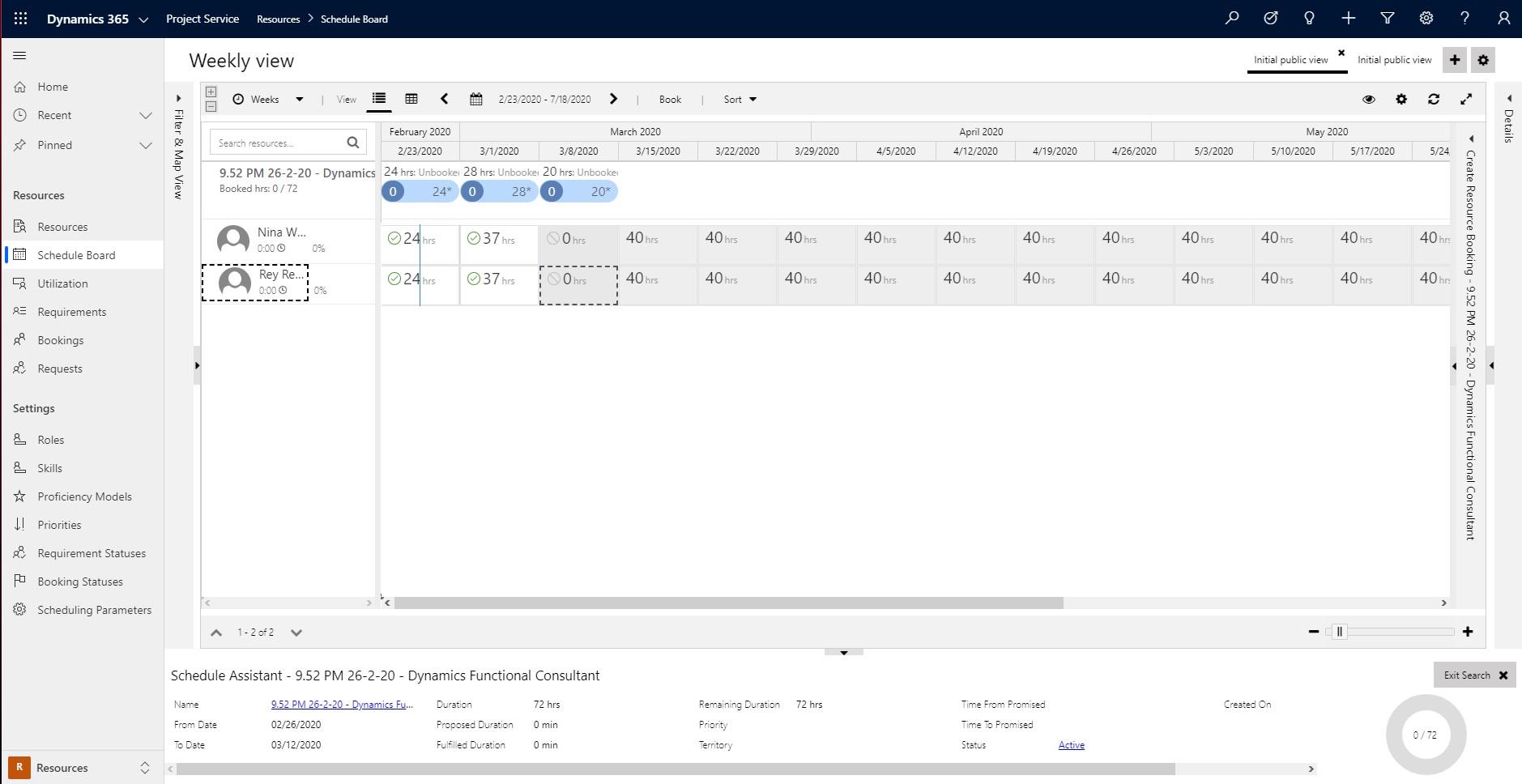
    3527.RS-Shortage.jpg

    When i opened "specify pattern" and saw the resource requirements generated I found that start date & end date timings are wrong. It is showing from 12 AM to 12 AM, where this should be pulled from the project calendar i.e., EST 8 AM to 5 PM

    Specify-pattern.png

    SP-2.jpg

    SP-3.jpg

    SP-4.jpg

    After changing the start & end times manually it shows that resource is available; still availability of 8 hours is not shown completely. Sorry I don't have screenshots to show as I have modified some changes to the project and also resource are booked for other projects.

    I faced the same issue in my previous trial accounts and I tried to reset, and created multiple times trial accounts and this was my third one. Microsoft tickets are still open by the way

    Instance.jpg

    To conclude this question, in my case there are some know bugs for version 3.xx and to make things work just edit the requirement record and click "Specify pattern" to see the bookings and correct them otherwise do not use project templates and just proceed with manual creation of project. 

Under review

Thank you for your reply! To ensure a great experience for everyone, your content is awaiting approval by our Community Managers. Please check back later.

Helpful resources

Quick Links

Responsible AI policies

As AI tools become more common, we’re introducing a Responsible AI Use…

Neeraj Kumar – Community Spotlight

We are honored to recognize Neeraj Kumar as our Community Spotlight honoree for…

Leaderboard > Finance | Project Operations, Human Resources, AX, GP, SL

#1
Martin Dráb Profile Picture

Martin Dráb 660 Most Valuable Professional

#2
André Arnaud de Calavon Profile Picture

André Arnaud de Cal... 549 Super User 2025 Season 2

#3
Sohaib Cheema Profile Picture

Sohaib Cheema 307 User Group Leader

Last 30 days Overall leaderboard

Product updates

Dynamics 365 release plans
