web
You’re offline. This is a read only version of the page.
close
Skip to main content

Announcements

News and Announcements icon
Community site session details

Community site session details

Session Id :
Dynamics 365 Community / Forums / Finance forum / addLookupMethod proble...
Finance forum

addLookupMethod problem X++

(0) ShareShare
ReportReport
Posted on by 65

My custom display method in the extension doesn't work in addLookupMethod.

0028.PNG

2350.PNG

43513.PNG

I have the same question (0)
  • Verified answer
    Blue Wang Profile Picture
    Microsoft Employee on at

    Hi Jerrold,

    According to your description, it is similar to this thread, you can understand the context.

    [View:https://community.dynamics.com/365/financeandoperations/f/dynamics-365-for-finance-and-operations-forum/287667/addlookupmethod-from-method-in-extension-table-class:750:50]

  • Suggested answer
    Moeen Ahmed Sultan Profile Picture
    1,402 on at

    Hi,

    To create lookup, please follow one of the following article:

    1) http://msdynamics.nevoitech.com/microsoft/how-to-create-lookup-in-form-data-source-field-in-d365fo/ (Recommended)

    2) http://msdynamics.nevoitech.com/microsoft/how-to-create-lookup-in-d365fo-using-x/

  • Community Member Profile Picture
    on at

    Hello,

    Code looks fine. It should be working fine.

    Could you paste the full code from lookup method.

    Thanks and regards,

    Bharath

  • Moeen Ahmed Sultan Profile Picture
    1,402 on at

    Hi,

    There are links to GitHub repository. And please verify the answer.

    Regards,

    Moeen Ahmed Sultan

  • Verified answer
    jerrold-verzosa Profile Picture
    65 on at

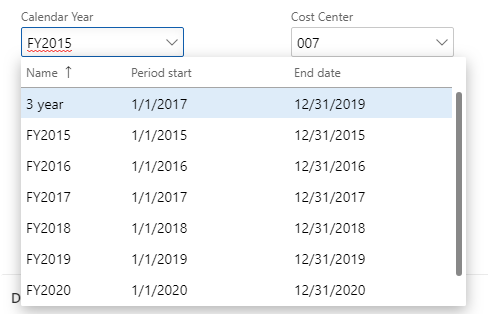
    Changed my approach and used the BudgetCycle method    editCycleStartDate and editCycleEndDate
    pastedimage1568862491562v1.png
    private void calendarYearLookup(FormStringControl _lookup)
        {
            Query query = new Query();
            QueryBuildDataSource qbds;
            SysTableLookup sysTableLookup;

            if(_lookup != null)
            {
                sysTableLookup = SysTableLookup::newParameters(tableNum(BudgetCycle), _lookup);
                
                qbds = query.addDataSource(tableNum(BudgetCycle));

                qbds.addSortField(FieldNum(BudgetCycle, Name),SortOrder::Ascending);

                qbds.fields().addField(fieldNum(BudgetCycle, StartFiscalCalendarPeriod));
                qbds.fields().addField(fieldNum(BudgetCycle, EndFiscalCalendarPeriod));

                sysTableLookup.addLookupField(fieldNum(BudgetCycle, Name), true);
                sysTableLookup.addLookupMethod(tableMethodStr(BudgetCycle, editCycleStartDate));
                sysTableLookup.addLookupMethod(tableMethodStr(BudgetCycle, editCycleEndDate));
                sysTableLookup.parmUseLookupValue(false);

                sysTableLookup.parmQuery(query);
                sysTableLookup.performFormLookup();

            }

    Thanks!

  • jerrold-verzosa Profile Picture
    65 on at

    Good reference for lookup in forms.

    [quote user="Moeen Ahmed Sultan"]

    Hi,

    To create lookup, please follow one of the following article:

    1) http://msdynamics.nevoitech.com/microsoft/how-to-create-lookup-in-form-data-source-field-in-d365fo/ (Recommended)

    2) http://msdynamics.nevoitech.com/microsoft/how-to-create-lookup-in-d365fo-using-x/

    [/quote]

Under review

Thank you for your reply! To ensure a great experience for everyone, your content is awaiting approval by our Community Managers. Please check back later.

Helpful resources

Quick Links

November Spotlight Star - Khushbu Rajvi

Congratulations to a top community star!

Forum Structure Changes Coming on 11/8!

In our never-ending quest to help the Dynamics 365 Community members get answers faster …

Dynamics 365 Community Platform update – Oct 28

Welcome to the next edition of the Community Platform Update. This is a status …

Leaderboard > Finance

Last 30 days Overall leaderboard

Featured topics

Product updates

Dynamics 365 release plans
