web
You’re offline. This is a read only version of the page.
close
Skip to main content

Notifications

Announcements

Community site session details

Community site session details

Session Id :
Microsoft Dynamics NAV (Archived)

Negative Purchase Invoice Lines Create Open Negative Receipts

(0) ShareShare
ReportReport
Posted on by

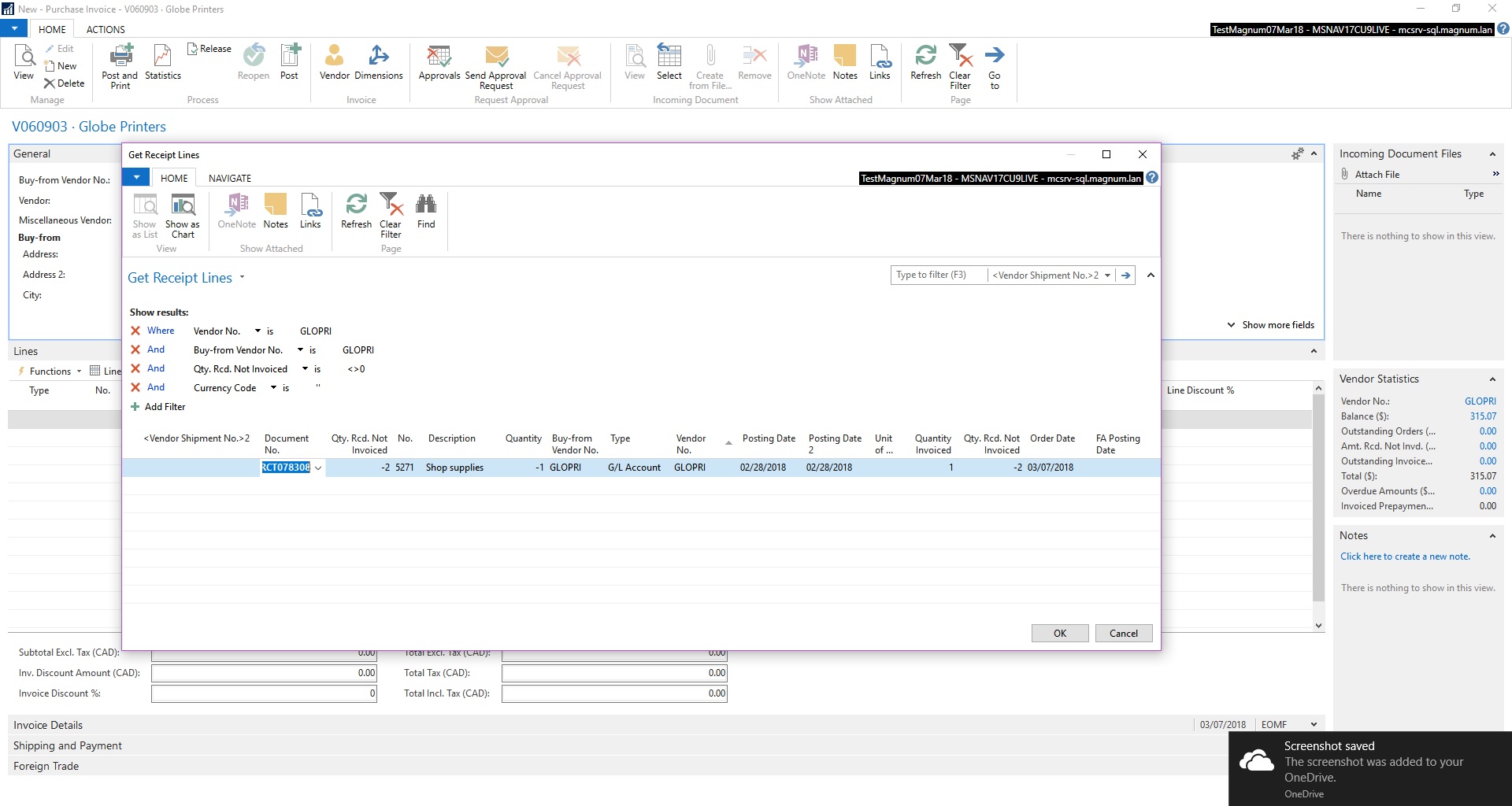
We just upgraded to Nav 2017 from Nav5 in November last year and I just noticed that when we post a negative line in a Purchase Invoice, it creates an open Receipt that shows when we use the "get receipt lines" function. I'd like to know how to clear these or not create them in the first place. Is there some setting we have to change?
Also, the negative receipt line shows -2 Rec'd not Invoiced, even though the original quantity on the posted invoice is -1.GetRectLines-Error.jpg
*This post is locked for comments

I have the same question (0)
  • Stefano Demiliani Profile Picture
    37,166 Most Valuable Professional on at

    Why a negative invoice and not a credit memo?

  • Community Member Profile Picture
    on at

    To balance the Purchase Invoice.

    For example:

    We receive a PO for each load of aggregate/cement/etc that we receive throughout the month and then we receive an invoice from the supplier on a monthly basis. Some loads at month end will be billed on the invoice even though we didn't receive them until the following month for various reasons. Rather than have the supplier rebill the invoice, we enter that ticket into a prepaid account (GL) rather than as inventory we didn't yet receive.

    The following month, the receipt we have prepaid will not be on the invoice, but we want to clear the PO, so we bring in the inventory and reduce the invoice (here's the negative line) by the prepaid account.

    This causes the negative receipt line that now shows up when we pull up the Get Receipt Lines page.

    Another Example:

    We are exempt from provincial tax depending on certain purchases use. Some suppliers don't charge us the tax because most of our purchases are exempt. However, we sometimes have to self assess.

    The easy way to do this is to have the first purchase line with the correct taxation and then a second line reducing the invoice (negative line) by the amount of the tax so the invoice balances and the tax we need to remit to the gov't is accrued to an account.

    The Invoices we post aren't negative, they have a negative line in them to reduce the invoice to create a balanced inventory, accrue tax or apply a discount.

  • Suggested answer
    RobertasR Profile Picture
    5,004 on at

    Hi Robyn,

    it seems to be a complicated scenario, as probably everything is in the construction industry...

    If I understand correctly, you just need to open the Purchases & Payables Setup, and untick the 'Receipt on Invoice' box. However, please make sure you test the  implication of this onto the rest of purchasing process.

    Robertas

  • Community Member Profile Picture
    on at

    Thanks for this. We will test it out to see if it doesn't cause a different problem.

    One interesting thing is that this wasn't an issue in our legacy Nav. It appears that the problem is that when entering a negative line on the Invoice, the receipt that is posted records the "Qty Invoiced" as a positive, which creates a difference in the "Qty Received not invoiced" as twice what was actually on the line. This has to be some kind of glitch.

  • Kerry Evans Profile Picture
    165 on at

    Regarding the creation of open receipts when posting negative lines in a Purchase Invoice, this is a default feature of the system. Negative lines are treated as returns, which create a credit memo or return order. However, the open receipt created can be closed by posting a return receipt or a purchase credit memo against it. You can also use the "Apply Entries" function to apply the open receipt to another outstanding invoice.

    In regards to the negative receipt line showing "-2 Rec'd not Invoiced," this is a known issue in Nav 2017, and it occurs when the original quantity on the posted invoice is negative. Unfortunately, there is no setting that can be changed to resolve this issue. However, you can modify the default templates for the Purchase Receipt to exclude the "-2 Rec'd not Invoiced" column, or you can use a custom report to display the information as per your requirements.

    We recommend that you consult with a certified Nav consultant or our support team to assist you with implementing these changes or addressing any other issues related to Nav 2017.

Under review

Thank you for your reply! To ensure a great experience for everyone, your content is awaiting approval by our Community Managers. Please check back later.

Helpful resources

News and Announcements

Season of Giving Solutions is Here!

Quick Links

Responsible AI policies

As AI tools become more common, we’re introducing a Responsible AI Use…

Neeraj Kumar – Community Spotlight

We are honored to recognize Neeraj Kumar as our Community Spotlight honoree for…

Leaderboard > 🔒一 Microsoft Dynamics NAV (Archived)

#1
HoangNam Profile Picture

HoangNam 7

Last 30 days Overall leaderboard

Featured topics

Product updates

Dynamics 365 release plans
