web
You’re offline. This is a read only version of the page.
close
Skip to main content

Announcements

No record found.

News and Announcements icon
Community site session details

Community site session details

Session Id :
Microsoft Dynamics NAV (Archived)

Post purchase order error on payment term

(0) ShareShare
ReportReport
Posted on by 360

Hello,

I'm start valuating and study NAV for implement in my company next year.

I have installed NAV 2017 beta.

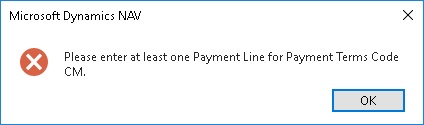
When I post a purchase order I get the error "Please enter at least one Payment Line for Payment Terms Code CM." PurchaseOrderPost.jpg
The Payment term was configured as in the picture:
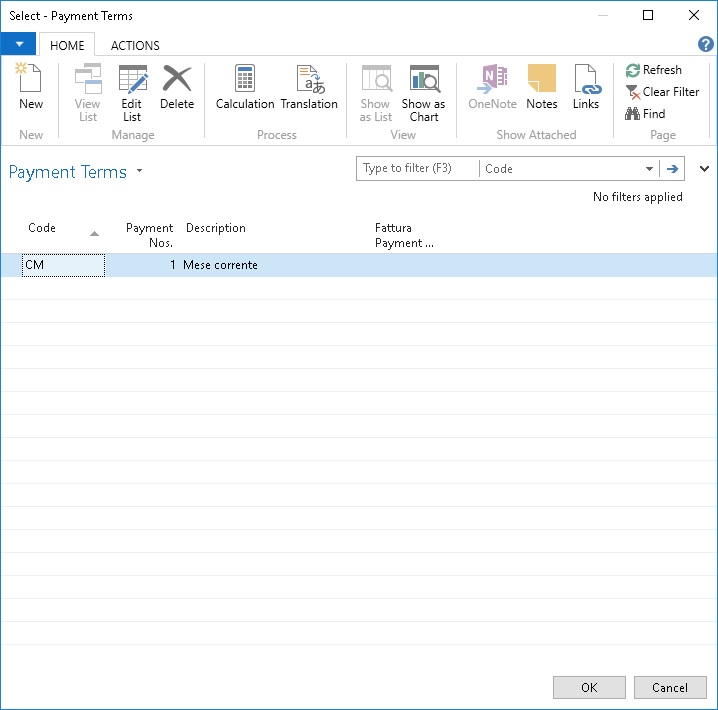
PaymentsTerm.jpg

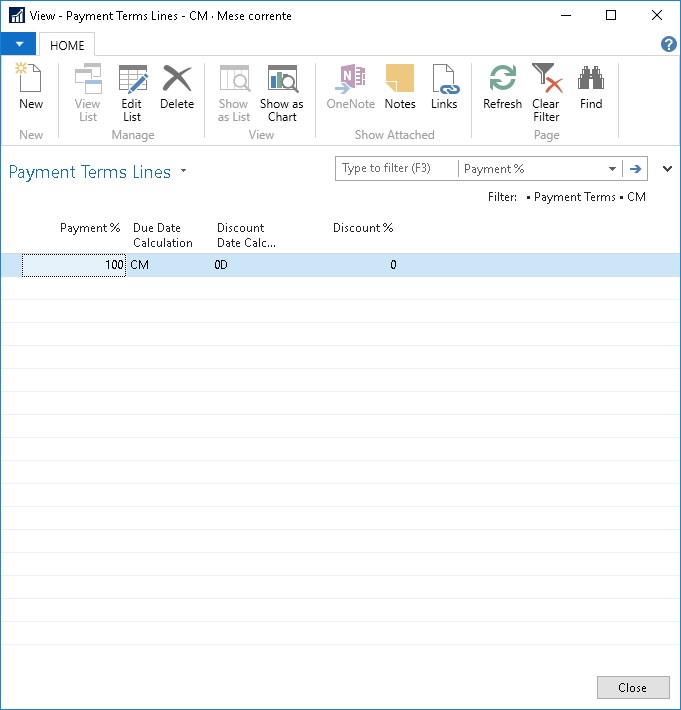
and the payment term line are:

PaymentsTermLines.jpg

What "Payment Line" I have missed?

Also in "Purchase order" I have the field "Vendor Invoice No:" is mandatory...but is a order so the invoice does not exist yet.

*This post is locked for comments

I have the same question (0)
  • Suggested answer
    Suresh Kulla Profile Picture
    50,278 Super User 2026 Season 1 on at

    Sorry i don't have access to IT NAV version to check the payment terms line error but for Vendor Invoice No. it is mandory if your posting the purchase order as invoice, since it will be create a purchase and that is the required value.

  • Suggested answer
    Saurav.Dhyani Profile Picture
    14,419 User Group Leader on at

    Hi Lorenzo,

    Two Things -

    1. As NAV 2017 is still under NDA, please don't post questions on public forums.

    2. There may be some bugs in the beta Version (as its Beta) which should be resolved in the GA release of 2017 Next week.

  • Suggested answer
    RockwithNav Profile Picture
    9,113 Super User 2026 Season 1 on at

    In this case I will support Saurabh's answer because NAV 2017 is still in NDA so we wont even try on this. There might be certain releases or patches going on in between.

    You you not trying on NAV 2016?

  • Suggested answer
    Tharanga Chandrasekara Profile Picture
    23,118 on at

    Let's wait till the NDA finishes and we will be able to help you out on this.

  • Suggested answer
    Amol Salvi Profile Picture
    18,698 on at

    May be you can activate debugger and check the same.

    Agree with other member as there might be any bug/issue in Beta version.

  • LSO Profile Picture
    360 on at

    Thanks everybody.

    I know there is an NDA so I have posted only picture of who are not changed and I think nothing is revealed

    Also the answer tell me who I have used the corrected table.

    LSo

Under review

Thank you for your reply! To ensure a great experience for everyone, your content is awaiting approval by our Community Managers. Please check back later.

Helpful resources

Quick Links

Introducing the 2026 Season 1 community Super Users

Congratulations to our 2026 Super Stars!

Meet the Microsoft Dynamics 365 Contact Center Champions

We are thrilled to have these Champions in our Community!

Congratulations to the April Top 10 Community Leaders

These are the community rock stars!

Leaderboard > 🔒一 Microsoft Dynamics NAV (Archived)

Last 30 days Overall leaderboard

Featured topics

Product updates

Dynamics 365 release plans