web
You’re offline. This is a read only version of the page.
close
Skip to main content

Notifications

Announcements

No record found.

Community site session details

Community site session details

Session Id :
Microsoft Dynamics AX (Archived)

TAX transaction Detail report functioning in ax 2012

(0) ShareShare
ReportReport
Posted on by 515

Hi All,

I want to know the working of GST transaction- Detail report. Two journals are showing under two different tax code while on journal line have selected same gst code.

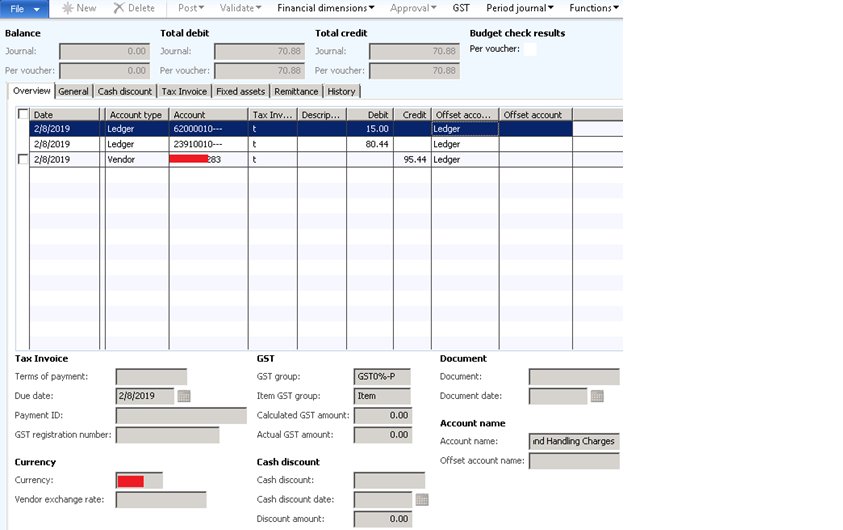
I have two journal – Case 1: Tax invoice journal(Total 3 lines 1- Vendor,1-GST input account,1-Freight and Handling Charges account ) I have selected the GST group(NA) & GST code(NA - 0 % rate) on line where Account type =Ledger & Account no= GST input account(Accnt no -23910010). I have selected other GST group (GST0-P) and GST code- NA for other account which is Freight and Handling Charges account.
multiline.png

GST Data for GST input account line(Accnt no - 23910010) :-

gstforgstaccount.png

GST data for non GST account :-

gstfornongstaccnt.png

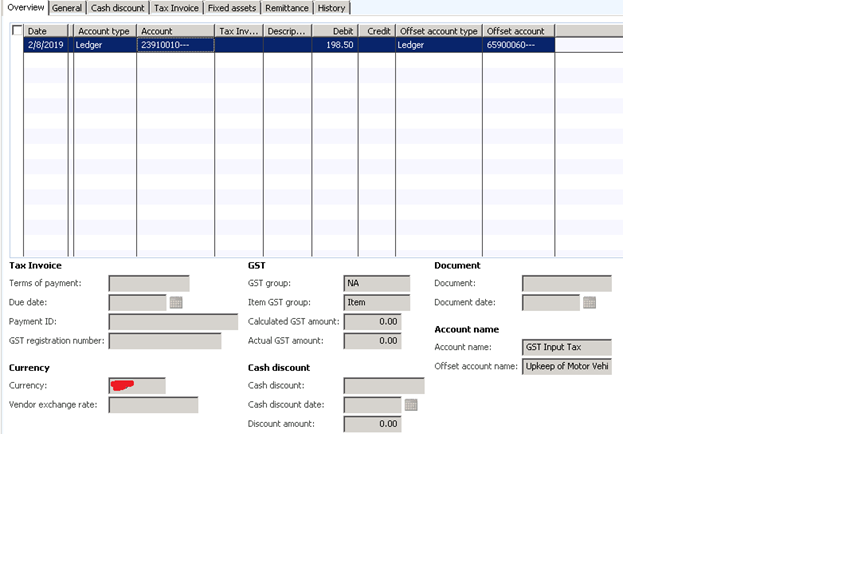
Case 2: Tax invoice journal (Single line with account type as Ledger)

I have selected the GST group(NA) & GST code(NA - 0 % rate) on line where Account type =Ledger & Account no= GST input account.
journalsingleline.png

GST Data:-

gstforsingleline.png

So ideally both the journals should show me 0 GST amount and when I run the tax transaction- detail report then it should show under GST code = NA

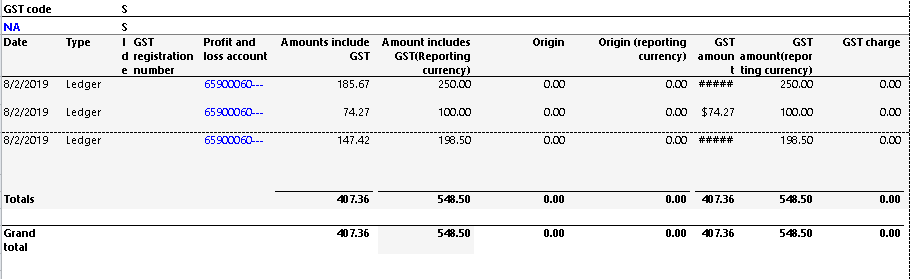
When I run the report , I observed the single line Journal is showing under GST code- NA while multiline Tax invoice journal is showing under (GST0-P ..(Rate is 0% only))


Report output-

1.Multiline journal is showing under GST code GST0-P :-

ReportopMultilineLine.png

2.Single line journal showing under NA GST code:- 
ReportopSingleline.png

Thanks,

Shri

*This post is locked for comments

I have the same question (0)
  • Dhanshri Profile Picture
    515 on at

    Hi All,

    By looking at the report logic, it seems for vendor invoices instead of taking GST account related tax information from TAX trans table it fetches "Profit & loss" account line info which result in showing wrong amount and journal voucher under wrong GST code. 

    Being as technical i don't understand the financial purpose behind this. All code is standard code only.

    Can anybody please help? 

    Thanks ,

    Shri

  • Dhanshri Profile Picture
    515 on at

    Hi All,

    Any pointer? I am technical person and not getting if user is making correct entry or not or even the whtever values are shown in posted GST form are correct or not? Please help.

    Thanks,

    Shri

  • Ludwig Reinhard Profile Picture
    Microsoft Employee on at

    Hello Shri,

    I had a look at the first transaction where you post a GST of $59.74.

    Why can't I see that in your reports?

    You share some reports that seem to show totally different data?!

    Can you also share and check the voucher and the posting dates used?

    I have a feeling that the reports shared above do not match the transactions that you shared.

    Would be great if you could clarify.

    Many thanks,

    Ludwig

  • Dhanshri Profile Picture
    515 on at

    Thanks Ludwig! I was waiting for your reply. I am totally stuck and unable to get through it.

    This report should have printed the GST data against GST input account selected on journal line in first transaction. Also, GST amount should be 0 as GST amount data on journal line forms(refer screen 1) but in posted GST it shows some non zero GST amount ($59.74 Refer screen 2)

    In my report o/p ->point 1, it is showing GST information from second journal line where we have selected non GST account. (please refer Screen print 3 above {GST data for non GST account} Compare screen 3 with report o/p ->point 1 screen)

    I am unable to understand why the tax is getting calculated for non GST account? In report as well it is showing GST info for non gst account journal line for vendor invoice. Here, it groups the GST info against the GST group code which is selected for non GST account line.

    While in case of single line voucher Gst code , amount are populating correctly.

    Thanks,

    Shri

  • Ludwig Reinhard Profile Picture
    Microsoft Employee on at

    Hello Shri,

    It is very difficult trying to find out why the report shows the data that you see.

    One possibility is that there is a system bug that can be fixed by a hotfix on LCS.

    Can you check that for your system version?

    The other thing that you can do is trying to get a local tax expert involved who might be able to help with the tax setup and configuration.

    We can of course try to discuss things here but this will take a lot of time and screenprints that you have to share.

    Following the last point, can you share the first voucher, the transaction origin of this voucher, the tax code posted and how this tax code is setup? Also let us know if the tax code was directly entered in the journal or whether it was found by AX through the selection of the item sales tax code and sales tax group.

    Best regards,

    Ludwig

  • Dhanshri Profile Picture
    515 on at

    Hi Ludwig,

    Regarding the TAx group it is populating based on account type & tax code set on master of Account Type (like Vendor's Tax group will be flow to journal line) Tax code we are selecting manually from lookup.

    Also, I am putting invoice number which is not related with any PO invoice,just any no. will it make any difference?

    Here is the voucher -

    0676.GSTCode.png

    transaction origin-

    5810.transOrigin.png

    Original Document-

    OriginalDoc.png

    Tax code Setup-

    0676.GSTCode.png

    Thanks,

    Shri

  • Suggested answer
    Ludwig Reinhard Profile Picture
    Microsoft Employee on at

    Hello Shri,

    I saw that the voucher posts 3 amounts:

    $80.44, $95.44 and $15.00

    Isn't the tax related to the $15.00?

    What kind of tax is that?

    I am asking this because it is not common entering the sales tax code.

    The sales tax code is usually left empty unless there is a special kind of tax invoice that you receive.

    Can you explain a bit more about the amounts posted?

    What does this transaction represent from a business perspective?

    Best regards,

    Ludwig

  • Dhanshri Profile Picture
    515 on at

    Hi Ludwig,

    No ,tax isn’t related to the $15 line. At this point I don’t know what kind of transaction it is.But as per user’s concern I was checking why it is showing tax for other account where tax code is not selected.what user told me that this is the scenario where they don’t pay tax on item.I will try to get more details on this on Monday when user is available and will update you.

    Also, can you please give me some pointer on how the ideal entry should be created with and without tax on vendor invoice?

    Thanks,

    Shri

  • Suggested answer
    Ludwig Reinhard Profile Picture
    Microsoft Employee on at

    Hello Shri,

    Usually, users simply select the sales tax group - which is usually attached to a vendor account and therefore defaults in the journal - and the item sales tax group. This combination results in a sales tax code that you do not enter in the journal but which you can see in the sales tax form that you can open from the journal.

    A sample setup of such a VAT system can be found in the Contoso demo environment DEMF. Maybe just take a look at that one.

    Would be great if you could let us know more details once you received some feedback from you colleagues.

    Many thanks and best regards,

    Ludwig

  • Dhanshri Profile Picture
    515 on at

    Thanks Ludwig!

    I checked with user and they confirmed that this is the scenario where they want to charge to different GL accounts and tax should not be calculated when we select GSt input account/GST receivable BS or prepayment Balance sheet account.

    Thanks,

    Shri

Under review

Thank you for your reply! To ensure a great experience for everyone, your content is awaiting approval by our Community Managers. Please check back later.

Helpful resources

Quick Links

Responsible AI policies

As AI tools become more common, we’re introducing a Responsible AI Use…

Neeraj Kumar – Community Spotlight

We are honored to recognize Neeraj Kumar as our Community Spotlight honoree for…

Leaderboard > 🔒一 Microsoft Dynamics AX (Archived)

#1
Martin Dráb Profile Picture

Martin Dráb 4 Most Valuable Professional

#1
Priya_K Profile Picture

Priya_K 4

#3
MyDynamicsNAV Profile Picture

MyDynamicsNAV 2

Last 30 days Overall leaderboard

Featured topics

Product updates

Dynamics 365 release plans
