web
You’re offline. This is a read only version of the page.
close
Skip to main content

Notifications

Announcements

No record found.

Community site session details

Community site session details

Session Id :
Finance | Project Operations, Human Resources, ...
Unanswered

Unable to connect to the financial reporter server on D365 F&O on prem. production environment

(0) ShareShare
ReportReport
Posted on by 30

Hi all,

I have a problem with the financial reporter designer tool on Dynamics AX 365 on prem. installed.

the environment not connected to the internet, and I downloaded the tool from General Ledger >> financial Reports >> New

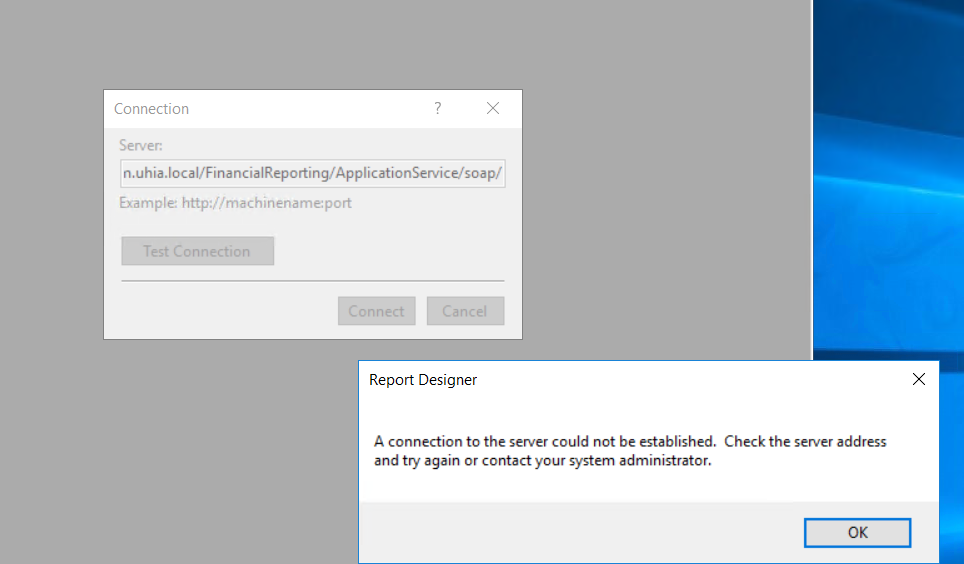
it is downloaded and installed but when i am trying to open it, I face this issue
pastedimage1636320773681v1.png

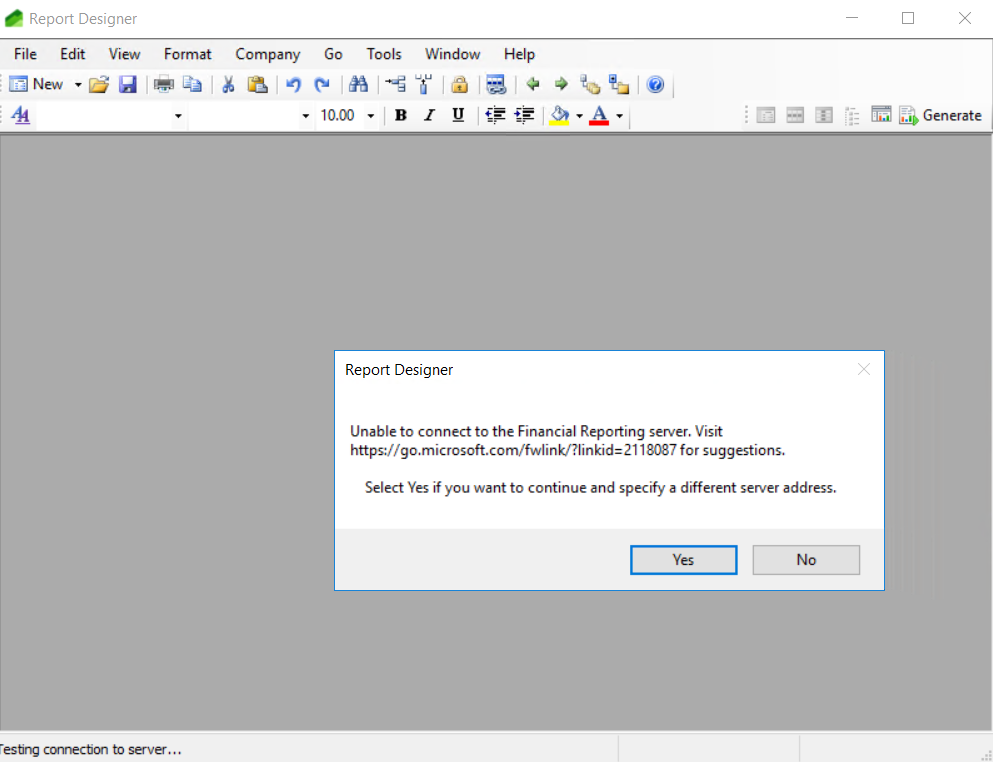
when click yes

pastedimage1636320844779v2.png

Does anyone know this issue ?

I have the same question (0)
  • MohamedMostafa Profile Picture
    30 on at

    I want to describe another thing about the error from the event viewer 

    An unsecured or incorrectly secured fault was received from the other party. See the inner FaultException for the fault code and detail. Machine: XXX-XXXX-XXX

    which XXX-XXXX-XXX is the PC on which i try to open the financial reporter design tool

    Regards

    Mohamed Mostafa

  • traemyn Profile Picture
    on at

    That error could mean the FR/MR services are not working or the FR integration has failed, possibly due to a communication issue to the AOS. Do any errors show in Service Fabric Explorer relating to the FR/MR node?

    To get more details on that error or related issues that are occurring, go to the FR/MR server node and look in the Event Viewer under Applications and Services Logs | Microsoft | Dynamics | MR-Logger | Operational. The errors located there and their call stacks would be helpful to understand what to look at next.

  • MohamedMostafa Profile Picture
    30 on at

    Thanks for your reply

    I have checked the service fabric nodes and applications and there is no errors related to FR/MR

    Also I have checked the Event Viewer and I didn't find the path : Event Viewer under Applications and Services Logs | Microsoft | Dynamics | MR-Logger | Operational.

  • traemyn Profile Picture
    on at

    That Event Viewer path (Applications and Services Logs | Microsoft | Dynamics | MR-Logger | Operational) will exist only on the Management Reporter node/server and should contain relevant errors/warnings if there are any problems occurring on the MR/FR services.

    Example infrastructure layout from the OnPrem install instructions:

    pastedimage1636920599491v1.png

  • André Arnaud de Calavon Profile Picture
    301,014 Super User 2025 Season 2 on at

    Hi Mohamed,

    Are you able to open the report designer from the Windows main menu? (Microsoft Dynamics > Management Reporter 2012 > Report Designer)

Under review

Thank you for your reply! To ensure a great experience for everyone, your content is awaiting approval by our Community Managers. Please check back later.

Helpful resources

Quick Links

Responsible AI policies

As AI tools become more common, we’re introducing a Responsible AI Use…

Neeraj Kumar – Community Spotlight

We are honored to recognize Neeraj Kumar as our Community Spotlight honoree for…

Leaderboard > Finance | Project Operations, Human Resources, AX, GP, SL

#1
Martin Dráb Profile Picture

Martin Dráb 659 Most Valuable Professional

#2
André Arnaud de Calavon Profile Picture

André Arnaud de Cal... 533 Super User 2025 Season 2

#3
Sohaib Cheema Profile Picture

Sohaib Cheema 289 User Group Leader

Last 30 days Overall leaderboard

Product updates

Dynamics 365 release plans