web
You’re offline. This is a read only version of the page.
close
Skip to main content

Announcements

No record found.

News and Announcements icon
Community site session details

Community site session details

Session Id :
Finance | Project Operations, Human Resources, ...
Suggested Answer

Trial Balance for Specific Year errors for users

(0) ShareShare
ReportReport
Posted on by 460

Trial balances for a specific calendar year errors out for all users except for Sysadmin. They are using Windows Authentication.

When tested on the server for sysadmin it runs without issues for 2020, when run by any users on their workstations it errors out with the following Crystal Reports error.
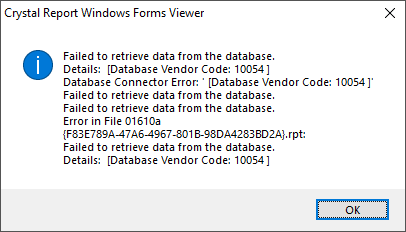
NAS-TB-error.png

Has anyone else seen this? I ran Synchronize Ownership once, but may do it again.

I have the same question (0)
  • Suggested answer
    CFROTON Profile Picture
    4,710 on at

    Dear Laura,

    It looks like a permissions issue , Can a regular user run it on the server? It could be odbc on their workstations?

    Have you tried putting a user in the administrators group to run it?

    It doesn't seem to make sense that you can run it for one fiscal year and not others. Are you running the standard report and not a custom report?

    If you are on a supported version you can open a case with support. Supported versions are 2015 and 2018.

    Best Regards,

    Jana MacDonald

  • CFROTON Profile Picture
    4,710 on at

    You might try this approach

    On a user’s workstation have them refresh the DSNs—click Start and type: ODBC. Then open ODBC Data Sources 32 bit. On the User DSN tab remove all of the SL database Data Sources. They also should check the System DSN tab and remove any SL database sources there.

    Then have the user test the report. If the error no longer occurs do the same for the on the other workstations.

    Thanks!

    Jana MacDonald

  • CFROTON Profile Picture
    4,710 on at

    On a user’s workstation have them refresh the DSNs—click Start and type: ODBC. Then open ODBC Data Sources 32 bit. On the User DSN tab remove all of the SL database Data Sources. They also should check the System DSN tab and remove any SL database sources there.

    Then have the user test the report. If the error no longer occurs do the same for the on the other workstations.

  • Laura Profile Picture
    460 on at

    Well this has come up again. Deleted the User DSN's and it did not resolve the problem.

    Very odd!

    Do the System DSN's get used when reports are run without any templates or sorts or selects?

    When we deleted the User DSN's we could do without issue, when we tried to click on the System DSN tab we could not and got an access rights error.

    Wondering if network rights is the cause of all of this.  Just very odd that it pops up out of the blue.

    Since Windows Authentication is used, would synchronizing ownership impact this?

  • Brian_IL Profile Picture
    719 on at

    DNS doesn't seem to be a likely cause, the report is pulling from the same tables whether pulling from just the current year or previous years. An account with local admin rights would be needed to remove a System DSN from a workstation. You may try leaving a profiler trace running while a non-admin user runs the report, see if they receive an error. Also make sure the standard report is being used, not a customized version, in case incorrect logic was used by a customized report.

  • Laura Profile Picture
    460 on at

    Thanks for the thoughts, we have tried all of that. Have Microsoft support involved but not coming up with any resolution. It works on the application server regardless of which user runs it. Does not work on any workstation regardless of which user. Put a select on the report and it works, try to pull the full report and it fails. Have tried standard report and same result.

  • Community Member Profile Picture
    on at

    Have you checked for records in RPTRuntime and RPTCompany that shouldn't be there? It also possible that there is a corrupt record in AcctHist. Have you done a check on the FiscYr field there?

Under review

Thank you for your reply! To ensure a great experience for everyone, your content is awaiting approval by our Community Managers. Please check back later.

Helpful resources

Quick Links

Introducing the 2026 Season 1 community Super Users

Congratulations to our 2026 Super Stars!

Meet the Microsoft Dynamics 365 Contact Center Champions

We are thrilled to have these Champions in our Community!

Congratulations to the March Top 10 Community Leaders

These are the community rock stars!

Leaderboard > Finance | Project Operations, Human Resources, AX, GP, SL

#1
Giorgio Bonacorsi Profile Picture

Giorgio Bonacorsi 694

#2
André Arnaud de Calavon Profile Picture

André Arnaud de Cal... 646 Super User 2026 Season 1

#3
CP04-islander Profile Picture

CP04-islander 337

Last 30 days Overall leaderboard

Product updates

Dynamics 365 release plans
