web
You’re offline. This is a read only version of the page.
close
Skip to main content

Notifications

Announcements

No record found.

Community site session details

Community site session details

Session Id :
Microsoft Dynamics NAV (Archived)
Suggested Answer

Can Nav email customer statements to multiple customers as a batch process?

(0) ShareShare
ReportReport
Posted on by 330

HI All,

Can Nav email customer statements to multiple customers as a batch process? We have setup the smtp email and most customers have email addresses.nav-statement.PNG
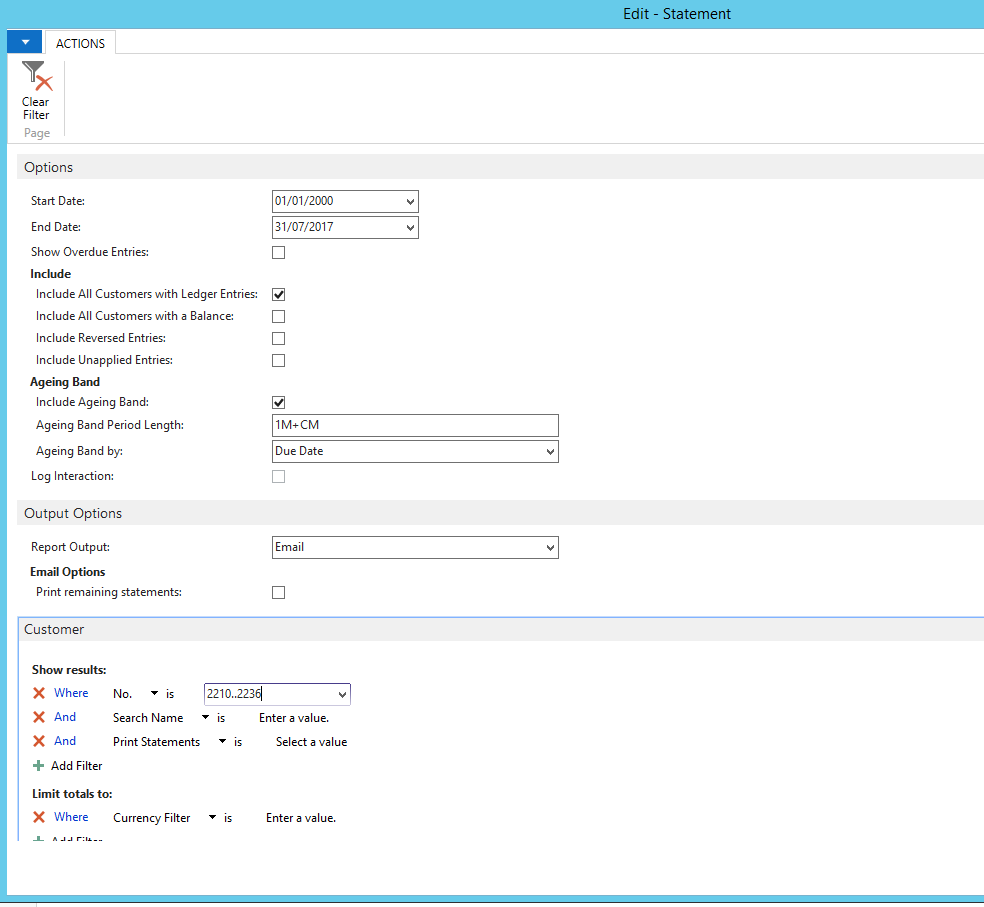
We tried this screen as above but it doesnt do anything if we select email. But if we try one customer it prints -not email

Any ideas?

*This post is locked for comments

I have the same question (0)
  • Suggested answer
    Amol Salvi Profile Picture
    18,698 on at

    Yes you can send customer statements to multiple customer as a batch process and for this you need to customize

  • Suggested answer
    Alexander Ermakov Profile Picture
    28,096 on at

    Check this thread, there are plenty of special add-ons for that purpose: www.navug.com/.../viewthread;CommunityKey=95503735-5a0b-4af1-8326-9bd7bb3b4d3d&tab=digestviewer

  • Suggested answer
    Tina Menezes Profile Picture
    2,582 on at

    Hi, you can send email to multiple customers in a batch. So need to do customization for the same.

    You can refer the below link of Saurav Dhyani to send an email using code in NAV. For multiple customers put the email code snippet inside a loop which will mail to multiple customers. For creating a batch you need to set up a job queue.

    https://saurav-nav.blogspot.in/2013/08/send-mail-with-attachment-from-navision.html

  • Suggested answer
    Yogesh Kulkarni_ Profile Picture
    1,762 on at

    As suggested by other members, you need to customize this.

    You can make the same available on Customer Card, to generate and mail the Statement for one customer.

    Also you can make a process-only report to get this done for multiple customers.

    And you can also set a Job Queue to get this thing done automatically at specific point of time.


    -Yogesh Kulkarni
    Please verify, if you find answer helpful.

  • CharithSilva Profile Picture
    330 on at

    Hi All,

    I think we are getting there somewhere with this we have seen the email option and we camn produce multiple pdfs for customer range. Problem now is email option doesnt work (MAY BE A BUG). if we can get this working it should work., SMTP is setup and we are already using smtp otion to send invoices and quotes

    but email option in statement doesnt work - it doesnt do anything......!!!!! (BUG I GUESS)

  • Suggested answer
    RobertasR Profile Picture
    5,004 on at

    Hi,

    you can e-mail batch customer statement as standard. You don't have anything e-mailed because customer e-mail is defined in 'wrong' place. System would look for customer e-mails in the Customer Document Layout page, and if not found it wouldn't pick up the e-mail from the Customer card (I think it's a bug, but that is how it works now). So you need to go to the customer card, on the 'Navigate' ribbon find 'Document Layouts', add new line for Customer Statement, with the report ID and customer e-mail.

    Do that to all customers and then you can e-mail customer statements as a batch.

    Hope that helps.

    Robertas

  • Community Member Profile Picture
    on at

    Hi Charith,

    If you want to use the standard report 116 to email out statement, you need to set up the following:

    1. Departments/Administration/IT Administration/Reports > Report Selection - Sales

    Customer-Document-Layouts.PNG

    2. Setup Document Layout for each customer

    Customer-Document-Layouts.PNG

    Alternatively, as others have suggested - create a custom code to email the statements.

    Regards,

    Susy

  • Community Member Profile Picture
    on at

    Creating a document layout record for each customer is not practical. I have come up with two alternatives:

    www.karenhigginsconsulting.com/creating-document-layouts-customers-vendors

  • Yoke May Profile Picture
    330 on at

    Hi,

    This post may be quite a while ago, but i am also facing the same problem where the Customer Statement email is not generated even though i had added in both the Customer > Document Layout - Customer Statement (Report ID 1316); also added to Report Selection - Sales under Usage > Customer Statement.

    When click on Customer > Report > Statement, there is 4 buttons: Send To, Print, Preview and Cancel. When i click send to, it ask for PDF or Word and depends on what i choose, it will save in the format in the default folder. If i choose Print, it will prompt the printer and if i choose Preview, it will preview on the window.

    If i would like to email, which button should i choose?

    Appreciate all advise.

    May

Under review

Thank you for your reply! To ensure a great experience for everyone, your content is awaiting approval by our Community Managers. Please check back later.

Helpful resources

Quick Links

Responsible AI policies

As AI tools become more common, we’re introducing a Responsible AI Use…

Neeraj Kumar – Community Spotlight

We are honored to recognize Neeraj Kumar as our Community Spotlight honoree for…

Leaderboard > 🔒一 Microsoft Dynamics NAV (Archived)

Last 30 days Overall leaderboard

Featured topics

Product updates

Dynamics 365 release plans
