Hi all,
Now i am currently working Integration project through AX AIF Web service.
for the above i have tried sample scenario use of AX AIF Data contract class the below i mentioned still now i have done.
Step 1: Create a sample table name as Table1:
Table 1 fields --> EmpId, EmpName
Sterp 2: Create data contract class
[DataContractAttribute]
public class EmployeeTest
{
str employeeid, employeename;
}
[DataMemberAttribute]
public str empID(str _employeeid = employeeid)
{
employeeid = _employeeid;
return employeeid;
}
[DataMemberAttribute]
public str empName(str _employeename = employeename)
{
employeename = _employeename;
return employeename;
}
Step 3: Create service class for the same
class EmployeeServiceContractTestClass
{
}
[SysEntryPointAttribute(true)]
public EmployeeTest getEmployee(str empid, str empname)
{
EmployeeTest employee;
;
employee = new EmployeeTest();
employee.empID(empid);
employee.empName(empname);
return employee;
}
[SysEntryPointAttribute(true)]
public str createJournal(EmployeeTest _journal)
{
str ret;
Table1 t;
;
select * from t where t.Field1 == _journal.empID();
if(t.RecId == 0)
{
t.clear();
t.Field1 = _journal.empID();
t.Field2 = _journal.empName();
t.insert();
ret = 'insert record successfully';
}
else
{
ret = 'updated';
}
return ret;
}
Step 4: Create a service name as 'EmployeeServiceTest'
In the service node class property mapped 'EmployeeServiceContractTestClass'
and add operation : getEmployee
Step 5: Create a service group and deploy the same.
i gor WSDL URI: http://AOS-Server:8102/DynamicsAx/Services/EmployeeTestServiceGroup.
Step 6:
After deploy the service group i have consumed in .net windows form application.
Create a visual C# window form application and add service reference and write a logic to consume the same.
Form1:
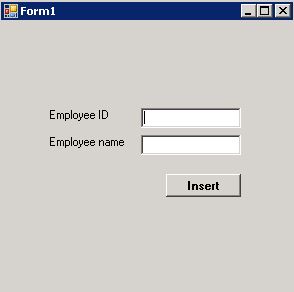
the above form textbox user will give a input and click insert button.
when click insert button the record create in AX 'Table1' table.
Insert button Clicked business logic in .net:
private void button1_Click(object sender, EventArgs e)
{
EmployeeServiceTestClient proxy = new EmployeeServiceTestClient();
CallContext cc = new CallContext();
cc.Company = "CEU";
EmployeeTest employee = new EmployeeTest();
employee.empID = textBox1.Text;
employee.empName = textBox2.Text;
//string journalId = proxy.(cc, employee);
}
the above scenario i have tried but i am not able to get solution. Can anyone let me give a guidance and help for this data contract AIF service scenario consume process.
if any document share the same.
This is my first scenario for Data contract service class AIF web service.







