web
You’re offline. This is a read only version of the page.
close
Skip to main content

Notifications

Announcements

No record found.

Community site session details

Community site session details

Session Id :
Microsoft Dynamics AX (Archived)

Grid Tab with multiple data source

(0) ShareShare
ReportReport
Posted on by 1,845

Hi,

I am working on a form with multiple datasource. In form design i have single grid with multiple tab that is the main issue.
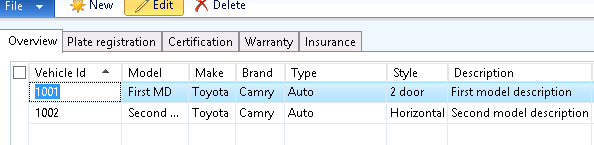
3005.Capture.PNG

In screenshot Overview and Plate Registration tab using same table and other 3 tab using other 3 table. Now i need when i create record in overview tab then user get a new line to create record in all tab with the respect of first record entered in overview tab. User can edit , delete any record that reflect on form immediately. I am trying to do it without any coding this is possible to do it without any code.

Table : A,B,C,D

i am created relation B.A == A.PrimaryKey (A is the main table that used in first two tab).

C.A == A.PrimaryKey

D.A == A.PrimaryKey

Any Suggestion is very helpful.

Thank You.

*This post is locked for comments

I have the same question (0)
  • XB Profile Picture
    1,875 on at

    Are dataSource linked on form?

  • Community Member Profile Picture
    on at

    If the records have a 1 to 1 mapping, then I guess you can use innerjoin between the tables.

    Else you may need to try with an active join.

  • Suggested answer
    Denis Macchinetti Profile Picture
    16,444 on at

    Hi Dinkar

    Is enough to :

    1- Set the Joinsource property of the Datasource B, C and D to the Datasource A.

    2- Set the linktype property to Delayed to the Datasource B, C and D

    3- Set the InsertAtEnd and InsertIfEmpty properties for all Datasource to Yes

  • startax Profile Picture
    1,845 on at

    Hi Denis,

    I am tried as your suggestion but its not working. I can insert first record when tried to insert second record then tab 3,4,5 record is blank but user created one record in all tab.

    Any other suggestion or anything that i am missing.

  • startax Profile Picture
    1,845 on at

    Hi bala,

    When i am tried with inner join then no record come in form. One more thing i am not specify any property in relation.

    EnitityRelationRole=

    RelatedTableCardinality =

    Cardinality =

    RelationshipType =

    And Active is also not working

    Any other suggestion

    Thank You

  • Denis Macchinetti Profile Picture
    16,444 on at

    Hi Dinkar

    Inside the Create method of the first Datasource, call the same method of all the other DS, so:

    B_ds.create();

    C_ds.create();

    D_ds.create();

Under review

Thank you for your reply! To ensure a great experience for everyone, your content is awaiting approval by our Community Managers. Please check back later.

Helpful resources

Quick Links

Responsible AI policies

As AI tools become more common, we’re introducing a Responsible AI Use…

Neeraj Kumar – Community Spotlight

We are honored to recognize Neeraj Kumar as our Community Spotlight honoree for…

Leaderboard > 🔒一 Microsoft Dynamics AX (Archived)

#1
Martin Dráb Profile Picture

Martin Dráb 4 Most Valuable Professional

#1
Priya_K Profile Picture

Priya_K 4

#3
MyDynamicsNAV Profile Picture

MyDynamicsNAV 2

Last 30 days Overall leaderboard

Featured topics

Product updates

Dynamics 365 release plans



