web
You’re offline. This is a read only version of the page.
close
Skip to main content

Notifications

Announcements

No record found.

Community site session details

Community site session details

Session Id :
Microsoft Dynamics AX (Archived)

Error when Deply Cube to Analysis Service

(0) ShareShare
ReportReport
Posted on by

Good morning,

I try deploy a Cube from this case https://technet.microsoft.com/es-es/library/cc622026.aspx

But when i deploy the Analysis Services Project to the server, i recived this message:

The table or view named 'BIPARTITIONSVIEW' is not related to any other tables or views. This will prevent creation of dimension usage mapping for that entity.

After this message, i recived this errors:
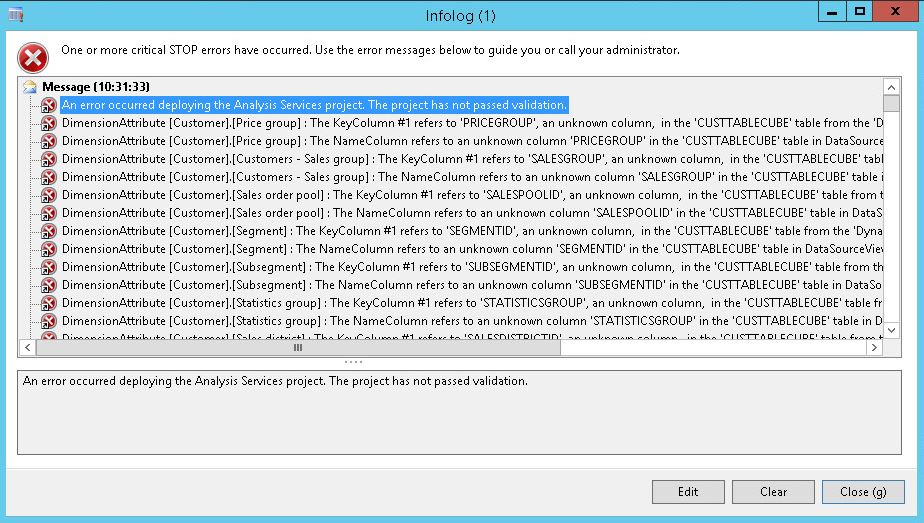
0880.Error.jpg

Please, help me.

Best regards.

*This post is locked for comments

I have the same question (0)
  • Community Member Profile Picture
    on at

    Edited

  • Community Member Profile Picture
    on at

    Nobody?

  • Verified answer
    Lance [MSFT] Profile Picture
    on at

    The message about BIPartionsView not being related to other tables is ignorable.  That view is not used.

    The other errors shown in your screen shot indicate that there are fields missing for the customer dimension and that will need to be fixed before deploying. 

    In the analysis services project, the definitions of the tables are stored in a file with a .dsv extension.  These errors mean there are dimension attributes in your customer dimension that are trying to select values from fields in the CustTableCube view and those fields are not present in the definition of the view in the data source view file.

    Before doing anything else, check if those columns do or do not exist in the sql view with the same name. 

    If the columns do exist then they could be added to the table definition in the data source view.  If the columns do not exist in the sql view then all the dimension attributes from the customer dimension that are using these fields would need to be deleted. 

    One thing to try is make a copy of your analysis services project and then run the Analysis Services Project Wizard, from the BI tools menu.  Choose either the configure or update option,  select the project copy and let it run. It is supposed to remove from the project schema any references to fields that don't actually exist in your current ax schema.  That may remove most of these bad references for you.  You can then try deploying the updated copy to see if it is now working.  If that doesn't fix it, you might have to either fix the customer dimension (by deleting any attributes using fields that don't exist in the data source view, or update the data source view and change the query for the CustTableCube view so that is selects the fields that are currently missing. 

    Hope this helps,

    --Lance 

  • Community Member Profile Picture
    on at

    Thank you. I deleted the wrong dimensions and all is ok.

  • Community Member Profile Picture
    on at

    Finally, i had to delete the fields on BIANALYSISSERVICESDATABASE table and deploy the Visual Studio Proyects again, where the Dynamics AX project was the first to deplyed.

Under review

Thank you for your reply! To ensure a great experience for everyone, your content is awaiting approval by our Community Managers. Please check back later.

Helpful resources

Quick Links

Responsible AI policies

As AI tools become more common, we’re introducing a Responsible AI Use…

Neeraj Kumar – Community Spotlight

We are honored to recognize Neeraj Kumar as our Community Spotlight honoree for…

Leaderboard > 🔒一 Microsoft Dynamics AX (Archived)

#1
Martin Dráb Profile Picture

Martin Dráb 4 Most Valuable Professional

#1
Priya_K Profile Picture

Priya_K 4

#3
MyDynamicsNAV Profile Picture

MyDynamicsNAV 2

Last 30 days Overall leaderboard

Featured topics

Product updates

Dynamics 365 release plans



