web
You’re offline. This is a read only version of the page.
close
Skip to main content

Announcements

No record found.

News and Announcements icon
Community site session details

Community site session details

Session Id :
Customer experience | Sales, Customer Insights,...
Suggested Answer

Solution will not begin Import into new environment

(0) ShareShare
ReportReport
Posted on by 41

Hello all, 

I am trying to import my unmanaged master solution into a new "DEV" environment. Our plan is to leave behind our old Dev environment and start using a new Dev environment. We are doing this because we have removed 60+ solutions out of our TEST and PROD environments. Removing these out of our unmanaged DEV will take weeks/months so we would like to just start over and move what we need to our new DEV. 

I stood up a new blank environment and attempted to import our unmanaged master solution and received an error before I could even start the import. 4061.Import-solution.png
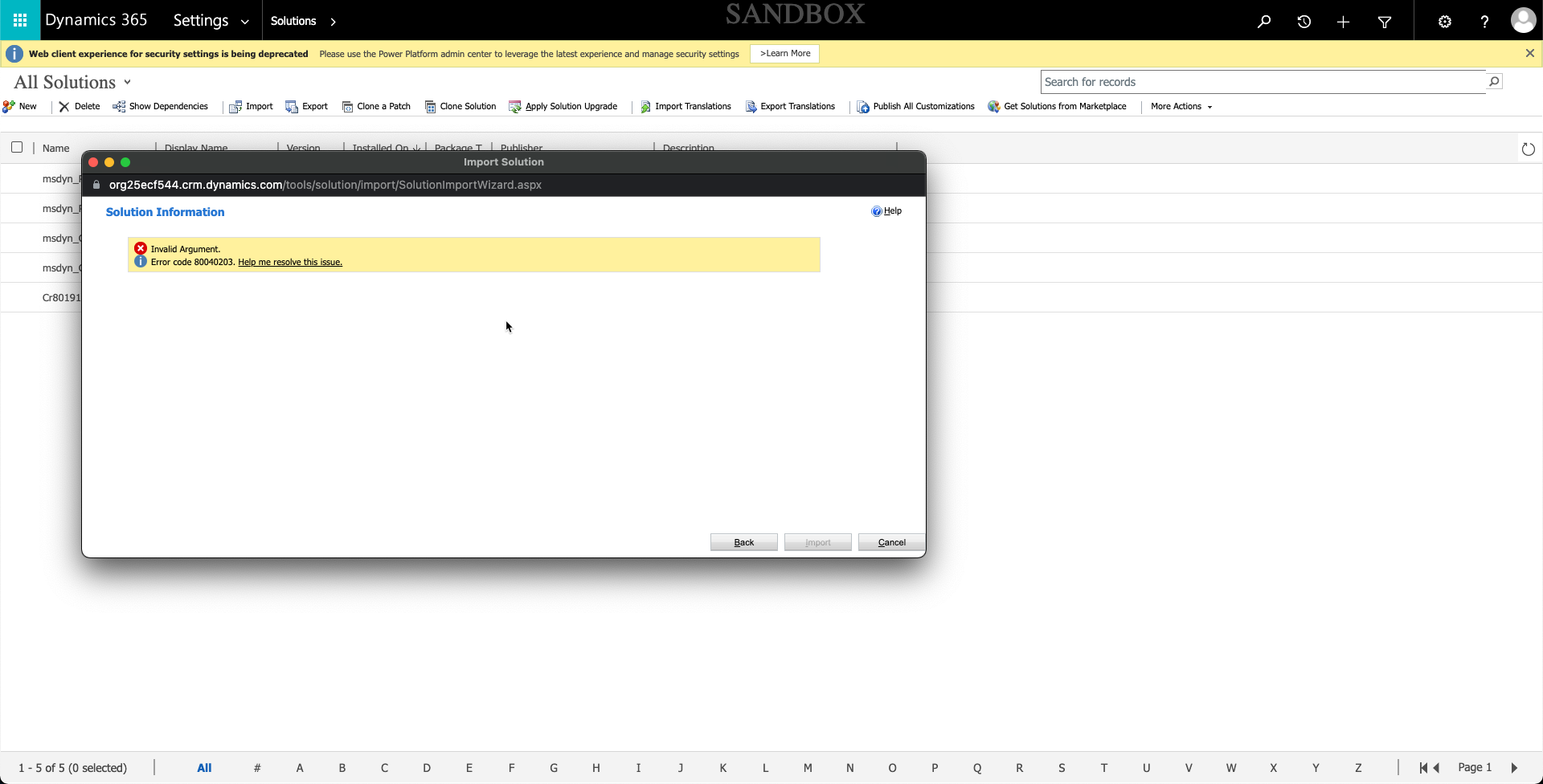
I have researched this error and have found a few things to try but before I take action I want to get some other opinions on what I should try. 

Thanks,

Joey

I have the same question (0)
  • Suggested answer
    Manoj Mane Profile Picture
    1,020 on at

    Hi Joey Helms,

    The image you have shown that is the classic CRM window.
    Recommendation is to use the new UI i.e. PowerApps https://make.powerapps.com/ to import the solution.

    pastedimage1643733010646v1.png


    Thanks,
    Manoj.

    Please mark this as VERIFIED if it helps.

  • Joey Helms Profile Picture
    41 on at

    Hey Manoj,

    Thanks for the recommendation I tried this and still received an error.

    The error: "Expected non-empty Guid."

    It will not let me proceed with the import. The "next" button is greyed out.

    pastedimage1643734321092v2.png

  • Suggested answer
    Manoj Mane Profile Picture
    1,020 on at

    Hi Joey Helms ,

    Usually this type of error came when you have any custom workflow or plugins where it is expecting Some sort of GUID.

    Please check by removing workflows if there aren't Many One by One to narrow down which one is causing issue.

    Thanks,
    Manoj.

  • Suggested answer
    Mohsin Ali Profile Picture
    3,634 on at

    I am assuming you are importing a default solution to new DEV instance. So I would recommend you to instead manually moving solution around, you should use 'Copy Environment' feature from Power Platform Admin Center.

    Please follow below article to get your environment copied over.

    docs.microsoft.com/.../copy-environment

  • Community Member Profile Picture
    on at

    While export the solution you missed required component then you try to import into another environment that is way it is falling.

    juniorcrmblog.blogspot.com/

    www.youtube.com/watch

  • Danny Vargas Profile Picture
    30 on at

    Hi Joey Helms 

    Could you please confirm if the given information is working for you?

  • Suggested answer
    Nishant Rana Profile Picture
    11,325 Microsoft Employee on at

    Check if this helps .. nishantrana.me/.../

    check the customization.xml for any missing tag and lastly raise MS Support Ticket for guidance.

Under review

Thank you for your reply! To ensure a great experience for everyone, your content is awaiting approval by our Community Managers. Please check back later.

Helpful resources

Quick Links

Introducing the 2026 Season 1 community Super Users

Congratulations to our 2026 Super Stars!

Meet the Microsoft Dynamics 365 Contact Center Champions

We are thrilled to have these Champions in our Community!

Congratulations to the March Top 10 Community Leaders

These are the community rock stars!

Leaderboard > Customer experience | Sales, Customer Insights, CRM

#1
ManoVerse Profile Picture

ManoVerse 196 Super User 2026 Season 1

#2
11manish Profile Picture

11manish 129

#3
CU11031447-0 Profile Picture

CU11031447-0 100

Last 30 days Overall leaderboard

Product updates

Dynamics 365 release plans
