web
You’re offline. This is a read only version of the page.
close
Skip to main content

Notifications

Announcements

No record found.

Community site session details

Community site session details

Session Id :
Small and medium business | Business Central, N...
Answered

How to populate Run Time Qtys on the Production Journal - Manufacturing

(0) ShareShare
ReportReport
Posted on by 10

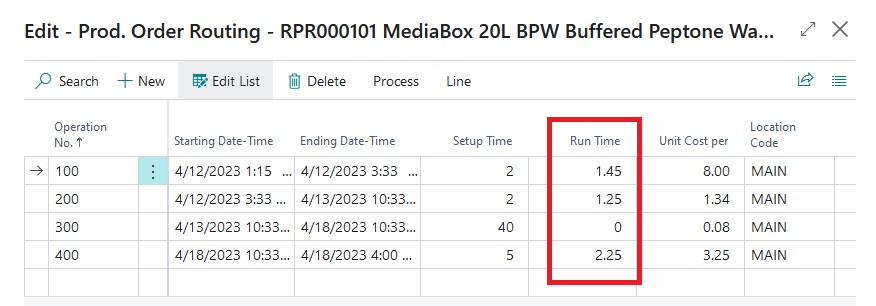
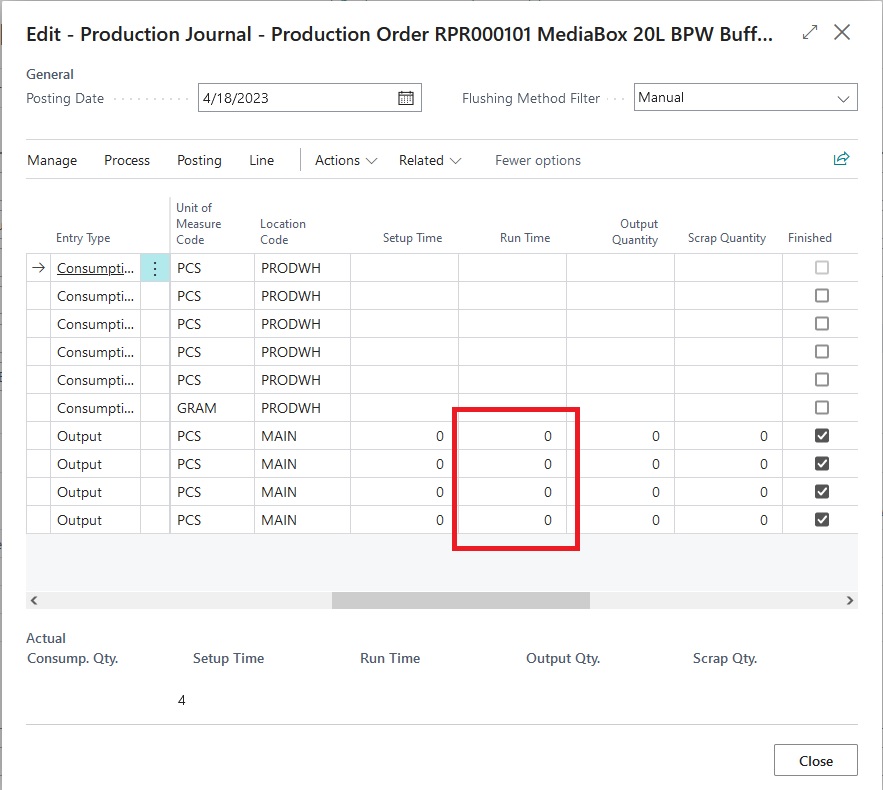
When completing a Released Production Order, we open the Production Journal and change some Item Qtys on the BOM and below the BOM items are the Routing lines. All of the routing lines show as Run Time zero for each line. If I back out of the Production Journal and look at the Routing, there are numbers there, why are these not transferring to the Production Journal the same way that the Items are?
route1.jpg

The image above shows the routing in the production order, when I open the Production Journal, this is what I see:
pj1.jpg

Am I missing something or is this by design that the calculated amounts do not feed into here?

I have the same question (0)
  • Verified answer
    Ben Baxter Profile Picture
    6,575 Super User 2025 Season 2 on at

    You are not missing anything.  Your capacity time is more variable than the BOM components.  Therefore, it expects the User to enter a value.

    You could build logic to pull the full Setup & Run Time into the Production Journal, but it would only be semi-accurate if you are producing the full amount at that time.

    Another option could be to add a trigger on the validation of the Output Quantity to calculate the Run Time for that number of Output.  If this is what you need, you might as well Backflush your capacity time.

  • KnottyMars Profile Picture
    10 on at

    Thanks for the information Ben, I didnt realize that the Routings portion of the Production Journal relied on only the user input to define the time.

    Sorry to pile on another question, but you mentioned back flushing the capacity time, would this mean changing the flushing method for the relevant Work centers and Machine centers to Backward? Then when posting the Production Journal, that would use the calculated values? If this is the case, would there be an opportunity to change the capacity values before posting?

    Thanks for your answers, I appreciate the help.

  • Suggested answer
    Ben Baxter Profile Picture
    6,575 Super User 2025 Season 2 on at

    Correct, the flushing method of the WC and MC would be set to Backward.  Be aware, the capacity flush does not happen until the Production Order is changed to Finished Status, so you won't see the entries when Output is posted.

    I do not recommend Backflushing the final operation of a Production Order or the system will also flush the Output Quantity, which may not reflect reality.

    The backflush happens based on the Expected Need, so anytime posted prior to the backflush is in addition to the defined time.  You cannot reduce the time on a Backlfush, as it goes with the defined time.

  • KnottyMars Profile Picture
    10 on at

    Thanks for the additional information. I believe your original suggestion to manually enter would be the most sensible. Since our output is variable from order to order, but the calculated capacity values tend to remain somewhat static, we will need to enter these if we want to change output values based on the production run.

Under review

Thank you for your reply! To ensure a great experience for everyone, your content is awaiting approval by our Community Managers. Please check back later.

Helpful resources

Quick Links

Responsible AI policies

As AI tools become more common, we’re introducing a Responsible AI Use…

Neeraj Kumar – Community Spotlight

We are honored to recognize Neeraj Kumar as our Community Spotlight honoree for…

Leaderboard > Small and medium business | Business Central, NAV, RMS

#1
OussamaSabbouh Profile Picture

OussamaSabbouh 3,226

#2
Jainam M. Kothari Profile Picture

Jainam M. Kothari 2,047 Super User 2025 Season 2

#3
YUN ZHU Profile Picture

YUN ZHU 1,257 Super User 2025 Season 2

Last 30 days Overall leaderboard

Featured topics

Product updates

Dynamics 365 release plans



