web
You’re offline. This is a read only version of the page.
close
Skip to main content

Notifications

Announcements

No record found.

Community site session details

Community site session details

Session Id :
Microsoft Dynamics AX (Archived)

BOM Item Type field

(0) ShareShare
ReportReport
Posted on by

I'm a bit new to the production side of AX, and we've been having a problem with how a certain component was behaving. I did some debugging and it seems the source of the problem is related to the item type field (shown in the screencap below). I would like to be able to change the box icon on the first line item to the blue icon displayed on the second line item. Is this possible or can this only be set when the component is originally created?
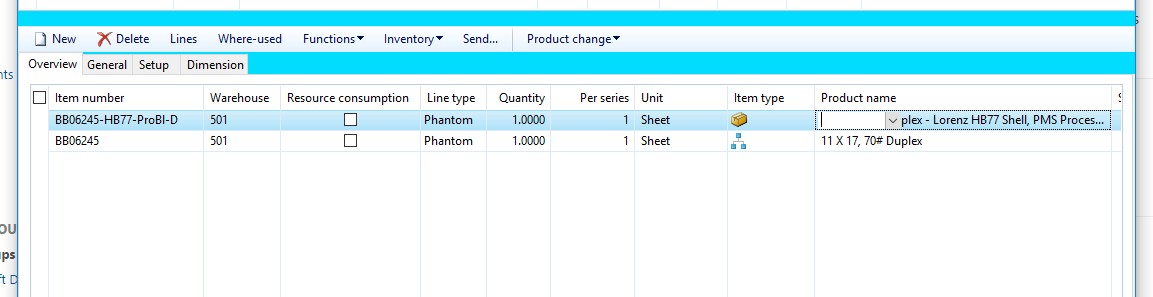
BOMItemType.PNG

*This post is locked for comments

I have the same question (0)
  • Suggested answer
    Stefan Hofmaninger Profile Picture
    520 on at

    Hello bsarge,

    the item type is depending from the settings of the item. The icon of the first line shows you that this is an item which has no bom. Second line icon shows that this item has a sub bom.

    Regards

    Stefan

  • Community Member Profile Picture
    on at

    Okay, but then if I view the bom lines of the item above which has the no bom symbol (the box), this is what I see. Shouldn't it be displaying the blue sub bom symbol? Or am I missing something?

    BOMItemType2.PNG

  • Suggested answer
    Stefan Hofmaninger Profile Picture
    520 on at

    I think that's why the Item weich shows the box is defined as purchase type. The other one is production Type.

  • Verified answer
    Community Member Profile Picture
    on at

    Thank you! That's the piece I was missing/didn't know to check for.

  • CBNestor Profile Picture
    46 on at

    Hi, I am trying to fix the same problem, I have a BOM inside a BOM. but the Blue Icon In the Bom Lines still display the Bom icon . Where is the Purchase/Production Type difine? where I have to change it? Thanks a loT

Under review

Thank you for your reply! To ensure a great experience for everyone, your content is awaiting approval by our Community Managers. Please check back later.

Helpful resources

Quick Links

Responsible AI policies

As AI tools become more common, we’re introducing a Responsible AI Use…

Neeraj Kumar – Community Spotlight

We are honored to recognize Neeraj Kumar as our Community Spotlight honoree for…

Leaderboard > 🔒一 Microsoft Dynamics AX (Archived)

#1
Priya_K Profile Picture

Priya_K 4

#1
Martin Dráb Profile Picture

Martin Dráb 4 Most Valuable Professional

#3
Ali Zaidi Profile Picture

Ali Zaidi 2

Last 30 days Overall leaderboard

Featured topics

Product updates

Dynamics 365 release plans



