web
You’re offline. This is a read only version of the page.
close
Skip to main content

Notifications

Announcements

No record found.

Community site session details

Community site session details

Session Id :
Microsoft Dynamics AX (Archived)

AX 2012 R2Client Slow Performance on some systems?

(1) ShareShare
ReportReport
Posted on by 20

Hi Folks,

We have moved our server VM's including AD and AX VM's to New Upgraded server.

for AX, we have 3 VM's(AOS, SQL & Retail). AX client is installed on AOS VM as well as on Retail VM, and it is working perfectly without any lagging.

Now, the problem arises when I am running AX client on independent windows 7 system joined to AD.

See the latency to AOS Server when I am Opening AX client or running some operation(e.g, opening forms, running task etc.).
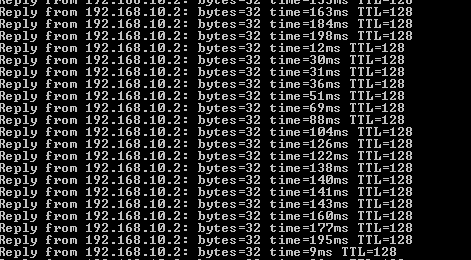
SSAXOpen.png

See the change in latency to AOS Server when AX client is not running or its already open and Idle

SSAXClose.png

All the firewalls are turned off(on AX system and on servers too).

Not sure what's going wrong here.

Any Suggestions please?

Thanks!

*This post is locked for comments

I have the same question (0)
  • Mohd saddaf khan Profile Picture
    20 on at

    Any suggestions here?

    Tried by replacing Network switch too, but no difference.

    Looks like some issue on the host server side but can't confirm. My infra architecture is very simple and looks something as below.

    NetworkArch.PNG

    As mentioned earlier, issue occurs if running AX client on Client machines as per above screen. AX works perfectly if running on any of the VM's. 

  • Martin Dráb Profile Picture
    237,965 Most Valuable Professional on at

    Latency is indeed about your network, not about Dynamics AX. Therefore you should try o forum about networking.

  • Mohd saddaf khan Profile Picture
    20 on at

    Hi Martin,

    I understand that. But there is a time delay only when running tasks on AX client(or while opening AX client), that's the reason i've posted query here(under AX Administration).

    Other than that, there is no issue when doing a ping to AOS server, it always responds in <1ms.

    Thanks.

  • Martin Dráb Profile Picture
    237,965 Most Valuable Professional on at

    Then you should focus on resources of the machine. Isn't the processor busy? Network saturated? Or something else?

    You must identify the bottleneck before you can address it.

  • Mohd saddaf khan Profile Picture
    20 on at

    There is no issue with the machine. The reason i am saying is this because,

    As i mentioned, we are currently migrating to new upgraded server(with AD). So we still have production environment on old server(with separate AD). Now, If i connect the machine to the switch serving for Live environment, I can run AX without any lagging.

    Can you describe more on Network saturation? Or any other possible troubleshooting to be performed?

    Thanks.

Under review

Thank you for your reply! To ensure a great experience for everyone, your content is awaiting approval by our Community Managers. Please check back later.

Helpful resources

Quick Links

Responsible AI policies

As AI tools become more common, we’re introducing a Responsible AI Use…

Neeraj Kumar – Community Spotlight

We are honored to recognize Neeraj Kumar as our Community Spotlight honoree for…

Leaderboard > 🔒一 Microsoft Dynamics AX (Archived)

#1
Martin Dráb Profile Picture

Martin Dráb 4 Most Valuable Professional

#1
Priya_K Profile Picture

Priya_K 4

#3
MyDynamicsNAV Profile Picture

MyDynamicsNAV 2

Last 30 days Overall leaderboard

Featured topics

Product updates

Dynamics 365 release plans



