web
You’re offline. This is a read only version of the page.
close
Skip to main content

Notifications

Announcements

No record found.

Community site session details

Community site session details

Session Id :
Finance | Project Operations, Human Resources, ...
Suggested Answer

How to add editable fields to the AX365 Packing Slip Journal?

(0) ShareShare
ReportReport
Posted on by 314

Hi Experts, Greetings!
So, in AX2012 I have some additional fields in the Packing Slip module. These fields can be edited to be filled in by the user.
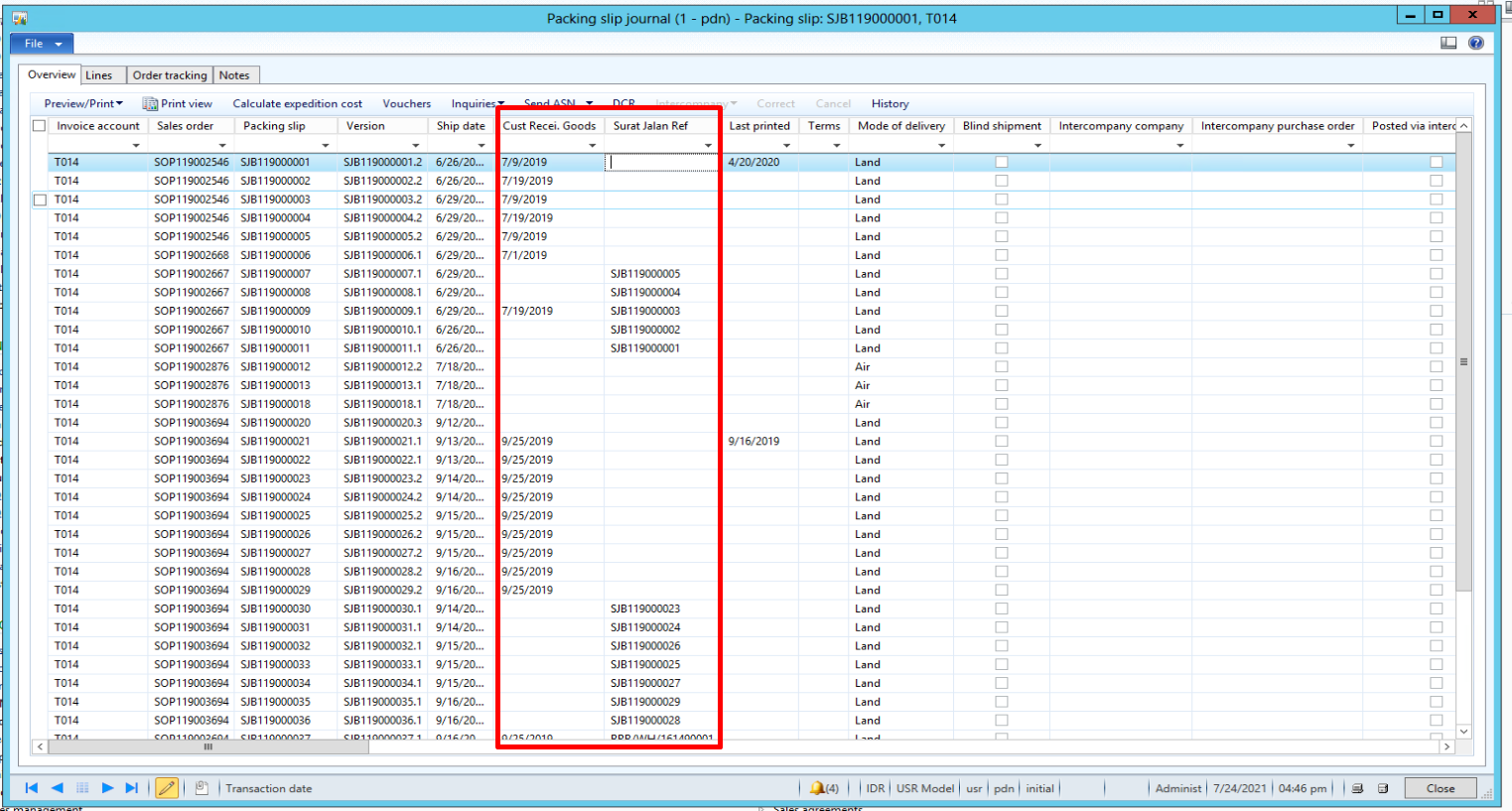
pastedimage1627120328645v2.png

But in AX365 the Packing Slip form can no longer be edited.
When I checked the Packing Slip (CustPackingSlipJournal) form in Visual Studio to change it to editable, the 'View Edit Mode' property of the form is 'View' and cannot be changed.
What's the solution, is there any other alternative to move this function to AX365, my friend?

pastedimage1627120351745v3.png

I have the same question (0)
  • Suggested answer
    greengrimms Profile Picture
    1,400 on at

    Hi Michael,

    You should create an extension class and modify that behavior through code, by adding the following to your post run event handler:

    sender.design().viewEditMode(ViewEditMode::Edit);

    Let us know if you have any questions regarding this.

  • Michael Antony Profile Picture
    314 on at

    Hi Danilo,

    I've done what you suggested, unfortunately this method doesn't work. I still can't edit the additional fields in the Packing Slip. I read some references and found an alternative to create a dialog box to be able to edit those fields in the Packing Slip.

  • Ludwig Reinhard Profile Picture
    Microsoft Employee on at

    Hi,

    What's the purpose of this field?

    Is it an information that you need to print on the packing slip or is it used for something else?

    Would be great if you could elaborate.

    Many thanks,

    Ludwig

  • Michael Antony Profile Picture
    314 on at

    Hi Ludwig,

    Yes, the purpose of this field is to provide additional reference that is needed by the user, and it is also an additional information to be added in the packing slip printout.

  • Suggested answer
    Ludwig Reinhard Profile Picture
    Microsoft Employee on at

    Good Morning Michael,

    Many thanks for the update.

    To me it sounds that you need to make a system modification to achieve that.

    There seems no standard feature that could potentially serve as a workaround.

    So, please talk to one of your developers to see what can be modified / extended here.

    Best regards,

    Ludwig

  • Suggested answer
    André Arnaud de Calavon Profile Picture
    300,911 Super User 2025 Season 2 on at

    Hi Michael,

    If this is information that needs to be printed on the packing slip, then the current approach is not a good design.

    In this case, you need to create new fields for the Packing slip posting form. This can be done by creating extension fields on the SalesParmTable next to the ones you have now on the packing slip journal. Then with a CoC command during the posting process you can copy the values to your fields.

    In this scenario, the user can provide the fields on the posting dialog and the packing slip can be printed directly.

  • Michael Antony Profile Picture
    314 on at

    Okay Ludwig, thank you for your advice.

    I will definitely do it.

  • Michael Antony Profile Picture
    314 on at

    Hi Andre,

    I will look at the needs of the user in more depth first as consideration for deciding the next step. If that's the case, then I'll follow your advice. Thanks for the advice Andre, really helped me.

Under review

Thank you for your reply! To ensure a great experience for everyone, your content is awaiting approval by our Community Managers. Please check back later.

Helpful resources

Quick Links

Responsible AI policies

As AI tools become more common, we’re introducing a Responsible AI Use…

Neeraj Kumar – Community Spotlight

We are honored to recognize Neeraj Kumar as our Community Spotlight honoree for…

Leaderboard > Finance | Project Operations, Human Resources, AX, GP, SL

#1
Martin Dráb Profile Picture

Martin Dráb 660 Most Valuable Professional

#2
André Arnaud de Calavon Profile Picture

André Arnaud de Cal... 549 Super User 2025 Season 2

#3
Sohaib Cheema Profile Picture

Sohaib Cheema 307 User Group Leader

Last 30 days Overall leaderboard

Product updates

Dynamics 365 release plans



