web
You’re offline. This is a read only version of the page.
close
Skip to main content

Notifications

Announcements

No record found.

Community site session details

Community site session details

Session Id :
Microsoft Dynamics AX (Archived)

how to populate field value based on dropdown list ax 2012

(0) ShareShare
ReportReport
Posted on by 508

Hi DAXers,

I'm new to X++

Thanks in advance for your support.

As shown in the picture below, I have created a new table includes 2 fields A & B used in a drop-down list in a master table form that includes other newly created 2 fields C & D. it is linked and drop-down list working properly. 

When I tried to modify C using the drop-down list that linked with the field A, I want to update field D by value from field B.
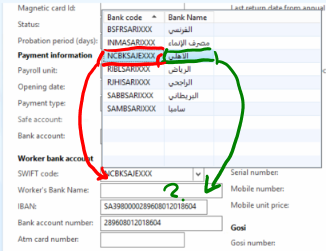
drop-down field population

Thanks again,

*This post is locked for comments

I have the same question (0)
  • Verified answer
    Martin Dráb Profile Picture
    237,904 Most Valuable Professional on at

    If you have the value of A (in C), is it sufficient to uniquely identify a record in the table with A and B? If so, you can simply find the record by A and read B. If it isn't, you need a different design.

  • Ahmed Siliem Profile Picture
    508 on at

    Hi Martin,

    Thank you very much for your quick answer.

    As I told "I am new to X++"

    So, would you mind explaining how to "is it sufficient to uniquely identify a record in the table with A and B? If so, you can simply find the record by A and read B." Please?

    If you guided me in this with sample or code, I will be very thankful.

  • Verified answer
    Martin Dráb Profile Picture
    237,904 Most Valuable Professional on at

    Sorry. :) All right, let's walk through it in a slower pace. I'll use a concrete example; it will be easier to talk about things like "vendor" than "the table containing fields A and B".

    Let's say that you're filling a custom table, MyOrder, with some values from a standard table containing vendors: VendTable.

    Each vendor has an ID unique in the given company (AccountNum field in VendTable). Because it's unique, you can use it to find the right vendor in VendTable and read values of any other field. Therefore if your first lookup is for a vendor ID, you have everything you need to find all other fields too.

    Let's say you get an ID 'Vendor001' and you're interested in BankAccount field. You could write code like this:

    VendTable vendTable = VendTable::find('Vendor001');
    str bankAccount = vendTable.BankAccount;

    Note that a common approach is putting code for copying values from another table to an initFrom* method:

    public void initFromVendTable(VendTable _vendTable)
    {
        this.BankAccount = _vendTable;
    }

    But you should realize another important thing: because you can get all fields from VendTable at any time, you don't necessarily have to duplicate them in your table. You should ask yourself whether you're interested in the current values (e.g. the bank account currently used by the vendor) or values that were in place when the order was created (e.g. if the order was created a year ago and the vendor has changed his bank account since then, you still need the old account).

    If you want current values, you shouldn't duplicate them in your table. It would cause you troubles, because when a vendor changes its account, you would have to update it in all tables where you've duplicate it.

    But if you want original values and/or you want allow users to change the value to something else (such as using a different bank account for one particular order), having separate fields in your table (or another related table) is the right approach.

  • Verified answer
    Ahmed Siliem Profile Picture
    508 on at

    Hi Martin,

    Thank you very much for your interested reply.

    Now, here is what I did:

    1- I have created a 'Find' method in the table 'WorkerAccountBankCodeTbl' to be able to retrieve the required field:

    public static WorkerAccountBankCodeTbl find(BankCode _BankCode)
    {
        WorkerAccountBankCodeTbl WABC;
    
        select WABC
        where WABC.BankCode == _BankCode;
        return WABC;
    
    }

    This code is tested by next job, and the result was correct:
    static void Job15(Args _args)
    {
        WorkerAccountBankCodeTbl WABC;
        ;
        WABC = WorkerAccountBankCodeTbl::find("SAMBSARIXXX");
        if ( WABC )
        {
            info(strFmt("%1, %2", WABC.BankCode, WABC.BankName));
        }
        else
            {
                info("Not available");
            }
    }

    2- I have created a 'Display' Method in table '' to just fix the matter of displaying the Bank Name:
    display WorkerBankName BankName()
    {
        return WorkerAccountBankCodeTbl::find(this.SwiftCode).BankName;
    
        //HcmWorker::findByPersonnelNumber(this.EmplId).name();
    }
    the result was like that:
    3823.WorkerBank.png


    I want to use the WorkerAccountBankCodeTbl.BankName value to fill RSExtendedEmplTable.BankName based on the related Bankcode filed in both table.

    Now, how to write the Modyfied() method code for RSExtendedEmplTable.BankCode to fill the RSExtendedEmplTable.BankName?


  • Verified answer
    Martin Dráb Profile Picture
    237,904 Most Valuable Professional on at

    Are you sure that BankAccount is a unique key of WorkerAccountBankCodeTbl? It sounds very strange that worker would be a part of the unique key.

    Don't create find() method for non-unique keys and when you decide to make one, make sure you follow the design pattern (you'll find thousand examples in the standard application).

    Seriously, the key point here is understanding whether you have a unique key or not. Don't write a single line of code until you make sure that the designed logic makes sense.

  • Verified answer
    Ahmed Siliem Profile Picture
    508 on at

    This table is used as a source data table to include the list of Banks. The field BankCode is a unique key (AllowDuplicates is set to 'No').

    the index and field properties are as follow:

    BankCodeIndexProperities.png

    BankCodeIndexProperities.png

  • Verified answer
    Martin Dráb Profile Picture
    237,904 Most Valuable Professional on at

    Okay, thank you for this explanation.

    I wonder why you don't use the standard BackAccountTable for this purpose; you normally need much more information than just account number and bank name. But all right, it's your choice.

    Then what I said applies - when you have BankCode, you can easily find the corresponding record in WorkerAccountBankCodeTbl and you can read BankName from there. But you should decide carefully whether you should copy the value to the other table or you should make a lookup when needed, as discussed in my previous reply.

  • Ahmed Siliem Profile Picture
    508 on at

    Thanks for your advice.

    I understand what you refer to.

    Although I faced this case many times with other projects where I am unable to copy the value to another table after field modified (Same like this case), but, actually, there is no need to copy the value to another table if it is possible to retrieve it in the report same as the display method if possible. But I do not know how to do so!! ;(

    So:

    1- Would you mind helping me in writing the code of copying the value from WorkerAccountBankCodeTbl.BankName to RSExtendedEmplTable.BankName, please?

    2- And how to retrieve such value in a report without the need to copy it??

    The answer to these two questions will help me to finish more than one project that still open.

    Thank again Martin for your kindness and professionality.

  • Verified answer
    Martin Dráb Profile Picture
    237,904 Most Valuable Professional on at

    It's difficult for me to give you concrete code if I know so little about your solution, such as what kind of report you're building and how your tables are related. Can you fill these gaps, please?

    Writing something like RSExtendedEmplTable.BankName = WorkerAccountBankCodeTbl.BankName is trivial, but it's not useful without any context. And I don't know yours.

  • Verified answer
    Ahmed Siliem Profile Picture
    508 on at

    The relation type is 'Normal':

    RSExtendedN.png

    RSExtendedN.png

    The report is a tabular SSRS report. I did not decide yet whether to design a class report or query report, I do prefer a query report but it depends on the way of retrieving the BankName field. if the value copied, I will use query since it is a very simple report.

    Please, do not forget the first question (If possible) or lead me to an existed example.

Under review

Thank you for your reply! To ensure a great experience for everyone, your content is awaiting approval by our Community Managers. Please check back later.

Helpful resources

Quick Links

Responsible AI policies

As AI tools become more common, we’re introducing a Responsible AI Use…

Neeraj Kumar – Community Spotlight

We are honored to recognize Neeraj Kumar as our Community Spotlight honoree for…

Leaderboard > 🔒一 Microsoft Dynamics AX (Archived)

#1
Martin Dráb Profile Picture

Martin Dráb 4 Most Valuable Professional

#1
Priya_K Profile Picture

Priya_K 4

#3
MyDynamicsNAV Profile Picture

MyDynamicsNAV 2

Last 30 days Overall leaderboard

Featured topics

Product updates

Dynamics 365 release plans
