web
You’re offline. This is a read only version of the page.
close
Skip to main content

Notifications

Announcements

Community site session details

Community site session details

Session Id :
Customer Service forum

Record URL is not visible

(0) ShareShare
ReportReport
Posted on by

Hello everyone,

I have created workflow to send email to another user. In that mail user have to click on URL so URL will directly take user to that particular record. I added the URL with help of this site.

https://dynamicsofdynamicscrm.com/2016/12/01/quick-tip-add-record-hyperlink-with-text-in-send-email-via-workflow-in-dynamics-crm/

But after adding the URL it give null value like this "<hyperlink><name>Kindly Click here</name><value>null</value></hyperlink>".

Even i tried to add URL manually but it not allowing me to save .

Thanks & Regards

Karthik V

Categories:
I have the same question (0)
  • Community Member Profile Picture
    on at

    Hi,

    Even i tried this method but still no use. When i try to click save & close button it not saving. If i close my send email property dialogue box and again i open it still the  value is set null.

  • DexterFishpaw Profile Picture
    45 on at

    Hey there karthik,

    I've run into this annoying bug as well. What helped me was to delete the "null" from the generated tags and then inserting the URL field from the right side as in this step:
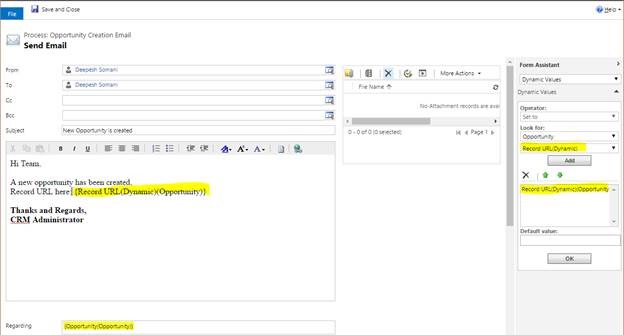
    but between the tags (where the "null" used to be), so your result would be:

    <hyperlink><name>Kindly Click here</name><value>{Record URL(Dynamic)(Opportunity)}</value></hyperlink>

    Have you tried this yet?

  • Community Member Profile Picture
    on at

    Am using Dynamics 365 online version 9.

  • Alex Fun Wei Jie Profile Picture
    33,628 on at

    Hi,

    you using crm on premise or online?

  • Community Member Profile Picture
    on at

    Hi Wei Jie,

    I have done the same thing but when i close that screen it gives null value inside the tag. if i copy and paste the record link its not allowing me to save the page.

    Thanks & Regards

    karthik V

  • Suggested answer
    Alex Fun Wei Jie Profile Picture
    33,628 on at

    Hi,

    did you select RecordURLDynamics ? if no ,please go for it.

    7737.59.png

    7737.59.png

Under review

Thank you for your reply! To ensure a great experience for everyone, your content is awaiting approval by our Community Managers. Please check back later.

Helpful resources

News and Announcements

Season of Giving Solutions is Here!

Quick Links

November Spotlight Star - Khushbu Rajvi

Congratulations to a top community star!

Forum Structure Changes Coming on 11/8!

In our never-ending quest to help the Dynamics 365 Community members get answers faster …

Dynamics 365 Community Platform update – Oct 28

Welcome to the next edition of the Community Platform Update. This is a status …

Leaderboard > Customer Service

Last 30 days Overall leaderboard

Featured topics

Product updates

Dynamics 365 release plans
