web
You’re offline. This is a read only version of the page.
close
Skip to main content

Announcements

No record found.

News and Announcements icon
Community site session details

Community site session details

Session Id :
Microsoft Dynamics AX (Archived)

AX Setup Crashes while installing Analysis Service

(0) ShareShare
ReportReport
Posted on by 435

Hi,

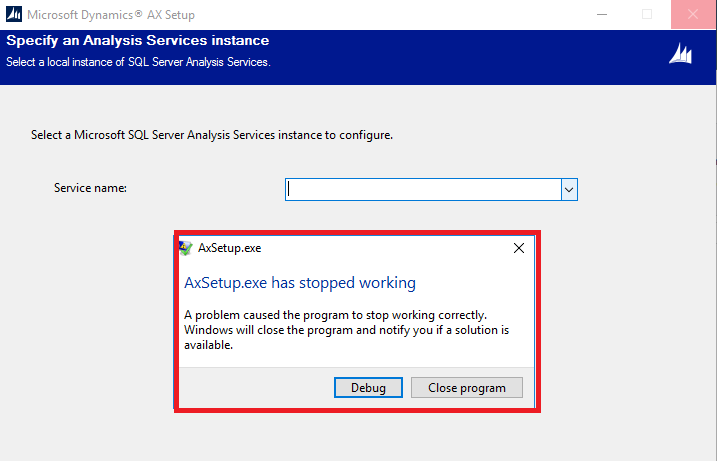
I am trying to install Analysis Service and when i click on service name drop down setup is getting closed.

below screen for your reference.
SSIS.png

I am getting below error i event viewer.

Faulting application name: AxSetup.exe, version: 6.3.5000.138, time stamp: 0x582a511a
Faulting module name: KERNELBASE.dll, version: 6.2.14393.2125, time stamp: 0x5a9906f8
Exception code: 0xe053534f
Fault offset: 0x0000000000033c58
Faulting process id: 0x%9
Faulting application start time: 0x%10
Faulting application path: %11
Faulting module path: %12
Report Id: %13
Faulting package full name: %14
Faulting package-relative application ID: %15

please advice.

Thanks,

*This post is locked for comments

I have the same question (0)
  • udaY-ch Profile Picture
    5,175 on at

    Are you running the correct setup file to install Analysis service?

    What is the AX 2012 version running in the system.

  • Mohammed Altaf Profile Picture
    435 on at

    Thanks @Udhaya,

    Yes i am using correct setup file.

    Our AX Version is

    AX 2012 6.3.5000.138.

    Just four your more info

    We have three different servers for application, ssrs, database.

  • Suggested answer
    udaY-ch Profile Picture
    5,175 on at

    Hi,

    Kernelbase.dll version shows ax 2012r2 build number.

    Verify the system has any ax2012R2 components there or existed earlier in the system, if so try to clear up auc files and user caches.

    /Uday.

  • Mohammed Altaf Profile Picture
    435 on at

    Hi,

    There are no R2 components installed.

    I deleted auc files and cleared user cache from ax, but still the same issue.

    Thanks

  • Verified answer
    Mohammed Altaf Profile Picture
    435 on at

    SQL 2012 SMO was missing.

    I installed it and worked for me.

    Thanks,

Under review

Thank you for your reply! To ensure a great experience for everyone, your content is awaiting approval by our Community Managers. Please check back later.

Helpful resources

Quick Links

Introducing the 2026 Season 1 community Super Users

Congratulations to our 2026 Super Stars!

Meet the Microsoft Dynamics 365 Contact Center Champions

We are thrilled to have these Champions in our Community!

Congratulations to the April Top 10 Community Leaders

These are the community rock stars!

Leaderboard > 🔒一 Microsoft Dynamics AX (Archived)

#1
CP04-islander Profile Picture

CP04-islander 24

#2
Michel ROY Profile Picture

Michel ROY 14

#3
Jagadabi Profile Picture

Jagadabi 6

Last 30 days Overall leaderboard

Featured topics

Product updates

Dynamics 365 release plans
