web
You’re offline. This is a read only version of the page.
close
Skip to main content

Notifications

Announcements

No record found.

Community site session details

Community site session details

Session Id :
Customer experience | Sales, Customer Insights,...
Suggested Answer

BPF Lead to Opportunity Sales Process: Next stage create button missing

(0) ShareShare
ReportReport
Posted on by 10

Environment: 365 Online, 2019 release wave 2

Hi all,

We are using the "OOB Lead to Opportunity Sales Process"  BPF and I'm missing the quick create button, when I want to move to the next stage:
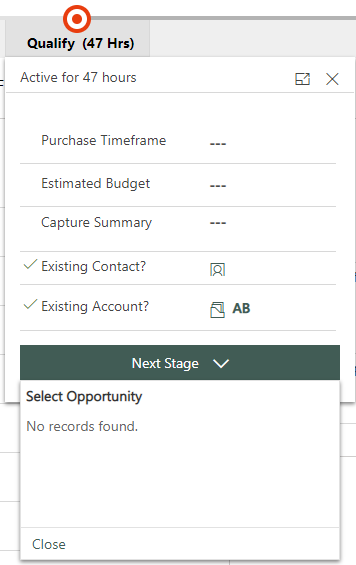
pastedimage1574255899249v1.png

When I create a custom BPF with a custom entity (Source is also lead) , I can use/see the create button:
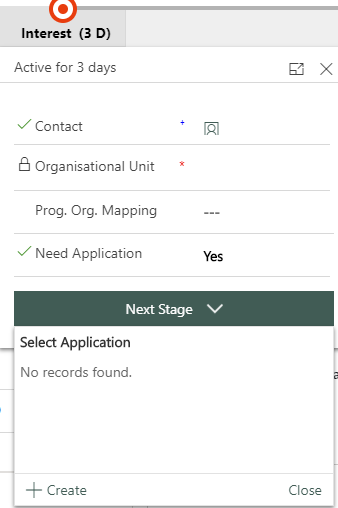
pastedimage1574083624930v5.png

Has anyone suggestions what I am missing?

Best regards,

Andreas

Edit history:

20. Nov 2019: Removed irritating opportunity from screenshot. Opportunity was created via qualify button and is not relevant for question

I have the same question (0)
  • Suggested answer
    manojd  Profile Picture
    1,397 on at

    Hi,

    If i look at your first screen shot, it is already showing the Opportunity which is created against the selected Lead & asking you to select the same, have you tried doing the same steps with new lead on OOTB BPF?

  • Suggested answer
    PS Profile Picture
    23,577 on at

    Hi Andreas

    I can see you're using the OOB Lead to opportunity BPF. This works like:

    To move from Qualify to develop stage, you need to click on the 'Qualify' button on lead header.

    To move from develop to propose, you need to click 'next'.

    For custom entities it's different as there's no qualify button to create associated record.

    From your screenshot what I can see is, you qualified this lead and then reactivated it and that's why you're able to see the opportunity already created from lead qualification. if you don't want to use the opportunity already created, you need to click on the 'qualify' button again.

    Hope it helps!

  • andzie Profile Picture
    10 on at

    Yes you are absolutely right, I'm using the OOB Lead to opportunity BPF. Furthermore you are also right with the "present opportunity" I have created it via the qualify button and forgot to remove it. 

    So you write, that the OOB BPF works like that.

    What if I don't  use the OOB BPF? I have tried it with a own BPF using Lead + Opportunity and there  it does also not work. So is it not supported to create an opportunity via the "fly out" menu? (like with the custom entity)

    Here is how I have set up the custom BPF with lead and Opportunity:

    pastedimage1574255591463v5.png

    pastedimage1574255561925v3.png

    pastedimage1574255572567v4.png

  • Suggested answer
    PS Profile Picture
    23,577 on at

    You have set it up right. You can't do that for leads and opportunities. The qualify button is there for a reason as it not only creates an opportunity but an account and a contact as well.

    The same is the case if you create a process flow for quote to order because 'create order' button is there for a reason as it not only copies data from quote to order but also populates the products/line items.

    It's just the perspective, you might see it as a limitation or a feature.

  • DnSh96 Profile Picture
    5 on at

    is your issue fixed??...  i am having same issue...

Under review

Thank you for your reply! To ensure a great experience for everyone, your content is awaiting approval by our Community Managers. Please check back later.

Helpful resources

Quick Links

Responsible AI policies

As AI tools become more common, we’re introducing a Responsible AI Use…

Neeraj Kumar – Community Spotlight

We are honored to recognize Neeraj Kumar as our Community Spotlight honoree for…

Leaderboard > Customer experience | Sales, Customer Insights, CRM

#1
Tom_Gioielli Profile Picture

Tom_Gioielli 137 Super User 2025 Season 2

#2
#ManoVerse Profile Picture

#ManoVerse 57

#3
Jimmy Passeti Profile Picture

Jimmy Passeti 50 Most Valuable Professional

Last 30 days Overall leaderboard

Product updates

Dynamics 365 release plans
