web
You’re offline. This is a read only version of the page.
close
Skip to main content

Notifications

Announcements

No record found.

Community site session details

Community site session details

Session Id :
Finance | Project Operations, Human Resources, ...
Unanswered

Problem with duplicate lines in SSRS report

(0) ShareShare
ReportReport
Posted on by 843

Hi,
I'm working on a report and data from a ProdTable. I have two custom string fields in the prodTable: ItemA and ItemB. I have created a query that retrieves this data and the other data from the ProdTable.
I created new ssrs report, new tablix and added grouping by ItemA and ItemB.
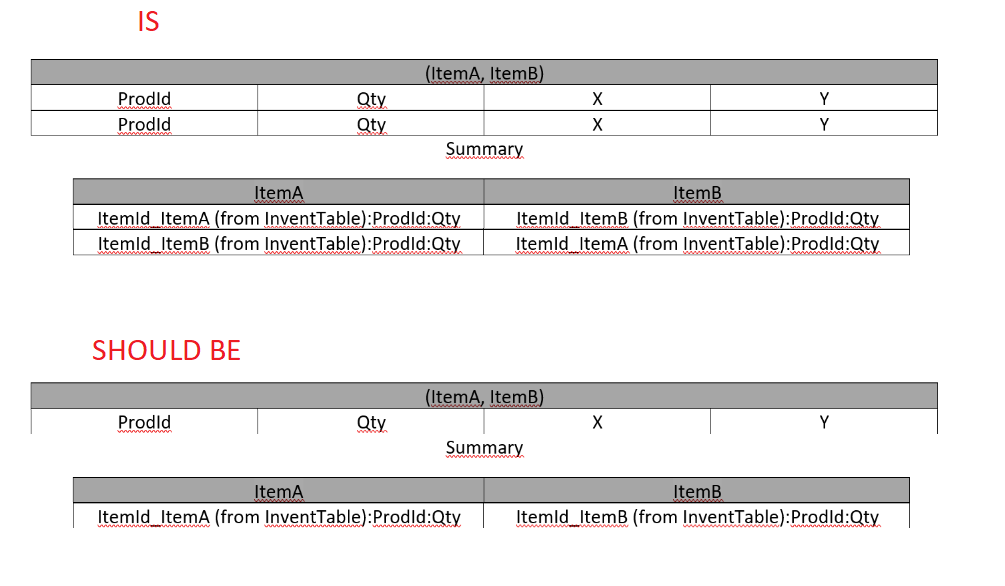
The result displays so that the table shows two rows. This seems logical to me, since the first row shows the result for ItemA and the second row shows the result for ItemB.
The problem is that these are duplicated rows, which I don't need.
Setting an additional grouping after ProdId does not work properly. Grouping by prodId is not sufficient because when summing up values, they are duplicated anyway....

query:
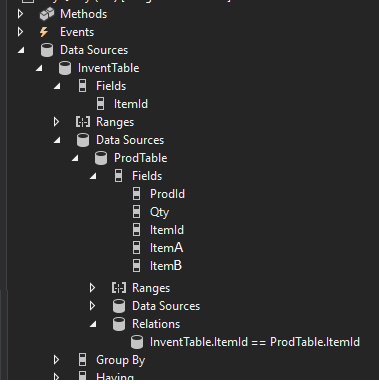
1680.query.png

Results:

table1.png

ItemA and itemB on prodTable is a lookup from a custom table, which has two fields:
1. itemDescription
2. itemId (form InventTable)

What I am most concerned with is how to get only one entry from ProdTable. Is there any way to get it?

I hope I described my problem clearly.
Thank you

I have the same question (0)
  • Martin Dráb Profile Picture
    237,878 Most Valuable Professional on at

    It seems to me that the grouping (by ItemA and ItemB) isn't what you want and your actual problem is that your query returns wrong data. At least that's how I interpret your statement "Grouping by prodId is not sufficient because when summing up values, they are duplicated anyway". Could you please test your query before using it in a form? Does it return the expected data, i.e. not "duplicated"?

  • Shooowtek Profile Picture
    843 on at

    Hello Martin,

    It seems to me that the query is correct. In this case, it inserts into the table, two of the same data rows, because both ItemA and ItemB refer to the same entry in the prodTable.

    In the report, I need to have it grouped in such a way that I have all the ProdId that have the same ItemA and ItemB, so there is no other knowledge than grouping by ItemA and ItemB.

    Unless I am misunderstanding something..

  • Martin Dráb Profile Picture
    237,878 Most Valuable Professional on at

    Okay, so you do want the query to return duplicate records...

    If you group by A and B, it means getting a single group for each combination of ItemA and ItemB, and there may be quite a few of them. It doesn't mean getting a single group. Am I right? Grouping by A and B is something completely than checking if A is the same as B.

    It seems to me that you need such a filter, and then maybe some aggregation (depending on your requirements).

  • Arunraj Rajasekar Profile Picture
    1,743 on at

    Hi shoowtek,

    Can you provide some data to explain the current and expected results?

Under review

Thank you for your reply! To ensure a great experience for everyone, your content is awaiting approval by our Community Managers. Please check back later.

Helpful resources

Quick Links

Responsible AI policies

As AI tools become more common, we’re introducing a Responsible AI Use…

Neeraj Kumar – Community Spotlight

We are honored to recognize Neeraj Kumar as our Community Spotlight honoree for…

Leaderboard > Finance | Project Operations, Human Resources, AX, GP, SL

#1
Martin Dráb Profile Picture

Martin Dráb 646 Most Valuable Professional

#2
André Arnaud de Calavon Profile Picture

André Arnaud de Cal... 529 Super User 2025 Season 2

#3
Sohaib Cheema Profile Picture

Sohaib Cheema 285 User Group Leader

Last 30 days Overall leaderboard

Product updates

Dynamics 365 release plans