web
You’re offline. This is a read only version of the page.
close
Skip to main content

Notifications

Announcements

No record found.

Community site session details

Community site session details

Session Id :
Finance | Project Operations, Human Resources, ...
Answered

Monthly Number Sequence change

(0) ShareShare
ReportReport
Posted on by 197

Hi there!

I need monthly number sequence for journal names. 

Currently format of my number sequence is as below. For November month period is "11".
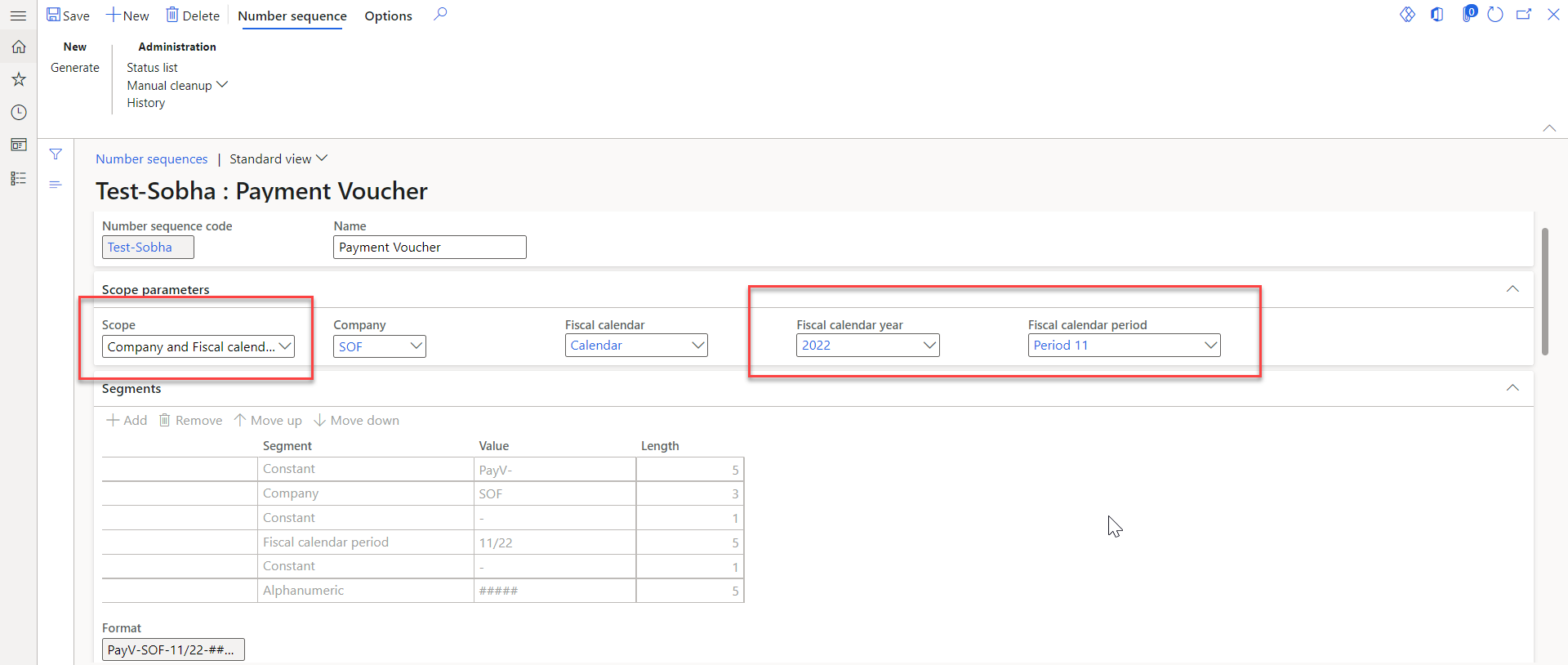
pastedimage1668680852756v1.png

Now, In the next month, I would be needing change in Period i.e., 12.

I do not want to change this every month. I tried uploading through data management with change in period but it is generating new number sequence in the system and changing the period.  

Kindly guide me how I can change this?

Thanks.

Regards,

Dixita

I have the same question (0)
  • Dixita Profile Picture
    197 on at

    Through Data management it is not changing and new number sequence is generated in to system.

  • Suggested answer
    Magno Pereira Profile Picture
    2,435 Moderator on at

    Hi Dixita,

    Do you have a specific requirement from your/customer government to have this sequence format?

    Are you aware of what you will need to update every month the number sequence? Unless you do a customization to automate this update. Or create a new number sequence for each month and update the parameters monthly to the new sequence to be used.

    Could you explain better - "I don't want to change this every month."?

    Take a look at this feature: Numbering documents and vouchers chronologically - Finance | Dynamics 365 | Microsoft Learn

  • Dixita Profile Picture
    197 on at

    Hi Magno Pereira,

    You said rightly, I want that every month, my period should be changed. for instance, I have created one number sequence in November then I would add "11" in my period.

    now, in the month of December, I should be able to change period from "11" to "12".

    I tried using data management template but it is creating new number sequence with same format only change in period with "12".

    I hope my question is clear.

    Thanks

    Regards,

    Dixita

  • Suggested answer
    Dixita Profile Picture
    197 on at

    Hello,

    I found the solution. Refer below link.

    exploredynamics365.home.blog/.../

    Regards,

    Dixita

  • Verified answer
    Magno Pereira Profile Picture
    2,435 Moderator on at

    It's the feature that I mentioned above. Here you have the MSFT docs: learn.microsoft.com/.../chrono-numbers. Glad to know that helps you.

  • Dixita Profile Picture
    197 on at

    Thank you Magno Pereira. It solved by problem,

Under review

Thank you for your reply! To ensure a great experience for everyone, your content is awaiting approval by our Community Managers. Please check back later.

Helpful resources

Quick Links

Responsible AI policies

As AI tools become more common, we’re introducing a Responsible AI Use…

Neeraj Kumar – Community Spotlight

We are honored to recognize Neeraj Kumar as our Community Spotlight honoree for…

Leaderboard > Finance | Project Operations, Human Resources, AX, GP, SL

#1
Martin Dráb Profile Picture

Martin Dráb 664 Most Valuable Professional

#2
André Arnaud de Calavon Profile Picture

André Arnaud de Cal... 522 Super User 2025 Season 2

#3
Sohaib Cheema Profile Picture

Sohaib Cheema 303 User Group Leader

Last 30 days Overall leaderboard

Product updates

Dynamics 365 release plans



