web
You’re offline. This is a read only version of the page.
close
Skip to main content

Notifications

Announcements

Community site session details

Community site session details

Session Id :
Customer experience | Sales, Customer Insights,...
Answered

Marketing Page Mobile Optimization Not Working

(0) ShareShare
ReportReport
Posted on by 35

Hey Experts, 

I've tried to embed this code in the HTML5 of a Marketing Page and somehow the page still does not respond to mobile view. Previously it did work, up until a week ago, the mobile view seems to be haywired. Hope to get your advice on this.

Code: <meta charset="utf-8"><meta name="viewport" content="width=device-width, initial-scale=1.0"><meta http-equiv="X-UA-Compatible" content="IE=edge">
This is how the images and button looked like in mobile view:
pastedimage1601286091396v1.pngpastedimage1601286141529v3.png
I have the same question (0)
  • Verified answer
    cloflyMao Profile Picture
    25,210 on at

    Hi Joey,

    Did you create marketing email from scratch or from existing templates?

    In addition to meta tags you added, please also check whether media query attribute has been nested within style tag,
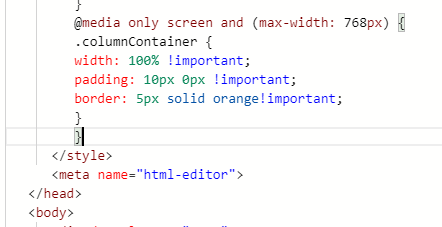
    pastedimage1601363068966v1.png

    and check whether your image elements has been applied with corresponding class name to be responsive on mobile device.
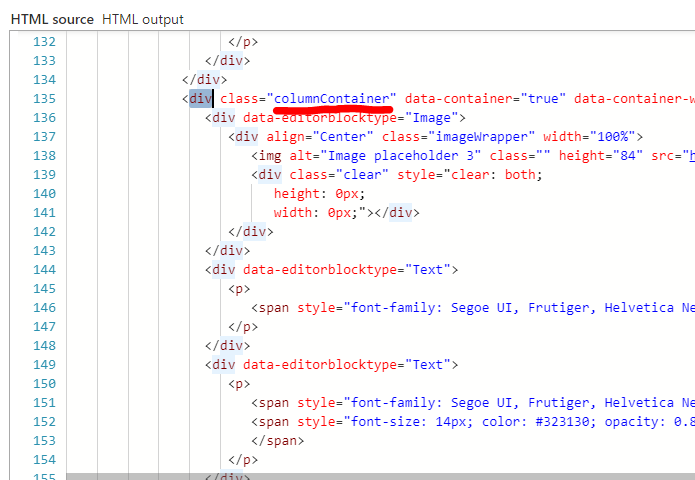
    pastedimage1601363306566v2.png

    The appearance of email on different clients will be different due to compatibility, 

    for example, email layout is responsive in Gmail App, while not on Gmail Web,(iOS) due to media query attribute is ignored on Gmail Web.

    Try testing whether the issue will also happen if the email is viewed in email application when both media query and class name were added.

    Regards,

    Clofly

  • Joey K Profile Picture
    35 on at

    Hey Clofly,

    It worked! Thank you so much. Took me a little while cause of the horizontal scrollbar. Hahaha but it works. Thank you!

    Best Regards,

    Joey K

  • Joey K Profile Picture
    35 on at

    Hey Clofly,

    After trying several CSS code & HTML code, the pinch zoom function on mobile is still enabled, can you share your advice on this? 

    This page was created from scratch.

    pastedimage1601534549835v1.png

    pastedimage1601534586897v2.pngpastedimage1601534609659v3.png

    Best Regards,

    Joey K

  • cloflyMao Profile Picture
    25,210 on at

    Hi Joey,

    I am back for work today.

    Could you share more details about what "the pinch zoom function on mobile is still enabled" is?

    As per my understanding, it is not supported to disable pinch zoom function when we are viewing email.

    Regards,

    Clofly

  • MansiGoel-7446 Profile Picture
    30 on at

    I am also facing the same issue.. Email template looks fine in desktop and tablet view but break in mobile view. Already added the tags suggested in this thread.

Under review

Thank you for your reply! To ensure a great experience for everyone, your content is awaiting approval by our Community Managers. Please check back later.

Helpful resources

Quick Links

Responsible AI policies

As AI tools become more common, we’re introducing a Responsible AI Use…

Congratulations to our 2025 Community Spotlights

Thanks to all of our 2025 Community Spotlight stars!

Leaderboard > Customer experience | Sales, Customer Insights, CRM

#1
Tom_Gioielli Profile Picture

Tom_Gioielli 60 Super User 2026 Season 1

#2
Eugen Podkorytov Profile Picture

Eugen Podkorytov 26

#3
Jimmy Passeti Profile Picture

Jimmy Passeti 23 Most Valuable Professional

Last 30 days Overall leaderboard

Product updates

Dynamics 365 release plans
