web
You’re offline. This is a read only version of the page.
close
Skip to main content

Notifications

Announcements

No record found.

Community site session details

Community site session details

Session Id :
Microsoft Dynamics AX (Archived)

Reporting Services is not start on SQL server

(0) ShareShare
ReportReport
Posted on by 4,624

Hi All,

I am getting below error while starting SQL server reporting services in my test server :
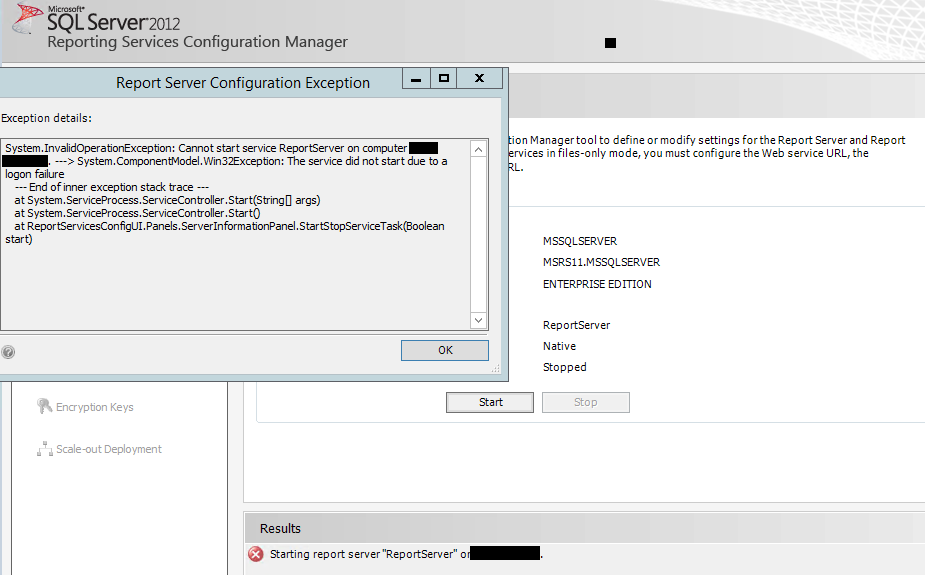
6278.ssrs.PNG

Thats why i am not able to print any report in AX. Please help me out

Thanks

Regards

Visvash Walia

*This post is locked for comments

I have the same question (0)
  • Rohin Profile Picture
    4,624 on at

    are you asking about Service account ??

    Thanks

  • Suggested answer
    Vilmos Kintera Profile Picture
    46,149 on at

    There are 2 credentials. Service account (for running the SSRS service, which needs access to the ReportServer database), and Execution account (which talks with the application).

    The recommendation for AX is to use the AX Business Connector Proxy account for both, which you have set up in the System Administration Service accounts form.

    If it does not work, either the user was changed and has no access to the DB, or the password was mistyped. It coudl also be that the admins forgot to set a password which cannot expire on the user account, or maybe someone tried to authenticate with the user and is locked out due to wrong password provided. They should validate it in the Active Directory.

  • Rohin Profile Picture
    4,624 on at

    Hi Vilmos,

    Thanks , I have checked my SystemService account in System Administration Module and it gives me :

    proxyaccount.PNG

    how can i get rid from this?

    Please suggest

    Thanks

  • Suggested answer
    Vilmos Kintera Profile Picture
    46,149 on at

    Provide a valid domain\user combination. Again, check with your system engineer managing AD.

  • Rohin Profile Picture
    4,624 on at

    But it was same User account in systemService account before, what should be the reason for this now ?

    Thanks

  • Vilmos Kintera Profile Picture
    46,149 on at

    The reasons are in the previous post. Account locked out, expired pwd, etc.

Under review

Thank you for your reply! To ensure a great experience for everyone, your content is awaiting approval by our Community Managers. Please check back later.

Helpful resources

Quick Links

Responsible AI policies

As AI tools become more common, we’re introducing a Responsible AI Use…

Neeraj Kumar – Community Spotlight

We are honored to recognize Neeraj Kumar as our Community Spotlight honoree for…

Leaderboard > 🔒一 Microsoft Dynamics AX (Archived)

#1
Priya_K Profile Picture

Priya_K 4

#1
Martin Dráb Profile Picture

Martin Dráb 4 Most Valuable Professional

#3
Ali Zaidi Profile Picture

Ali Zaidi 2

Last 30 days Overall leaderboard

Featured topics

Product updates

Dynamics 365 release plans



