web
You’re offline. This is a read only version of the page.
close
Skip to main content

Announcements

No record found.

News and Announcements icon
Community site session details

Community site session details

Session Id :
Customer experience | Sales, Customer Insights,...
Answered

Quote Products: Discount in % and mapping to Manual Discount Field

(0) ShareShare
ReportReport
Posted on by 17

Hi everyone, 

I am facing the following situation: when adding a product to a quote, I need a field for discount in percent. So I created a custom field with a calculation (claculated discount = discount in % * amount). This all works fine and I am happy with it. My issue now is, how to get the calculated discount field into the system calculation. My idea was to simply create a workflow to fill the field manual discount with the value of calculated discount. But for some reason I can't chose the entity Quote Products when trying to add the step. Is there any other (simple) way to achieve this? 

I hope I explained it cleary. Can anyone help me with this issue? 

Thanks a lot in advance. 

I have the same question (0)
  • Suggested answer
    Wahaj Rashid Profile Picture
    11,323 on at

    Hi,

    I am afraid you cannot do this using Update step of workflow.

    Fill Manual Discount field either with Business Rule/JS before saving record.

    Or you have to create a custom workflow step (custom code activity) to achieve this.

    However, keep in mind that Quote Line entity is being updated by System Processes and you might face dead-lock issues.

    Hope this helps.

    Wahaj

  • Verified answer
    LuHao Profile Picture
    40,892 on at

    Hi partner,

    I would recommend you create a simple filed to represent percentage, and use business rule to calculate the manual discount field.

    The disadvantage of using calculated field is that calculated field can only be updated when the record is saved. So when the Quote Line record is saved for the first time, the calculated field is updated, and the manual discount field is also updated. At this time, we need to save the record a second time to get the correct Extended Amount.

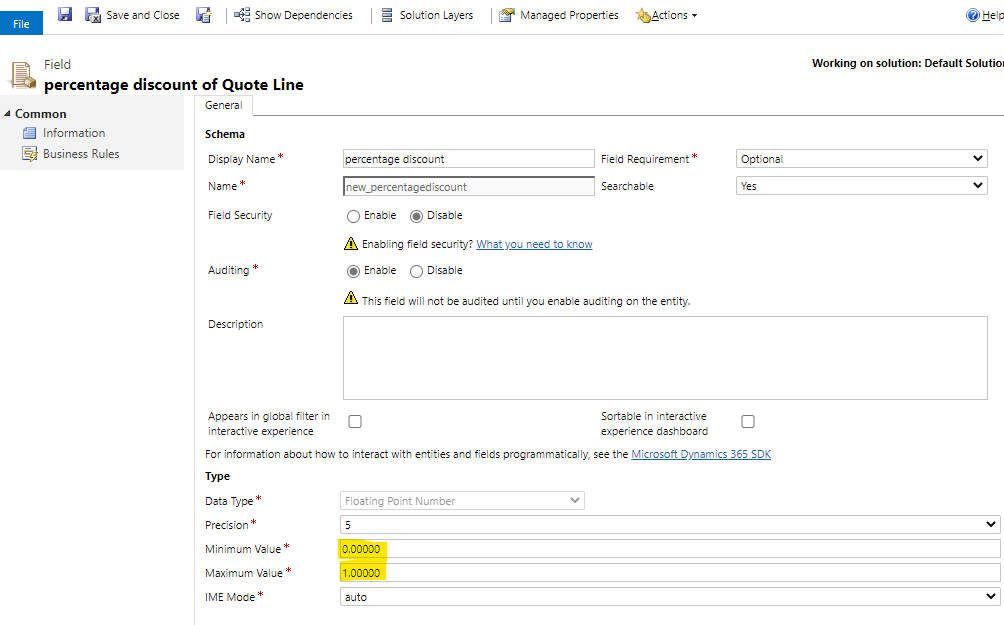
    1. Create a floating point number field for Quote Line entity. Minimum Value is 0 and Maximum Value is 1.
    pastedimage1594795027994v1.png

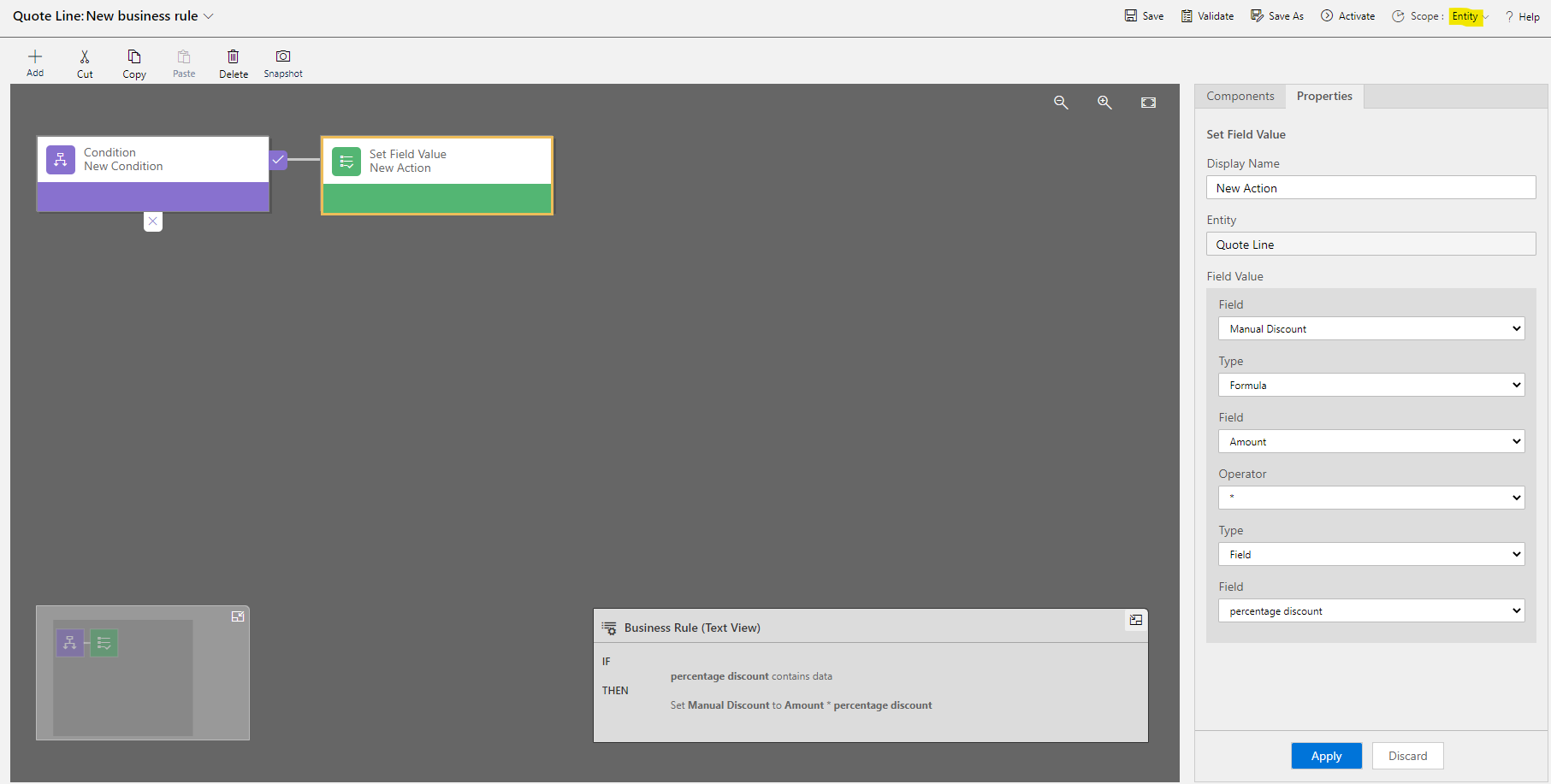
    2. Add this field to Quote Line form, then create a business rule as follow. Select the Scope to Entity.
    pastedimage1594796492249v3.png

    IF

    percentage discount contains data

    THEN
    Set Manual Discount to Amount * percentage discount


    In this way, whenever user enter a percentage decimal, the Manual Discount will be the percentage decimal * Amount.

  • yvka123 Profile Picture
    17 on at

    Thank you so much! Works perfectly the way I need it!

Under review

Thank you for your reply! To ensure a great experience for everyone, your content is awaiting approval by our Community Managers. Please check back later.

Helpful resources

Quick Links

Introducing the 2026 Season 1 community Super Users

Congratulations to our 2026 Super Stars!

Meet the Microsoft Dynamics 365 Contact Center Champions

We are thrilled to have these Champions in our Community!

Congratulations to the March Top 10 Community Leaders

These are the community rock stars!

Leaderboard > Customer experience | Sales, Customer Insights, CRM

#1
ManoVerse Profile Picture

ManoVerse 141 Super User 2026 Season 1

#2
11manish Profile Picture

11manish 137

#3
Muhammad Shahzad Shafique Profile Picture

Muhammad Shahzad Sh... 69 Most Valuable Professional

Last 30 days Overall leaderboard

Product updates

Dynamics 365 release plans



